 PluginStats
Test Runner for Java installs statistics
By Microsoft (223 listings) · VS Code Marketplace · Testing
Run and debug JUnit or TestNG test cases.
Test Runner for Java has 47,879,894 recorded installs on VS Code Marketplace.
It ranks #26 of 2,500 tracked VS Code Marketplace listings by installs.
It is rated 4.2 out of 5 from 21 ratings.
PluginStats has 3 daily observations since Oct 16, 2026; the latest is from Oct 18, 2026.
Rating: 4.24 / 5 from 21 ratings
About Test Runner for Java
Test Runner for Java
Run and debug Java test cases in Visual Studio Code
Overview
A lightweight extension to run and debug Java test cases in Visual Studio Code. The extension support following test frameworks:
• JUnit 4 (v4.8.0+) • JUnit 5 (v5.1.0+) • JUnit 6 (v6.0.1+) • TestNG (v6.9.13.3+)
Note: JUnit 3 styled tests are not supported in this extension (i.e. extends junit.framework.TestCase).
The Test Runner for Java works with Language Support for Java by Red Hat and Debugger for Java to provide the following features:
• Run/Debug test cases • Customize test configurations • View test report • View tests in Test Explorer
Requirements
• JDK (version 17 or later) • VS Code (version 1.59.0 or later) • Language Support for Java by Red Hat • Debugger for Java
Features
Run/Debug Test Cases
• The extension will generate shortcuts (the green play button) on the left side of the class and method definition. To run the target test cases, simply click on the green play button. You can also right click on it to see more options.
Test Explorer
• The Test Explorer is the place to show all the test cases in your workspace. You can also run/debug your test cases from here.
Customize Test Configurations
• Sometimes you may want to customize the configuration to run your test cases. To achieve this, you can add the configuration into your workspace settings under the section: java.test.config.
Note: More details can be found here.
View Test Result
• After running/debugging the test cases, the state of the related test items will be updated in both editor decoration and test explorer. • You can trigger the command Test: Peek Output to peek the result view. • You can click on the links in the stack trace to navigate to the source location.
VS Code Embedded Commands for Testing
There are other VS Code embedded commands for testing, which can be found by searching Test: in the Command Palette.
Settings
| Setting Name | Description | Default Value |
| java.test.config | Specify the configuration for the test cases to run with. More details. | {} | | java.test.defaultConfig | Specify the name of the default test configuration. | "" |
VS Code Embedded Settings for Testing
There are some other VS Code embedded settings for testing, which can be found by searching testing in the Settings view.
Project Setup
JUnit 6
Please refer to Getting Started from the JUnit 6's official document for getting started documentation.
JUnit 5
Please refer to Getting Started from the JUnit 5's official document for getting started documentation.
Note: If your project does not use build tools(Maven/Gradle/...), please make sure junit-platform-console-standalone.jar is on your project classpath.
JUnit 4
Please refer to Download and Install from the JUnit 4's official document for the getting started documentation.
TestNG
Please refer to TestNG Docs from the TestNG's official document for getting started documentation.
FAQ
If you meet any problem when using the extension, please refer to the FAQ and our issue list to check if there is an answer to your problem.
Contributing and Feedback
If you are interested in providing feedback or contributing directly to the code base, please check the document Contributing to Test Runner for Java, which covers the following parts: • Questions and Feedback • Reporting Issues • Contributing Fixes
License
This extension is licensed under MIT License.
Telemetry
This extension collects telemetry data to help improve our products. Please read Microsoft privacy statement to learn more. If you opt out to send telemetry data to Microsoft, please set below configuration in settings.json: telemetry.enableTelemetry = false. Learn more in our FAQ.
Description from the VS Code Marketplace listing.
- debug
- java
- junit
- test
- testng
Where Test Runner for Java sits in the listing
Each band is one page of 20. Installs on a log scale. Placement is projected from installs, so it can differ from the marketplace's own sort order. Hover a dot to see the listing.


Charts
Images: 30d · 1y · all time · 1600×900 dark


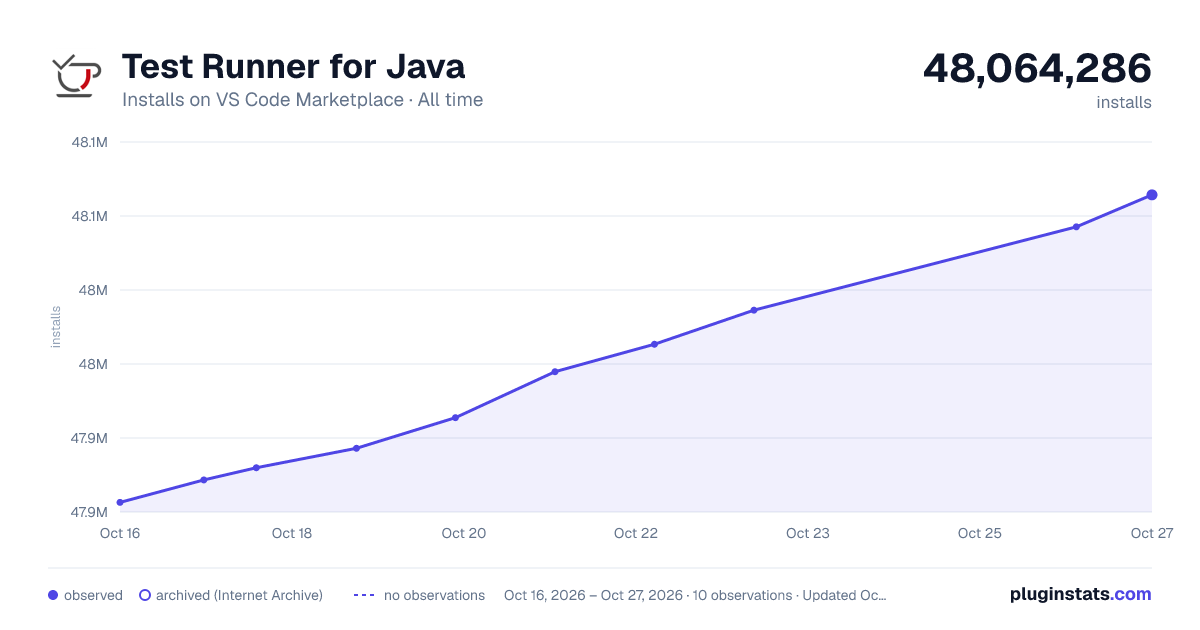

Adoption over time


7/30/90-day growth


Ranking history


Filled points are observed values; hollow points come from Internet Archive snapshots of the listing page. Dashed segments span periods with no observations — values between points are not interpolated.
Recent observations
Full history (3)Similar VS Code Marketplace Testing plugins
Data source
Install counts, average rating, and rating counts come from the public Visual Studio Marketplace gallery API. Installs are cumulative and exclude updates.
Listing: https://marketplace.visualstudio.com/items?itemName=vscjava.vscode-java-test. First seen Oct 16, 2026; last successful collection Oct 18, 2026. See the methodology.