 PluginStats
Mermaid installs statistics
By Mermaid (2 listings) · VS Code Marketplace · Visualization
The official Mermaid Editor plugin by the Mermaid open source team, now with AI-powered diagramming! Create, edit and preview diagrams seamlessly within VS Code
Mermaid has 1,142,078 recorded installs on VS Code Marketplace, ranking #503 of 2,501 tracked listings.
Rating: 2.74 / 5 from 43 ratings
About Mermaid
Mermaid extension for Visual Studio Code
The official Mermaid extension for Visual Studio Code enables developers to seamlessly create, edit, preview and integrate mermaid diagrams from within the VS Code. It's built by the team behind Mermaid.js.
Diagrams tend to go stale — the code moves on, and the diagram stays where someone left it. This extension generates diagrams from your code, fixes them when the syntax breaks, and offers to regenerate them when the code they describe changes, so your diagrams keep up with your code.
Which extension is right for you?
There are two Mermaid extensions for VS Code, and they do two different jobs:
- Mermaid (this extension): generate diagrams from your code, repair and improve them with AI, keep them in sync as your code changes, and share them with your team. Sign in with a free Mermaid account to get started.
- Mermaid Preview: our open-source previewer for diagrams you write by hand — live preview, export, and syntax highlighting. No account needed.
| Feature | Mermaid | Mermaid Preview |
|---|---|---|
| Account | Free Mermaid account | Not needed |
| Live preview with pan and zoom | ✓ | ✓ |
| PNG and SVG export | ✓ | ✓ |
| Syntax highlighting and snippets | ✓ | ✓ |
| Mermaid rendering in Markdown preview | ✓ | ✓ |
| Generate diagrams from code with AI | ✓ | |
| Repair and improve diagrams with AI | ✓ | |
| Regenerate diagrams when your code changes | ✓ | |
| Review diagram updates from Mermaid Diagram Sync | ✓ | |
| Cloud sync and sharing | ✓ | |
| Theme selector and custom export backgrounds | ✓ |
Getting Started 🚀
- Install Mermaid from Marketplace.
- Open the Mermaid icon in the activity bar and click Sign in. No account yet? Click Create a free account to sign up at mermaid.ai, then come back to the editor.
- Open a
.mmdor.mermaidfile, add a```mermaidcode block to any Markdown file, or mention@mermaid-chartin GitHub Copilot Chat and describe the diagram you want.
Signing in
OAuth is the default: click Sign in and finish in your browser. If you're in a remote environment, a different IDE, or a network where OAuth is blocked, use a token instead — generate one in your Mermaid account settings and paste it into the extension.
Note<br/> Diagram generation and
@mermaid-chartrun in GitHub Copilot Chat. Improve Diagram uses the VS Code Language Model API, so it works with any supported chat extension (for example, GitHub Copilot Chat or Cursor). Repair Diagram and diagram regeneration use AI credits from your Mermaid account.
Now with AI-Powered Diagramming! ✨
Transform ideas into diagrams instantly with our AI integration! Our extension now includes:
- AI-Powered Repair Diagram : In just one click repair your broken mermaid digram
- AI Chat Participant: Simply describe your diagram needs in natural language with
@mermaid-chartand watch as beautiful diagrams materialize - Smart Diagram Regeneration: Auto-detect changes in your source files and instantly update referenced diagrams with one click
- Pre-commit Diagram Regeneration: Automatically detects when staged source files are referenced by Mermaid diagrams and prompts you to regenerate them before committing
- AI-Powered ER Diagrams: Generate entity relationship diagrams from your codebase with simple commands
- AI-Powered Cloud Architecture: Visualize your cloud infrastructure automatically from configuration files
- AI-Powered Docker Diagrams: Create Docker architecture diagrams from your containerized applications
- AI-Powered Ownership Diagram: Visualize your code Ownership of each packages/folder form you project using the Git commit history
- AI-Powered Dependency Diagrams: Visualize all packages in your project, categorized by security issues, latest version status, and potential risks
- AI-Powered Sequence Diagrams: Generate execution sequence diagrams from your modular code, showing interactions between components, classes, and methods
- AI-Powered C4 Architecture Diagrams: Generate top-down C4 architecture diagrams from your codebase, visualizing system components and their relationships
- AI-Powered Generate Diagram from Code: Generate flowcharts, class diagrams, sequence diagrams, and more directly from your source code files
- Mermaid AI Skills for GitHub Copilot: Install workspace instructions so Copilot can call Mermaid extension commands (preview, repair, generate, sync, and more) when you need them
Note<br/> To use the AI diagramming feature, you must have the GitHub Copilot extension installed.
Mermaid Account Required 🔐
From v2.7.7, Mermaid is a signed-in extension. Creating, previewing, AI diagramming, cloud sync, Improve Diagram and Mermaid Sync review are all login gated, so you need a free Mermaid account to use them.
If you run a command while signed out, the extension shows a notification instead of running it, with three choices:
- Show more — opens an in-editor page explaining what changed
- Get the extension — Install Mermaid Preview in the Marketplace, so you can keep previewing diagrams without signing in
- Discard — dismisses the notification…
Description from the VS Code Marketplace listing.
- architecture
- class diagram
- color-theme
- diagram
- entity relationship diagram
- flow
- flow chart
- flowchart
- gantt
- gantt chart
- journey
- keybindings
- mermaid
- Mermaid architecture
- Mermaid blockDiagram
- Mermaid C4 Diagram
- mermaid chart
- mermaid charts
- Mermaid Class Diagram
- Mermaid Er Diagram
README badge
Show your rank in a README or on your website. The badge updates automatically.
Charts
Images: 30d · 1y · all time · 1600×900 dark


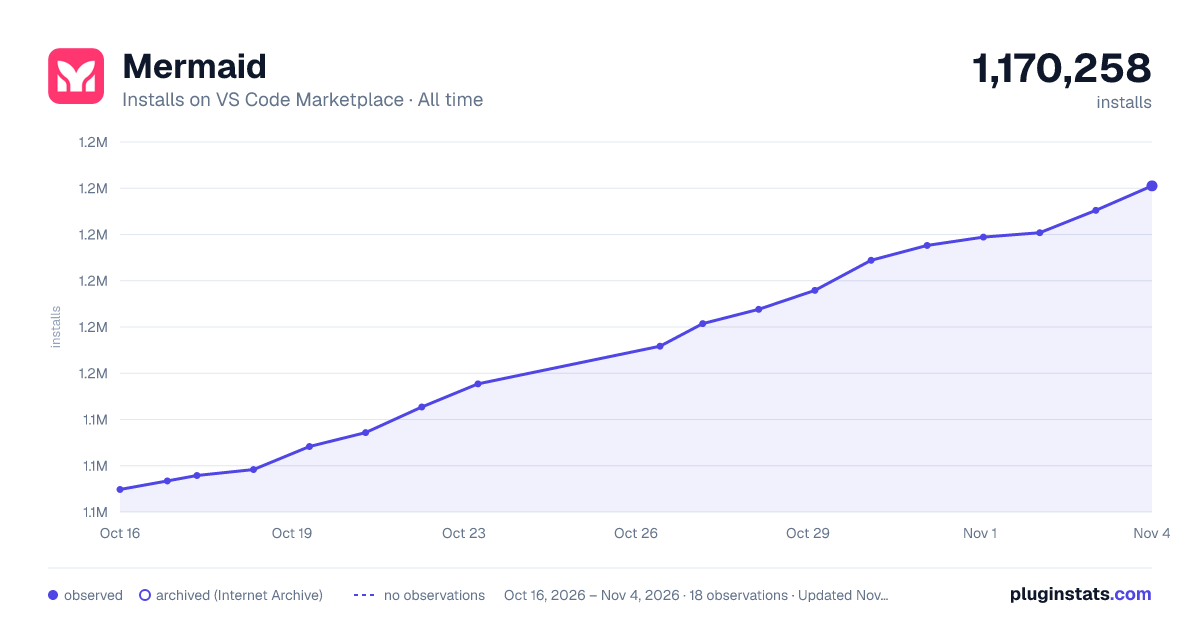

Adoption over time
7/30/90-day growth
Ranking history
Ratings over time
Listing placement
Listing placement
Filled points are observed values; hollow points come from Internet Archive snapshots of the listing page. Dashed segments span periods with no observations — values between points are not interpolated.
Each band is one page of 20. Installs on a linear scale. Placement is projected from installs, so it can differ from the marketplace's own sort order. Hover a dot to see the listing.
Recent observations
Full history (5)Similar VS Code Marketplace Visualization plugins
All 20 Mermaid alternativesMermaid on other marketplaces
Data source
Install counts, average rating, and rating counts come from the public Visual Studio Marketplace gallery API. Installs are cumulative and exclude updates.
Listing: https://marketplace.visualstudio.com/items?itemName=MermaidChart.vscode-mermaid-chart. First seen Oct 16, 2026; last successful collection Oct 20, 2026. See the methodology.