 PluginStats
OCaml Platform installs statistics
By OCaml Labs · VS Code Marketplace · Programming Languages
Official OCaml language extension for VSCode
OCaml Platform has 302,048 recorded installs on VS Code Marketplace.
It ranks #1154 of 2,501 tracked VS Code Marketplace listings by installs.
It is rated 4.7 out of 5 from 19 ratings.
PluginStats has 4 daily observations since Oct 16, 2026; the latest is from Oct 19, 2026.
Rating: 4.74 / 5 from 19 ratings
About OCaml Platform
VSCode OCaml Platform
| Platform | Downloads |
| VS Marketplace | | | Open VSX | |
Visual Studio Code extension for OCaml and relevant tools.
❗️ You are encouraged to read the Getting started section. The rest of the document assumes you have read it. You may also find Important concepts useful.
If you have issues with the extension and you have read the "Getting Started" section, see Debugging the extension and FAQ below.
Getting started
Installation
Below we first install the extension dependencies and then the extension itself. You can reverse the order; it's just that the extension will not work to its full without all of its dependencies.
1. Installing extension dependencies
This VS Code for most of its OCaml language support functionality requires OCaml Language Server (often called ocaml-lsp or ocamllsp). Install ocaml-lsp-server package as usual with a package manager of your choice: OPAM or esy. Installation instructions by package manager are available here.
Make sure to install the packages in the sandbox (usually, OPAM switch or esy sandbox) you use for compiling your project.
Optionally:
• Install ocamlformat package if you want source file formatting support.
Note: Formatting support requires having .ocamlformat file in your project root directory.
• When you hover the cursor over OCaml code, the extension shows you the type of the code. Install ocamlformat to get nicely formatted types.
2. Install this extension from the VSCode Marketplace. VSCode extension installations instructions are available here.
Setting up the extension for your project
1. Open your OCaml/ReasonML project (File > Add Folder to Workspace...).
2. Configure the extension to use the desired sandbox (usually, OPAM switch or esy sandbox). You can pick it by
• either calling VSCode command "OCaml: Select a Sandbox for this Workspace" (one can do this from VSCode Command Palette - Ctrl+P or on MacOS Cmd+Shift+P) • or clicking on the package icon at the bottom of VSCode window and picking your sandbox from the menu
_What's a sandbox?_ In short, the main purpose of a sandbox is to specify how this extension should invoke its dependencies such as ocaml-lsp-server or ocamlformat. For more information on what a sandbox is, see "Sandbox" subsection.
3. Build your project with Dune to get go-to-definition, auto-completion, etc.
Important note: OCaml Language Server has its information about the files from the last time your built your project.
_Caveat 1:_ Because of the note above, during active development of your project, we advise building your project with dune in a polling mode using the option --watch. This rebuilds your project whenever a file is changed in your project. For example, run dune build --watch --terminal-persistence=clear-on-rebuild in your VSCode integrated terminal.
_Caveat 2:_ Save the currently open file to get latest diagnostics (error and warning squiggly underlining). For example, if you created a module A in some file, and you still get an error that it's "unbound" (i.e., not found) in the current file, save the file to get up-to-date diagnostics, assuming you built your project after adding A or are running build in a polling mode, and make sure that error isn't a stale error.
By this point, you should have a working OCaml development editor ready.
Dune Package Management (DPM)
This extension now supports Dune Package Management (DPM) as a sandbox for your OCaml projects.
DPM becomes available when your system has:
• Dune version ≥ 3.20.0, or • A Dune preview build dated 2025-07-30 or later.
A final required feature was implemented on 2025-07-29, enabling full support for Dune development tools (dune lock, dune tools exec, and tools like ocamlformat) inside the ocamllsp sandbox environment.
Automatic Detection
When a compatible Dune version is detected:
• The extension automatically recognizes that your environment supports DPM. • A popup notification informs you that **Dune Package Management is available**. • If your project is not yet locked, the extension will prompt you to lock the project. • Once the project is locked, the extension will automatically configure ocamllsp to use the DPM sandbox.
Using Dune Package Management
To manually enable DPM for your project at any time:
1. Open your OCaml project in VSCode. 2. In the status bar (bottom-right), click the sandbox selector. 3. Choose “Dune Package Management” from the list of available sandboxes.
The extension then configures ocamllsp to run inside the DPM sandbox, ensuring that all Dune dev tools are available in the sandboxed PATH.
ReasonML / ReScript / BuckleScript
ReasonML, as an alternative syntax for OCaml, is supported out-of-the-box, as long as reason is installed in your environment.
The new ReScript syntax (res and resi files) is not supported, you should use rescript-vscode instead.
If you're looking for a way to use OCaml or ReasonML syntax in a ReScript project, it is no longer supported by this extension.
If you need to compile existing OCaml or ReasonML syntax to JS and use this extension, you can use Melange:
1. Install esy
2. You can use the Melange basic template to add OCaml LSP support. Then modify esy.json to pin ocaml-lsp-server to version 1.8.3 due to lack of Merlin support in newer versions.
3. Install and build packages
Important Concepts
Sandbox
Sandbox defines environment that the extension sees, for example, to launch ocamllsp, detect OCaml compiler version, or use ocamlformat.
The extension supports 4 kinds of sandboxes:
1. Global
The extension uses the environment that VS Code was opened in.
2. OPAM Sandbox
The extension uses the environment defined by the OPAM switch that the user picks. Both global and local OPAM switches are supported.
3. Esy Sandbox
The extension uses the environment defined by the Esy sandbox that the user picks.
4. Custom…
Description from the VS Code Marketplace listing.
- atd
- cram
- CramTest
- debuggers
- dune
- duneproject
- dune-project
- duneworkspace
- dune-workspace
- json
- keybindings
- Menhir
- Merlin
- META
- OASIS
- ocaml
- ocaml.interface
- ocaml.menhir
- ocaml.merlin
- ocaml.META
Where OCaml Platform sits in the listing
Each band is one page of 20. Installs on a log scale. Placement is projected from installs, so it can differ from the marketplace's own sort order. Hover a dot to see the listing.


Charts
Images: 30d · 1y · all time · 1600×900 dark


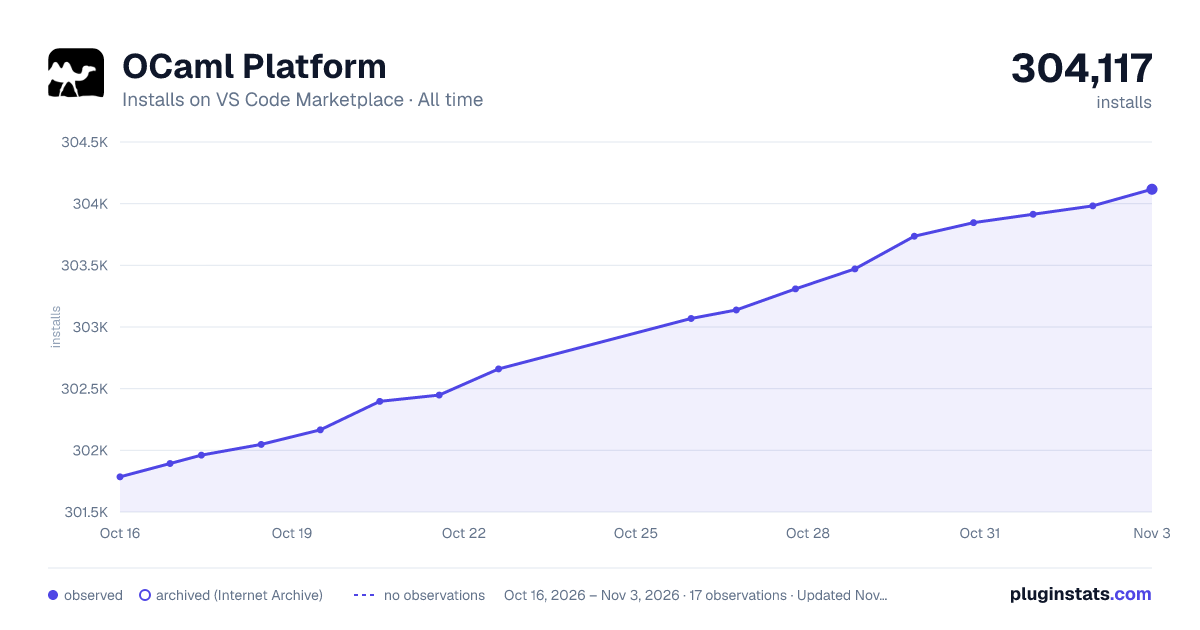

Adoption over time


7/30/90-day growth


Ranking history


Filled points are observed values; hollow points come from Internet Archive snapshots of the listing page. Dashed segments span periods with no observations — values between points are not interpolated.
Recent observations
Full history (4)Similar VS Code Marketplace Programming Languages plugins
Data source
Install counts, average rating, and rating counts come from the public Visual Studio Marketplace gallery API. Installs are cumulative and exclude updates.
Listing: https://marketplace.visualstudio.com/items?itemName=ocamllabs.ocaml-platform. First seen Oct 16, 2026; last successful collection Oct 19, 2026. See the methodology.