 PluginStats
Atom Material Icons installs statistics
By Atom Material · VS Code Marketplace · Themes
Atom Material Icons for Visual Studio Code
Atom Material Icons has 452,588 recorded installs on VS Code Marketplace, ranking #892 of 2,501 tracked listings.
Rating: 5.00 / 5 from 10 ratings
About Atom Material Icons
Atom Material Icons Plugin for VSCode
<h1 align="center"> <br> <img src="https://raw.githubusercontent.com/mallowigi/a-file-icon-vscode/master/logo.png?sanitize=true" alt="logo" width="200"> <br><br> Atom Material File Icons for VSCode <br> <br> </h1>This plugin is a port of the Atom File Icons for VSCode.
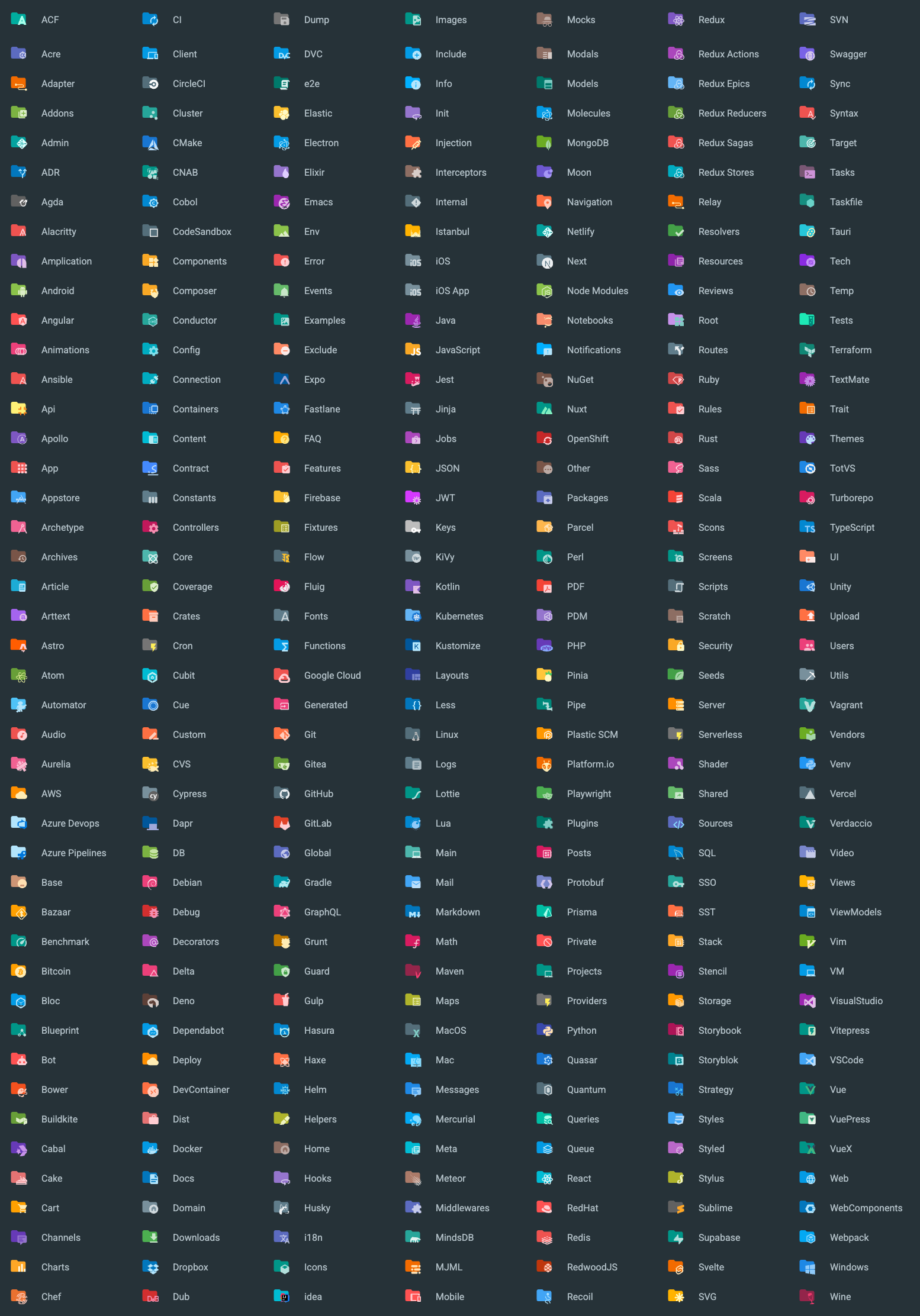
It replaces the icons and folder icons with better suited icons, related to the file type, framework or language.
This plugin is inspired by the Material Icon Theme and Atom Material Icons for JetBrains.
Features
- Replaces file icons with their relevant logo icons
- According to their extension (
.java,.php,.ruby...) - According to the framework (Android, NPM, RSpec...)
- According to the program used in conjonction (Babel, Docker, CircleCI...)
- According to the parent directory (
.github/*,.vscode/*...) - And others...
- According to their extension (
- Replaces folder icons:
- From common patterns:
src,main,app,img,docs... - From specific use cases:
node_modules,.vscode,.git...
- From common patterns:
- Provides it's own Product Icons from the Material Design Icons.
Associations
You can find a list of all the available associations in the following links:
- File Associations
- Folder Associations
- Language Associations (TODO)
File Icons

Folder Icons
Usage
Since this extension is based off the original Material Icon Theme, you can find most of the original settings here as well.
Therefore, this extension exposes a bunch of commands that you can invoke via the command palette:

Just type Atom Material in order to see the commands that are available.
Settings
You can customize many aspects of the extension, either via the VSCode settings or by invoking the commands via the command palette.
When setting the option via the Preferences, they will affect all projects, whereas the commands only affect the current workspace.
Icon Packs
While this extension contains a lot of icons, there are some icons that overlap with each other. For example, Angular, and NestJS use similar icon filename patterns. If you are working with an angular project you wouldn't want to see NestJS icons and vice-versa.
This command will allow you to decide which pack(s) to enable for the current workspace.

Note: Since you can enable multiple packs, there is still a way to enable both overlapping icon packs. It's recommended to not do as such as it would return unexpected results.
Arrow Styles
You can customize the look of the arrows in the tree view using the command palette:

or via user settings:
{
  "a-file-icon-vscode.arrowTheme": "material"
}
The available options are:
material: Material Design arrows (chevrons)triangle: Triangle arrowsplusMinus: Plus and minus signsarrow: Simple Arrowsnone: No arrows
Note: This setting affects not only arrows from the tree view, but also arrows that you can find in many other places, such as the collapsible sections, code folding, etc.
Another note: Arrows in the tree view work differently than arrows in the other places, as they are currently rotated from the "down arrow". As a result, some styles will display "weird results", such as the "Plus-Minus" style, that only displays the minus sign, but rotated. This could be solved via custom CSS in the future.
Custom Folder Color
You can customize the color of the default folder icon using the command palette:

or via user settings:
{
  "a-file-icon-vscode.folderColor": "#ef5350"
}
Folder Theme
You can change the style of the folder icons using the command palette:

or via user settings:
{
  "a-file-icon-vscode.folderTheme": "specific"
}
The available options are:
specific: Replace specific folders, such assrc,main,app,img,docs, etc.classic: Replace all folders with the default folder iconnone: No folder icons
Custom icons' opacity
You can customize the opacity of the icons, between totally opaque to completely gone.
You can either choose a predefined opacity or enter your own opacity via the command palette:

or via user settings:
{
  "a-file-icon-vscode.opacity": 0.5
}
Custom icons' saturation
You can customize the saturation of the icons. The less saturated they are, the more grayscale they will appear.
You can either choose a predefined saturation or enter your own saturation via the command palette:

or via user settings:
{
  "a-file-icon-vscode.saturation": 0.5
}
Product Theme…
Description from the VS Code Marketplace listing.
- atom
- customization
- icons
- icon-theme
- material
- product-icon-theme
- theme
README badge
Show your rank in a README or on your website. The badge updates automatically.
Charts
Images: 30d · 1y · all time · 1600×900 dark


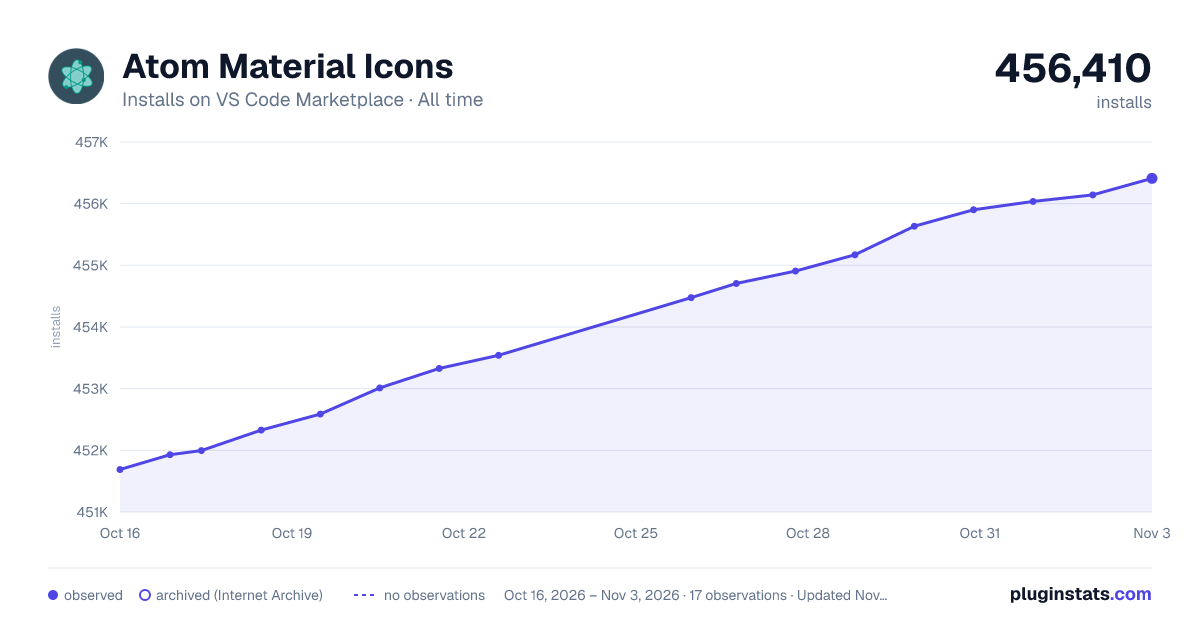

Adoption over time
7/30/90-day growth
Ranking history
Ratings over time
Listing placement
Listing placement
Filled points are observed values; hollow points come from Internet Archive snapshots of the listing page. Dashed segments span periods with no observations — values between points are not interpolated.
Each band is one page of 20. Installs on a linear scale. Placement is projected from installs, so it can differ from the marketplace's own sort order. Hover a dot to see the listing.
Recent observations
Full history (5)Similar VS Code Marketplace Themes plugins
All 20 Atom Material Icons alternativesAtom Material Icons on other marketplaces
Data source
Install counts, average rating, and rating counts come from the public Visual Studio Marketplace gallery API. Installs are cumulative and exclude updates.
Listing: https://marketplace.visualstudio.com/items?itemName=AtomMaterial.a-file-icon-vscode. First seen Oct 16, 2026; last successful collection Oct 20, 2026. See the methodology.