 PluginStats
ftp-sync installs statistics
By Łukasz Wroński · VS Code Marketplace · Other
Auto sync your work to remote FTP/SFTP server
ftp-sync has 412,724 recorded installs on VS Code Marketplace, ranking #944 of 2,501 tracked listings.
Rating: 3.21 / 5 from 106 ratings
About ftp-sync
FTP-Sync extension for VS Code
This extension allows you to easily synchronise your local workspace (project files) with an FTP server. It also has several advanced features such as automatic upload on save.

Usage
There are four commands available. You can access them from the command palette (Ctrl+Shift+P on Windows/Linux).
You can also sync a single file by right-clicking on it in the left menu and using the "Ftp-sync: Upload File" and "Ftp-sync: Download File" commands.
Ftp-sync: Init
Initializes a default FTP-Sync configuration file in the .vscode directory. Options can be customised as follows:
- remotePath - This can be set to the path on the remote that you would like to upload to. The default is
./i.e. the root. - host - The hostname of the FTP server you want to connect to.
- username - The username of the FTP account you want to use.
- password - The password of the FTP account you want to use.
- port - The port on the FTP server you would like to connect to. The default is
"21". - protocol - The FTP protocol to be used. The default is
"ftp"but you can also specify"sftp". - uploadOnSave - Whether files should automatically be uploaded on save. The default is
false. - passive - Specifies whether to use FTP passive mode. The default is
false. - debug - Specifies whether to display debug information in an ftp-sync Output window. The default is
false. - privateKeyPath - Specifies the path to the private key for SFTP. The default is
null. - passphrase - Specifies the passphrase to use with the private key for SFTP. The default is
null. - agent - Specifies the ssh-agent to use for SFTP. The default is
null. - allow - An array of escaped regular expression strings specifying paths which are allowed. If nonempty, unless a path matches any of these regular expressions it will not be included in the sync. Default value is empty, implying everything is allowed.
- ignore - An array of escaped regular expression strings specifying paths to ignore. If a path matches any of these regular expressions then it will not be included in the sync. Default values are
"\\.git","\\.vscode"and".DS_Store". - generatedFiles: - Automatically upload freshly generated files. Also uploads files that are deleted. extensionsToInclude has to be set for this feature to work.
- extensionsToInclude: [""] e.g. [".js", ".css"] - Array of strings specifying what extensions to add for auto-upload. Default is "" which means that it will automatically upload files of all extensions. An empty array here means that generatedFiles feature is disabled.
- path: "" - This specifies the path to the directory where the files are, [e.g.] "/build", default is "" which is the root workspace directory
Ftp-sync: Sync Local to Remote
Displays a synchronization wizard to configure a sync operation that changes FTP files and folders to match project files.
Ftp-sync: Sync Remote to Local
Displays a synchronization wizard to configure a sync operation that changes project files and folders to match FTP files.
Ftp-sync: Commit
Commits reviewed list of changes made with Sync Local to Remote or Sync Remote to Local command.
To be added soon:
- Config validation (add minimal configuration requirement)
- Better connection error handling
- More real life testing
- Bug fixes
- Context menu to sync folders (up/down)
Future plans
- Integration with git-ftp
Found any bugs? Got any questions or ideas?
- Rise a ticket here!
- Contact me at vscode[at]lukaszwronski.pl
Please provide as much information as possible. We are dealing with diffrent ftp servers, file structures, file permissions, operating systems and it might be difficult to reproduce your error and fix it without detailed informations.
I'm looking forward to get any feedback from extension users! Contribution, especially on bug fixing is more than welcome!
Great thanks for suggestions and help with debugging for Martin, Allan, Maxime, suuuunto and all other folks who reported bugs or made improvement requests.
Use at your own risk - I do not guarantee that it will work correctly!
Version history…
Description from the VS Code Marketplace listing.
- ftp
README badge
Show your rank in a README or on your website. The badge updates automatically.
Charts
Images: 30d · 1y · all time · 1600×900 dark


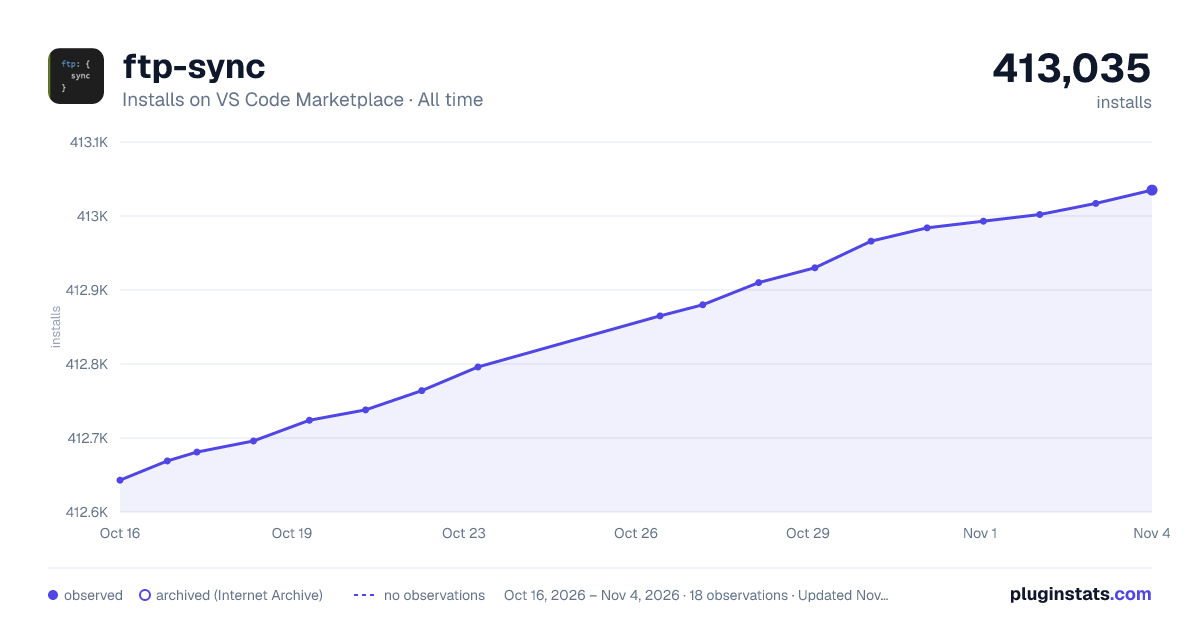

Adoption over time
7/30/90-day growth
Ranking history
Ratings over time
Listing placement
Listing placement
Filled points are observed values; hollow points come from Internet Archive snapshots of the listing page. Dashed segments span periods with no observations — values between points are not interpolated.
Each band is one page of 20. Installs on a linear scale. Placement is projected from installs, so it can differ from the marketplace's own sort order. Hover a dot to see the listing.
Recent observations
Full history (5)Similar VS Code Marketplace Other plugins
All 20 ftp-sync alternativesData source
Install counts, average rating, and rating counts come from the public Visual Studio Marketplace gallery API. Installs are cumulative and exclude updates.
Listing: https://marketplace.visualstudio.com/items?itemName=lukasz-wronski.ftp-sync. First seen Oct 16, 2026; last successful collection Oct 20, 2026. See the methodology.