 PluginStats
Microsoft Foundry installs statistics
By Microsoft (224 listings) · VS Code Marketplace · Azure
Visual Studio Code extension for Microsoft Foundry
Microsoft Foundry has 1,049,887 recorded installs on VS Code Marketplace, ranking #525 of 2,501 tracked listings.
Rating: 3.67 / 5 from 3 ratings
About Microsoft Foundry
Microsoft Foundry for Visual Studio Code
With the Microsoft Foundry for Visual Studio Code extension you can easily deploy Large Language Models, develop AI applications, develop with Agents, and more with Microsoft Foundry from the Visual Studio Code interface.
With Microsoft Foundry, you can:
- Deploy language models from Microsoft, OpenAI, Meta, DeepSeek, and more using the model catalog
- Test deployed models in a model playground
- Start building with deployed models by right-clicking on the model to get the sample code
- Create, deploy, and test agents with Azure AI Agent Service
With this extension installed, you can accomplish much of this workflow directly from Visual Studio Code.
Get Started
To get the most out of the extension, please set your Microsoft Foundry Project by using the command palette (Ctrl + Shift + P by default), with the command "Microsoft Foundry: Select Default Project".
The following steps will help you get started with the Microsoft Foundry extension:
- Click on the Azure Icon on the VS Code Navbar.
- Under the "Resources" section, select your Azure Subscription and Resource Group.
- Click on "Microsoft Foundry" and open your project, you should see both Agents and Models.
- Now you can start interacting with your agents and models.
For a full list of features available in the extension, use the Command Palette and search "Microsoft Foundry".
Related extensions
The Microsoft Foundry extension for Visual Studio Code works with the following extensions:
- Azure Resources
- AI Toolkit for Visual Studio Code is recommended for the full Microsoft Foundry experience.
Learn more
Troubleshooting
ACR Permission Error During Hosted Agent Deployment
When deploying a hosted agent, the extension creates an Azure Container Registry (ACR) and assigns roles so your project can pull container images. If you lack permission to assign roles, you'll see an authorization error.
We are actively working with Foundry service team for a better user experience. Currently, there're 2 workarounds:
Option 1: Pre-assign ACR Roles (Recommended)
Ask your admin to pre-create the ACR and assign these roles directly:
| Role | Assign To | Purpose |
|---|---|---|
| Container Registry Repository Reader | Project's managed identity | Read container images |
| Container Registry Repository Catalog Lister | Project's managed identity | List repositories |
| Container Registry Repository Writer | Your user account | Push container images |
- Create an ACR in the same resource group as your Foundry project
- Find the project's managed identity (System-assigned identity on the AI Foundry project resource)
- On the ACR, go to Access Control (IAM) > Add > Add role assignment
- Assign the roles above to the appropriate principals
Option 2: Grant Role Assignment Permission (Not Recommended)
Alternatively, ask your admin to grant you User Access Administrator or Owner role on the ACR or resource group. This lets the extension auto-assign roles but gives you over-privileged permissions, thus not recommended.
Support
Support for this extension is provided on our GitHub Issue Tracker. You can submit a bug report, a feature suggestion or participate in discussions.
You can also send any bugs or concerns privately to us at vscai-support@microsoft.com
Code of Conduct
This project has adopted the Microsoft Open Source Code of Conduct. For more information see the Code of Conduct FAQ.
Privacy Statement
The Microsoft Enterprise and Developer Privacy Statement describes the privacy statement of this software.
Description from the VS Code Marketplace listing.
README badge
Show your rank in a README or on your website. The badge updates automatically.
Charts
Images: 30d · 1y · all time · 1600×900 dark


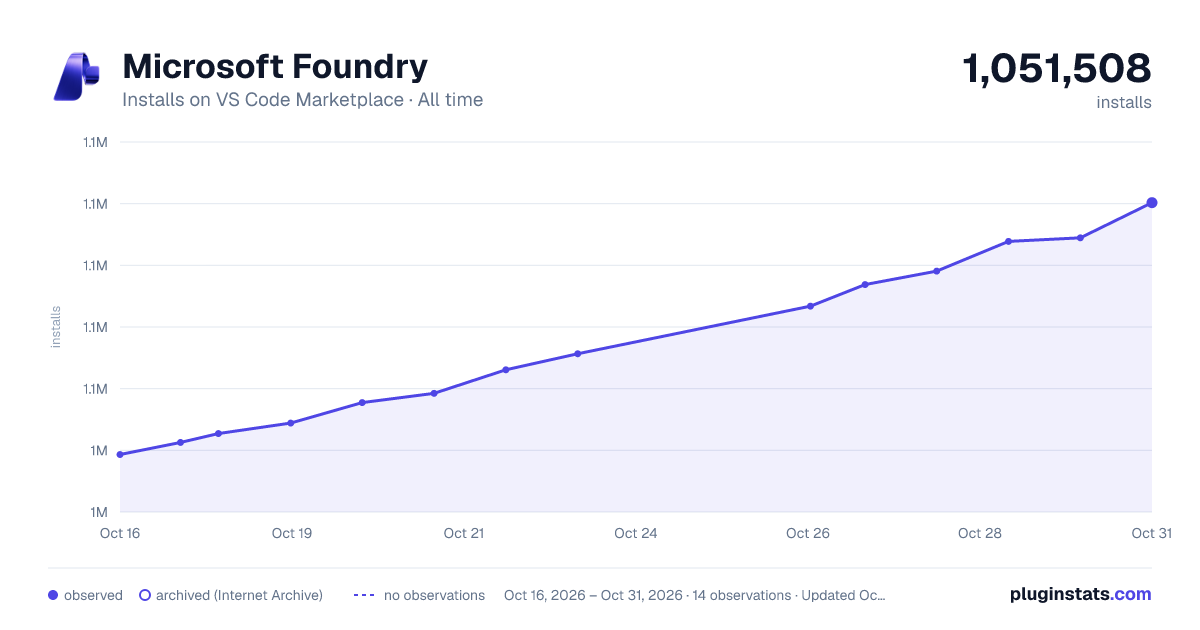

Adoption over time
7/30/90-day growth
Ranking history
Ratings over time
Listing placement
Listing placement
Listing placement
Filled points are observed values; hollow points come from Internet Archive snapshots of the listing page. Dashed segments span periods with no observations — values between points are not interpolated.
Each band is one page of 20. Installs on a linear scale. Placement is projected from installs, so it can differ from the marketplace's own sort order. Hover a dot to see the listing.
Recent observations
Full history (5)Similar VS Code Marketplace Azure plugins
All 20 Microsoft Foundry alternativesData source
Install counts, average rating, and rating counts come from the public Visual Studio Marketplace gallery API. Installs are cumulative and exclude updates.
Listing: https://marketplace.visualstudio.com/items?itemName=TeamsDevApp.vscode-ai-foundry. First seen Oct 16, 2026; last successful collection Oct 20, 2026. See the methodology.