 PluginStats
vscode-dbt installs statistics
By bastienboutonnet · VS Code Marketplace · Snippets
VSCode Snippet Package for jinja and dbt
vscode-dbt has 156,146 recorded installs on VS Code Marketplace, ranking #1813 of 2,502 tracked listings.
Rating: 5.00 / 5 from 2 ratings
About vscode-dbt
vscode-dbt v0.5.0
Provides snippets for dbt and Jinja functions in SQL, YAML, and Markdown.
Cool Tip: For a richer integration between dbt and vscode you should install vscode-dbt-power-user it does a LOT of cool stuff such as: code navigation between your models, completion aware of your dbt project, and much more. dbt power user has a dependency on this extension so you'll also find my snippets in there! Give it a go!
Features
Generic Jinja
for loops, conditionals, blocks, variable settings etc. See source for a full list
dbt-SQL
ref, source, log, config, snapshots, log etc. See source for a full list.
Model Overview
This snippet helps coders provide a high-level overview of every model in a standard way.
YAML
ref, source, var etc. See source for a full list.
Markdown
docs definitions. See source for a full list.
Set-up
To enable support for these snippets when viewing a SQL, YAML, or Markdown file in Visual Studio Code, enter Ctrl + K, M (or Ctrl + Shift + P and search for "Change Language Mode").
Then select Jinja SQL, Jinja YAML, or Jinja Markdown respectively.
Alternatively, add the following to your Visual Studio Code settings in your dbt project:
"files.associations": {
    "**/<dbt-project-dir>/**/*.yaml": "jinja-yaml",
    "**/<dbt-project-dir>/**/*.yml": "jinja-yaml",
    "**/<dbt-project-dir>/**/*.sql": "jinja-sql",
    "**/<dbt-project-dir>/**/docs/**/*.md": "jinja-md"
}
If snippet suggestions still do not work after selecting the appropriate language, try adding the following configuration to you Visual Studio Code project settings:
"editor.quickSuggestions": {
    "strings": true
}
Known Issues
Using the Jinja YAML language for YAML files changes the default comment style from YAML (#) to Jinja style ({# #}), which can cause YAML syntax errors.
Likewise, using the Jinja Markdown language on Markdown files changes the default comment style from Markdown (<-- -->) to Jinja style.
Credits
dbt jinja concepts
adapted from https://github.com/fishtown-analytics/atom-dbt/blob/master/snippets/dbt-sql.cson
Jinja Concepts
adapted from https://github.com/danielchatfield/atom-jinja2/blob/master/snippets/atom-jinja2.cson and https://github.com/fishtown-analytics/atom-dbt/blob/master/snippets/dbt-jinja.cson
Release Notes
Description from the VS Code Marketplace listing.
- snippet
README badge
Show your rank in a README or on your website. The badge updates automatically.
Charts
Images: 30d · 1y · all time · 1600×900 dark


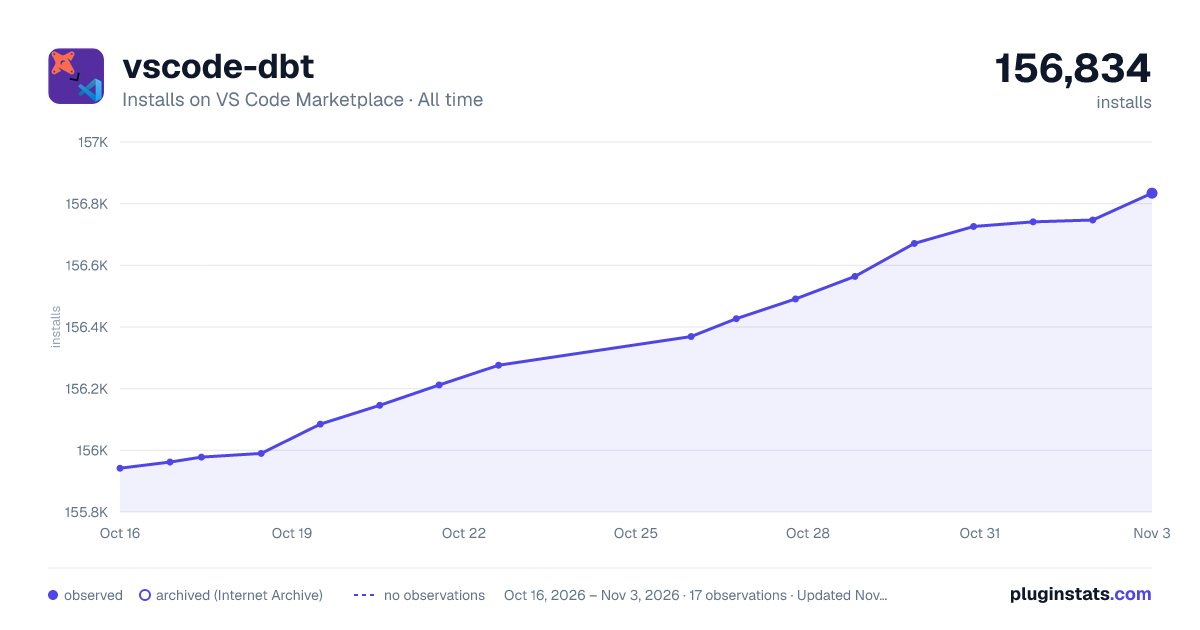

Adoption over time
7/30/90-day growth
Ranking history
Ratings over time
Listing placement
Listing placement
Filled points are observed values; hollow points come from Internet Archive snapshots of the listing page. Dashed segments span periods with no observations — values between points are not interpolated.
Each band is one page of 20. Installs on a linear scale. Placement is projected from installs, so it can differ from the marketplace's own sort order. Hover a dot to see the listing.
Recent observations
Full history (6)Similar VS Code Marketplace Snippets plugins
All 20 vscode-dbt alternativesData source
Install counts, average rating, and rating counts come from the public Visual Studio Marketplace gallery API. Installs are cumulative and exclude updates.
Listing: https://marketplace.visualstudio.com/items?itemName=bastienboutonnet.vscode-dbt. First seen Oct 16, 2026; last successful collection Oct 21, 2026. See the methodology.