 PluginStats
Rainbow CSV installs statistics
By mechatroner · VS Code Marketplace · Programming Languages
Highlight CSV and TSV files, Run SQL-like queries
Rainbow CSV has 24,546,876 recorded installs on VS Code Marketplace.
It ranks #48 of 2,501 tracked VS Code Marketplace listings by installs.
It is rated 4.8 out of 5 from 163 ratings.
PluginStats has 4 daily observations since Oct 16, 2026; the latest is from Oct 19, 2026.
Rating: 4.79 / 5 from 163 ratings
About Rainbow CSV
Rainbow CSV
Main Features
• Highlights columns in CSV, TSV, semicolon, and pipe-separated files with distinct colors. • Query, transform, and filter data using a built-in SQL-like language (RBQL). • Augmented tracking of up to 3 columns of interest with auxiliary decorations. • Align columns graphically or with extra spaces and Shrink (trim spaces from fields). • Optional sticky header line. • Provide info about column on hover. • Automatic CSV consistency checks (CSVLint). • Optional alternating row background colors for improved readability. • Multi-cursor column edit. • Copy in Excel and Markdown format for export. • Works in browser (vscode.dev).
Usage
Rainbow CSV looks better and is more usable in general with dark mode. Manually enable highlighting by running the Set rainbow separator command or by clicking on the current language button in the bottom right corner and choosing one of the built-in CSV dialects from the table below.
Supported separators
|Language name | Separator | Extension | Properties |
|csv | , (comma) | .csv | Ignored inside double-quoted fields | |tsv | \t (TAB) | .tsv .tab | | |csv (semicolon) | ; (semicolon) | | Ignored inside double-quoted fields | |csv (whitespace) | whitespace | | Consecutive whitespaces are merged | |csv (pipe) | | (pipe) | | | |dynamic csv | any char or string | | Customizable |
Content-based separator autodetection
Rainbow CSV automatically detects separators for "Plain Text" and "*.csv" files. This is usually a fast operation, typically analyzing only the first few lines. Autodetection can be adjusted or disabled in the extension settings.
Customizing file extension - separator association
To avoid relying on autodetection for specific file extensions (e.g., ".dat"), you can manually associate them with a supported separator in VSCode config:
Important: language identifiers in the config must be specified in lower case! E.g. use csv (semicolon), not CSV (semicolon). List of supported language ids: "csv", "tsv", "csv (semicolon)", "csv (pipe)", "csv (whitespace)", "dynamic csv".
Working with arbitrary separators
Rainbow CSV supports using any character or string as a separator. You can add the separator to the list of autodetected separators in the VSCode settings or if you just want to use it once you can either: • Select Dynamic CSV filetype (bottom-right corner) and then enter the separator in the prompt. • Select the separator text with the cursor and run Rainbow CSV: Set rainbow separator command.
Dynamic CSV filetype also supports multiline CSV fields escaped in double quotes (RFC-4180 compliant).
Note: In rare cases Dynamic CSV highlighting might not work at all due to compatibility issues with some other third-party extensions.
CSVLint consistency check
The linter checks the following: • Ensures consistent use of double quotes within rows. • Verifies that each row has the same number of fields.
To recheck a CSV file, click the "CSVLint" button in the status bar.
Working with large files
To enable Rainbow CSV for very big files (more than 300K lines or 20MB) disable "Editor:Large File Optimizations" option in VS Code settings. You can preview huge files by clicking "Preview... " option in VS Code File Explorer context menu. All Rainbow CSV features would be disabled by VSCode if the file is bigger than 50MB.
Colors customization
You can customize Rainbow CSV colors to increase contrast, see Instructions. This is especially helpful if you are using one of Light color themes.
Working with CSV files with comments
Some CSV files can contain comment lines e.g. metadata before the header line. To allow CSVLint, content-based autodetection algorithms, and _Align_, _Shrink_, _ColumnEdit_ commands to work properly with such files you need to adjust your settings.
Aligning/Shrinking table
Rainbow CSV provides two alignment modes: 1. Virtual Align: Provides visual alignment without modifying the file content. 2. Whitespace Align: Inserts spaces to align columns, modifying the file content.
You can align columns in CSV files by clicking "Align" status-line button or using the alignment command. To shrink the table, i.e. remove leading and trailing whitespaces, click "Shrink" status-line button or use _Shrink_ command
Column Tracking
You can track up to 3 columns of interest with auxiliary decorations to make them even more noticeable compared to color-only rainbow indication. This is especially helpful for tables with multiple columns and/or when viewing the table in Row-Wrap i.e. word wrap mode. Column Tracking is available via the editor context menu (Right click -> Rainbow CSV ...) or via the "ToggleColumnTracking" command. If you find yourself often using this command you can also set a keyboard shortcut to toggle column tracking. To do this run Open Keyboard Shortcuts (JSON) command that will open VSCode keybindings.json file and add the following line to the list:
Alternate Row Background Highlighting
You can enable highlighting of odd and even rows with alternating background colors. This is especially helpful for tables with multiple columns and/or when viewing the table in Row-Wrap i.e. word wrap mode.
Screenshot of Row-Wrap & Column Tracking & Alternating Row Background:
Settings
Customize Rainbow CSV's behavior in the extension settings section of VS Code. There you can find the list of available options and their description.
Commands
Most of the Rainbow CSV commands are available through the editor context menu [Right click] -> [Rainbow CSV] ->
SQL-like "RBQL" query language
Rainbow CSV has a built-in RBQL query language interpreter that allows you to run SQL-like queries using a1, a2, a3, ... column names. Example:…
Description from the VS Code Marketplace listing.
- csv
- CSV (pipe)
- csv (semicolon)
- csv (whitespace)
- dynamic csv
- highlight
- plaintext
- sql
- tsv
Where Rainbow CSV sits in the listing
Each band is one page of 20. Installs on a log scale. Placement is projected from installs, so it can differ from the marketplace's own sort order. Hover a dot to see the listing.


Charts
Images: 30d · 1y · all time · 1600×900 dark


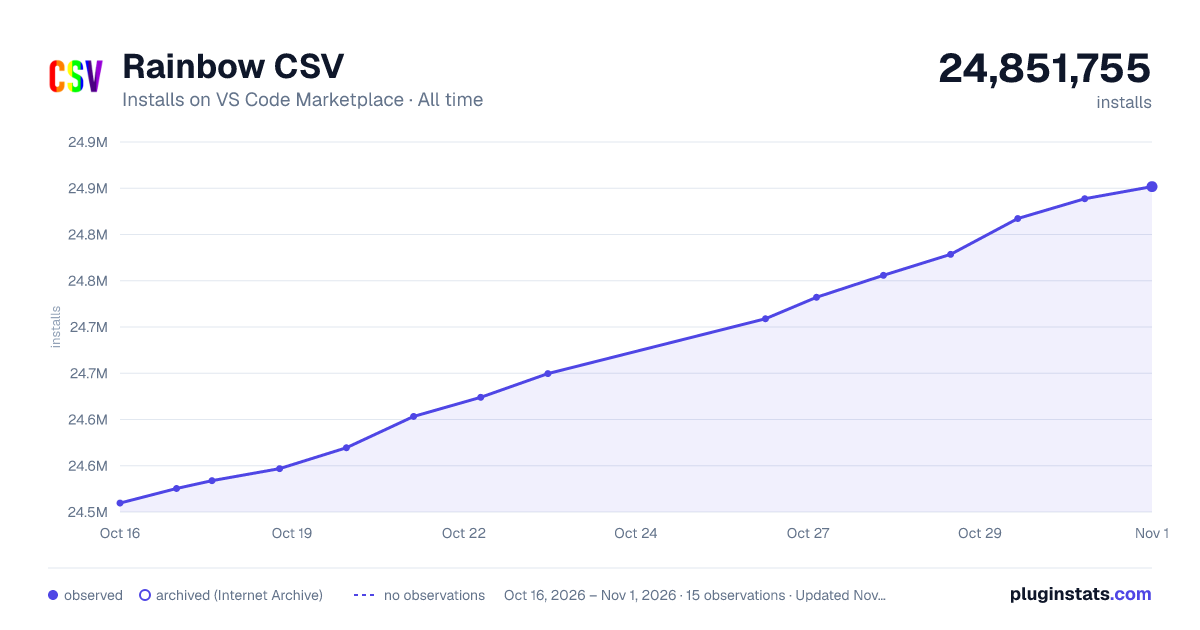

Adoption over time


7/30/90-day growth


Ranking history


Filled points are observed values; hollow points come from Internet Archive snapshots of the listing page. Dashed segments span periods with no observations — values between points are not interpolated.
Recent observations
Full history (4)Similar VS Code Marketplace Programming Languages plugins
Data source
Install counts, average rating, and rating counts come from the public Visual Studio Marketplace gallery API. Installs are cumulative and exclude updates.
Listing: https://marketplace.visualstudio.com/items?itemName=mechatroner.rainbow-csv. First seen Oct 16, 2026; last successful collection Oct 19, 2026. See the methodology.