 PluginStats
Rails Run Specs installs statistics
By Peter Negrei · VS Code Marketplace · Other
Rails Run Spec Files
Rails Run Specs has 107,455 recorded installs on VS Code Marketplace, ranking #2269 of 2,501 tracked listings.
Rating: 5.00 / 5 from 6 ratings
About Rails Run Specs
rails-run-spec-vscode
This extension provides basic commands for running spec files in build-in vscode terminal.
Features
Available commands:
[
  {
    "command": "extension.runAllSpecFiles",
    "title": "Run All Specs",
    "key": "cmd+ctrl+r"
  },
  {
    "command": "extension.runFileSpecs",
    "title": "Run File Specs",
    "key": "cmd+ctrl+t"
  },
  {
    "command": "extension.runSpecLine",
    "title": "Run Spec Line",
    "key": "cmd+ctrl+l"
  },
  {
    "command": "extension.runLastSpec",
    "title": "Run Last Spec",
    "key": "cmd+ctrl+y"
  }
]
Sidebar Option
There is an option to run any file or folder specs from sidebar.
Right click an folder or spec file and choose Run Specs option.
Infer Spec Files
There is posibility to run specs for currently open file, the extension will try to guess the path using Rails convention:
app/controllers/test_controller.rb => spec/controllers/test_controller_spec.rb.
Minitest support
In order to run *_test files the ruby.specPattern needs to be set to test in the Vscode settings.
Extension Settings
This extension contributes the following settings:
"ruby.specCommand": {
    "type": "string",
    "default": "",
    "description": "Defines a custom command to run for specs (i.e. 'spring rspec')"
},
"ruby.specGem": {
    "type": "string",
    "default": "rspec",
    "description": "Defines the type of tool used for testing",
    "enum": [
        "rspec",
        "zeus"
    ]
},
"ruby.specPattern": {
    "type": "string",
    "default": "spec",
    "description": "Defines the pattern for seaching test files",
    "enum": [
        "spec",
        "test"
    ]
},
"ruby.zeusStartTimeout": {
    "type": "number",
    "description": "Wait time neccessary on spec first run.
        Zeus gem requries a certain period to start",
    "default": 2000
}
"ruby.specFocusTerminal": {
    "type": "boolean",
    "default": true,
    "description": "Defines if it should focus on terminal on each spec run"
}
"ruby.specClearTerminal": {
    "type": "boolean",
    "default": true,
    "description": "Defines if it should clear the terminal on each spec run"
}
"ruby.specSaveFile": {
    "type":"boolean",
    "default": false,
    "description": "Auto Save file before running spec test"
}
Description from the VS Code Marketplace listing.
- keybindings
- Rspec
- Ruby on Rails
README badge
Show your rank in a README or on your website. The badge updates automatically.
Charts
Images: 30d · 1y · all time · 1600×900 dark


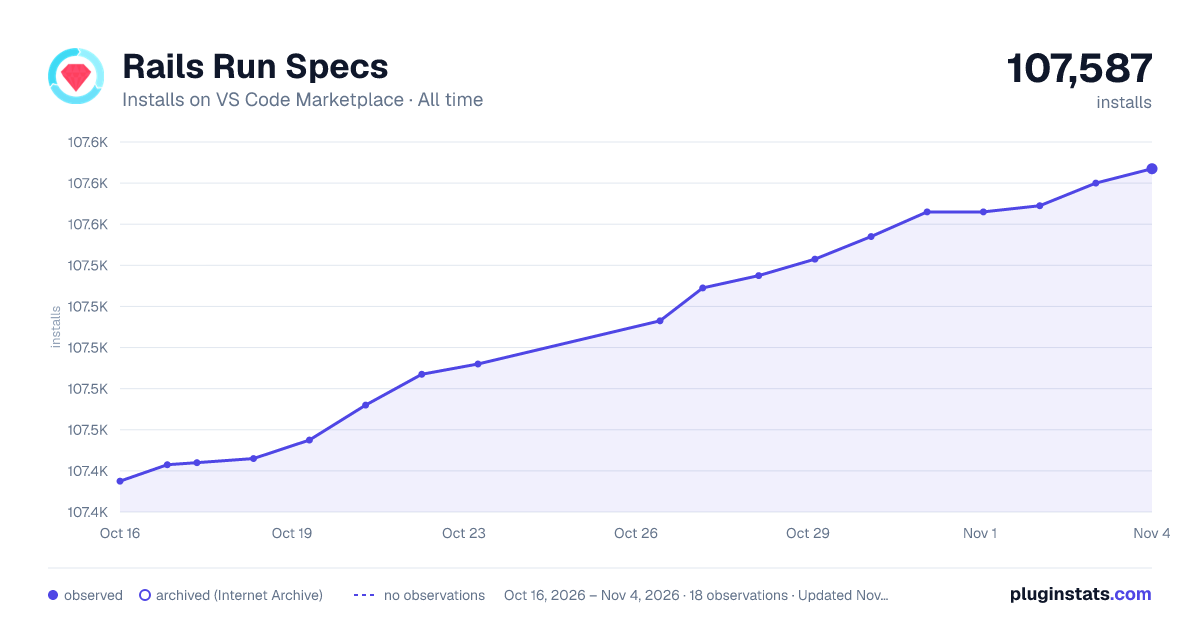

Adoption over time
7/30/90-day growth
Ranking history
Ratings over time
Listing placement
Listing placement
Filled points are observed values; hollow points come from Internet Archive snapshots of the listing page. Dashed segments span periods with no observations — values between points are not interpolated.
Each band is one page of 20. Installs on a linear scale. Placement is projected from installs, so it can differ from the marketplace's own sort order. Hover a dot to see the listing.
Recent observations
Full history (5)Similar VS Code Marketplace Other plugins
All 20 Rails Run Specs alternativesData source
Install counts, average rating, and rating counts come from the public Visual Studio Marketplace gallery API. Installs are cumulative and exclude updates.
Listing: https://marketplace.visualstudio.com/items?itemName=noku.rails-run-spec-vscode. First seen Oct 16, 2026; last successful collection Oct 20, 2026. See the methodology.