 PluginStats
Roslynator installs statistics
By Josef Pihrt · VS Code Marketplace · Other
A collection of refactorings and compiler diagnostic fixes for C#, powered by Roslyn. Use Roslynator NuGet packages for analyzers.
Roslynator has 122,884 recorded installs on VS Code Marketplace, ranking #2107 of 2,502 tracked listings.
Rating: 4.60 / 5 from 15 ratings
About Roslynator
Roslynator for Visual Studio Code
A collection of refactorings, and fixes for C#, powered by Roslyn.
Analyzers are not included in this extension. Add Roslynator.Analyzers to your projects for diagnostics in the editor and dotnet build.
Prerequisites
This extension requires legacy OmniSharp (not C# Dev Kit):
- Set VS Code setting
dotnet.server.useOmnisharptotrue - Disable extension C# Dev Kit (if installed)
- Use a recent C# extension with OmniSharp 1.39.15+ (Roslyn 5.x)
NOTE: After each installation, Roslynator updates omnisharp.json with references to its DLLs.
C# Dev Kit does not currently support loading Roslyn features from an extension (see related issue), so this extension does not work with C# Dev Kit. As an alternative, use NuGet packages that provide refactorings and code fixes for compiler diagnostics.
Configuration
Use an EditorConfig file to configure analyzers, refactorings, and compiler diagnostic fixes.
# Set severity for all analyzers that are enabled by default (https://docs.microsoft.com/en-us/visualstudio/code-quality/use-roslyn-analyzers?view=vs-2022#set-rule-severity-of-multiple-analyzer-rules-at-once-in-an-editorconfig-file)
dotnet_analyzer_diagnostic.category-roslynator.severity = default|none|silent|suggestion|warning|error

# Enable/disable all analyzers by default.
# NOTE: This option can be used only in .roslynatorconfig file
roslynator_analyzers.enabled_by_default = true|false

# Set severity for a specific analyzer
dotnet_diagnostic.<ANALYZER_ID>.severity = default|none|silent|suggestion|warning|error

# Enable/disable all refactorings
roslynator_refactorings.enabled = true|false

# Enable/disable specific refactoring
roslynator_refactoring.<REFACTORING_NAME>.enabled = true|false

# Enable/disable all compiler diagnostic fixes
roslynator_compiler_diagnostic_fixes.enabled = true|false

# Enable/disable specific compiler diagnostic fix
roslynator_compiler_diagnostic_fix.<COMPILER_DIAGNOSTIC_ID>.enabled = true|false
See the full list of configuration options.
Default Configuration
To configure Roslynator for all projects on your machine, use a .roslynatorconfig file.
To open the config file:
- Press Ctrl + Shift + P
- Type "roslynator"
- Select "Roslynator: Open Default Configuration File (.roslynatorconfig)"
Location of Configuration File
The configuration file is located at %LOCALAPPDATA%/JosefPihrt/Roslynator/.roslynatorconfig.
The value of %LOCALAPPDATA% depends on the operating system:
| OS | Path |
|---|---|
| Windows | C:/Users/<USERNAME>/AppData/Local/JosefPihrt/Roslynator/.roslynatorconfig |
| Linux | /home/<USERNAME>/.local/share/JosefPihrt/Roslynator/.roslynatorconfig |
| OSX | /Users/<USERNAME>/.local/share/JosefPihrt/Roslynator/.roslynatorconfig |
Default configuration is loaded once when the IDE starts. Therefore, it may be necessary to restart the IDE for changes to take effect.
Requirements
This extension requires C# for Visual Studio Code with OmniSharp 1.39.15+ (Roslyn 5.x). See Prerequisites.
Donation
Although Roslynator is free of charge, donations are welcome and support further development.
Thanks
- Thanks to Pekka Savolainen, who pioneered Roslyn analyzers on Visual Studio Code.
- Thanks to Adrian Wilczynski for several great PRs.
Description from the VS Code Marketplace listing.
- Analyzer
- aspnetcorerazor
- C#
- CSharp
- Refactoring
- Roslyn
README badge
Show your rank in a README or on your website. The badge updates automatically.
Charts
Images: 30d · 1y · all time · 1600×900 dark


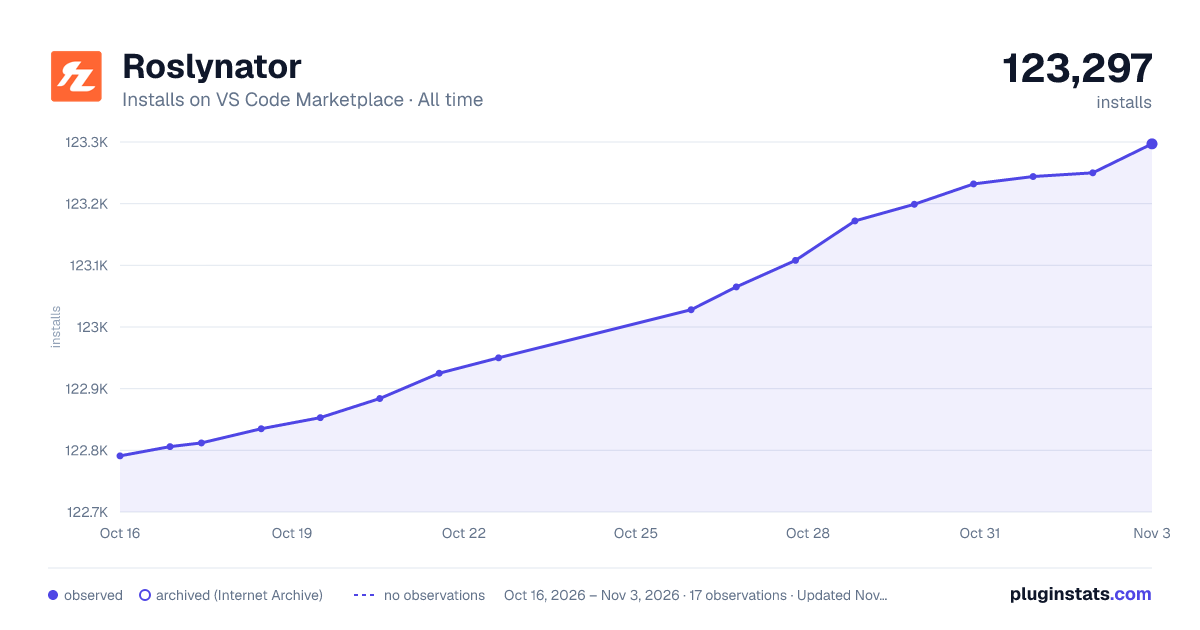

Adoption over time
7/30/90-day growth
Ranking history
Ratings over time
Listing placement
Listing placement
Filled points are observed values; hollow points come from Internet Archive snapshots of the listing page. Dashed segments span periods with no observations — values between points are not interpolated.
Each band is one page of 20. Installs on a linear scale. Placement is projected from installs, so it can differ from the marketplace's own sort order. Hover a dot to see the listing.
Recent observations
Full history (6)Similar VS Code Marketplace Other plugins
All 20 Roslynator alternativesData source
Install counts, average rating, and rating counts come from the public Visual Studio Marketplace gallery API. Installs are cumulative and exclude updates.
Listing: https://marketplace.visualstudio.com/items?itemName=josefpihrt-vscode.roslynator. First seen Oct 16, 2026; last successful collection Oct 21, 2026. See the methodology.