 PluginStats
Dadroit JSON Generator installs statistics
By Dadroit · VS Code Marketplace · Programming Languages
Generate nested sample JSON data using custom templates.
Dadroit JSON Generator has 665,678 recorded installs on VS Code Marketplace, ranking #718 of 2,502 tracked listings.
Rating: 5.00 / 5 from 2 ratings
About Dadroit JSON Generator
Dadroit JSON Generator VSCode Extension


Generate random nested data using custom templates to craft sample JSON files directly within your development workspace. This user-friendly JSON data generator tool is beneficial for debugging, schema validation, and optimizing your application's performance.
Install
To install, search for "Dadroit JSON Generator" in the VSCode Extensions panel or download it directly from the VSCode Marketplace.
Usage and Commands
To access the extension's features, open the Command Palette by pressing F1 or Ctrl+Shift+P (on Windows), then type "Dadroit" to see the list of commands that you can select from. Here’s an overview of the currently available commands:
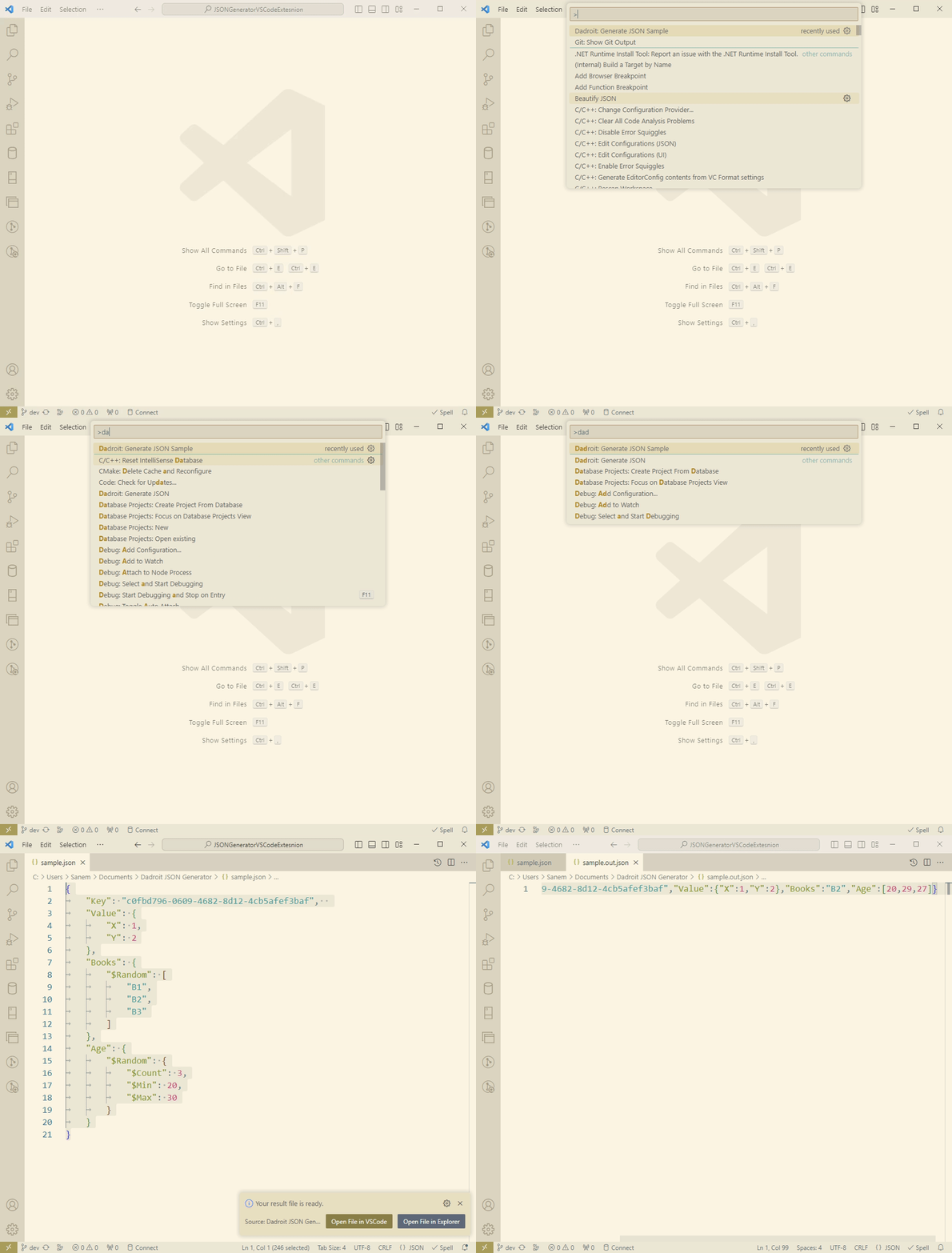
Dadroit: Generate JSON Sample
- Purpose: Automatically generate a JSON file based on a pre-defined template that was embedded in the extension for demonstration purposes.
- How to Use: After executing the command, you can view the template used for generating the JSON file opened in the VSCode editor.
Dadroit: Generate JSON
- Purpose: Create a customized JSON file based on your own template code.
- How to Use:
- Open a new editor tab in VSCode.
- Paste or write your template code. For sample templates, you can visit our GitHub samples.
- With the template opened in the editor, execute the
Dadroit: Generate JSONcommand to generate the JSON file based on it.
After executing each command, you’ll be presented with 2 action buttons in the notification message which you can choose from. The first one is to open the resultant JSON data in VSCode, and the latter is for opening the JSON file location.
Dynamic Templates
Use templates with loop syntax to handle repetitive data structures.
{
  "List": {
    "$Loop": {
      "$From": 0,
      "$To": 9,
      "$Var": "I",
      "$Block": {
        "X": {
          "$GetVar": "I"
        }
      }
    }
  }
}
Random Data Generation
Use the template language's built-in random function to generate varied data in JSON files.
{
  "Age": {
    "$Random": {
      "$Min": 25,
      "$Max": 75
    }
  }
}
Build from Source
For developers interested in modifying or contributing to the extension:
-
Clone the repository:
git clone https://github.com/DadroitOrganization/JSONGeneratorExtension.git -
Install dependencies: Navigate to the project directory and run:
npm install -
Build and run: Build the project and launch VSCode in an extension development host by hitting
F5or runningRun Extensionfrom the debug menu.
For a comprehensive guide on how to use the JSON generator, visit https://dadroit.com/blog/json-generator/.
Compatibility
This extension is now available for Windows, macOS, and Linux operating systems. Stay tuned for further updates and expanded compatibility.
License
The extension is licensed under the Apache-2.0 license.
Contributing
Your contributions are invaluable to making the Dadroit JSON Generator better! If you've crafted a useful template and wish to share it with the community:
- Visit our GitHub repository sample folder to understand the structure and formatting of existing templates.
- Feel free to submit a pull request with your added template, ensuring it adheres to the syntax found in the sample folder.
Introducing the Capabilities of Dadroit JSON Generator
For a better understanding of the core values and features of this extension, don't miss our introductory blog post: https://dadroit.com/blog/json-generator-vscode-extension/.
Issues and Support
For any questions, issues, or assistance, please Create an issue on GitHub.
Description from the VS Code Marketplace listing.
- generator
- JSON
- make
- mock data
- random
- sample
- template
README badge
Show your rank in a README or on your website. The badge updates automatically.
Charts
Images: 30d · 1y · all time · 1600×900 dark


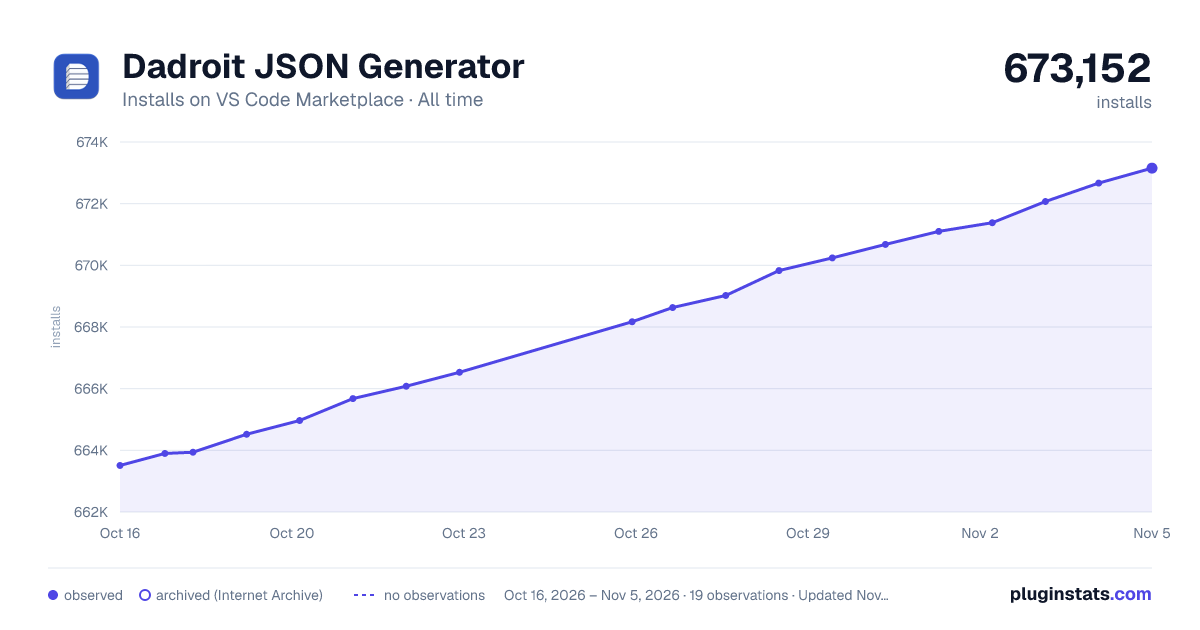

Adoption over time
7/30/90-day growth
Ranking history
Ratings over time
Listing placement
Listing placement
Listing placement
Listing placement
Filled points are observed values; hollow points come from Internet Archive snapshots of the listing page. Dashed segments span periods with no observations — values between points are not interpolated.
Each band is one page of 20. Installs on a linear scale. Placement is projected from installs, so it can differ from the marketplace's own sort order. Hover a dot to see the listing.
Recent observations
Full history (6)Similar VS Code Marketplace Programming Languages plugins
All 20 Dadroit JSON Generator alternativesData source
Install counts, average rating, and rating counts come from the public Visual Studio Marketplace gallery API. Installs are cumulative and exclude updates.
Listing: https://marketplace.visualstudio.com/items?itemName=Dadroit.dadroit-json-generator. First seen Oct 16, 2026; last successful collection Oct 21, 2026. See the methodology.