 PluginStats
Cypress Helper installs statistics
By Oleksandr Shevtsov · VS Code Marketplace · Other
Extension for cypress.io testing tool
Cypress Helper has 134,210 recorded installs on VS Code Marketplace, ranking #1988 of 2,501 tracked listings.
Rating: 4.08 / 5 from 13 ratings
About Cypress Helper
vscode-cy-helper
Cypress extension for vs code



Available functionality
Custom commands
Step definitions (cucumber)
Other
- Open cypress window
- Fixture path autocompletion
- Fixture path go to definition
- Alias autocompletion
- Alias go to definition
- Cucumber tags autocompletion
- Create default tsconfig file
- Keypress events snippets inside cy.type autocompletion
- jQuery locators autocompletion
Configuration
| setting | description | default |
|---|---|---|
cypressHelper.commandForOpen | command used for opening cypress | npx cypress open |
cypressHelper.commandForRun | command used for running cypress | npx cypress run |
cypressHelper.customCommandsFolder | path to folder with custom commands | cypress/support |
cypressHelper.typeDefinitionFile | file to save generated custom commands | cypress/support/customCommands.d.ts |
cypressHelper.typeDefinitionExcludePatterns | array of glob patterns that should be excluded from types generation | [**/*.ts] |
cypressHelper.includeAnnotationForCommands | include comments before custom command to type definition file | false |
cypressHelper.typeDefinitionOnSave | generate type definitions file for custom commands on save | false |
cypressHelper.menuItems | display menu items or lenses for commands | { <br/>"OpenCypress": true,<br/>"RunCypress": false,<br/>"GenerateCustomCommandTypes": true,<br/>"GoToCustomCommand": true,<br/> "FindCustomCommandReferences": true,<br/>"FindStepDefinitionReferences": true<br/>} |
cypressHelper.jqueryLocators | configuration for jquery locators autocomplete | { <br/>"enabled": true,<br/>"commandsForAutocompletion": ["get", "find", "filter"],<br/>"includePatterns": [],<br/>"excludePatterns": [],<br/> "customAttributes": [],<br/>} |
cypressHelper.fixtureAutocompletionCommands | cypress commands that accept fixture path as argument to add fixture path autocompletion | ["fixture"] |
cypressHelper.cucumberFixtureAutocompleteOnQuotes | If you want fixture autocompletion in cucumber scenarios (using fixtures as parameters) you can enable it by setting true | false |
cypressHelper.enableCommandReferenceProvider | In case you have type definitions, native Find all References will return duplicates for commands. To avoid it set this parameter to false | true |
cypressHelper.cucumberTagsAutocomplete | Set enable: true for cucumber feature autocomplete on @. Array of tags could be specified. Option to add cypress-allure-plugin tags. | {<br/>"enable": false,<br/>"tags": ["focus"],<br/>"allurePlugin": false<br/>} |
cypressHelper.reuseTerminalInstance | By default executes commandForOpen in same terminal instance. To spawn new instance for each cypress opening set it to false | true |
Usage
1. Open cypress custom command definition
In case you want to be instantly redirected to definition file - click on custom command, and from editor menu select Cypress: Go to custom command definition
You can use native Go to Definition and Peek Definition - but usually it offers several results, so you should pick one by yourself.
If you are using just native editor menu items - you can disable Cypress: Go to custom command definition in configuration cypressHelper.menuItems by setting "GoToCustomCommand": false
How it works:
- Text from current line with cursor is taken, trying to find closest command call in line;
- Checking files in
cypressHelper.customCommandsFolder(cypress/supportby default). - In case file with
Cypress.Commands.add(%%detected_command%%)is found - redirect.

2. Find Cypress custom commands references
From editor menu select Cypress: Get custom command references to choose from quick-pick menu or you can use native Find All References and Peek References to use left-panel tab.
You can disable editor Cypress: Get custom command references item with configuration cypressHelper.menuItems and "FindCustomCommandReferences": false.
In case you have custom command .ts definition file in your workspace - native methods will return duplicated results, so you can turn off extension references provider with configuration cypressHelper.enableCommandReferenceProvider: false.
 …
…
Description from the VS Code Marketplace listing.
- feature
- javascript
- keybindings
- typescript
README badge
Show your rank in a README or on your website. The badge updates automatically.
Charts
Images: 30d · 1y · all time · 1600×900 dark


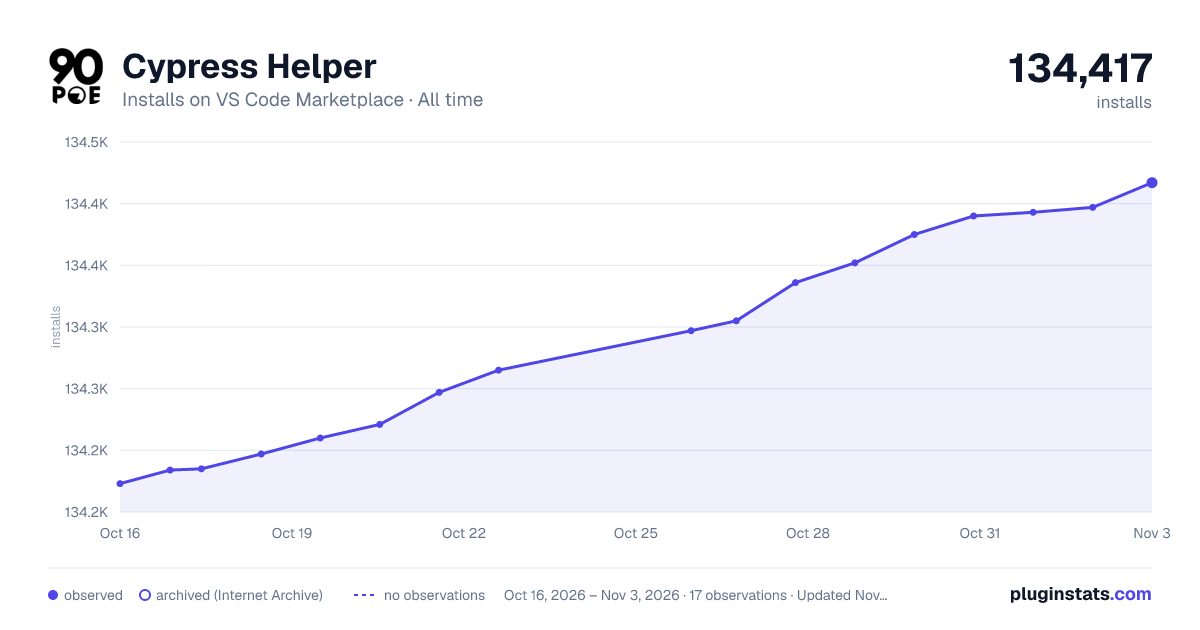

Adoption over time
7/30/90-day growth
Ranking history
Ratings over time
Listing placement
Listing placement
Filled points are observed values; hollow points come from Internet Archive snapshots of the listing page. Dashed segments span periods with no observations — values between points are not interpolated.
Each band is one page of 20. Installs on a linear scale. Placement is projected from installs, so it can differ from the marketplace's own sort order. Hover a dot to see the listing.
Recent observations
Full history (5)Similar VS Code Marketplace Other plugins
All 20 Cypress Helper alternativesData source
Install counts, average rating, and rating counts come from the public Visual Studio Marketplace gallery API. Installs are cumulative and exclude updates.
Listing: https://marketplace.visualstudio.com/items?itemName=Shelex.vscode-cy-helper. First seen Oct 16, 2026; last successful collection Oct 20, 2026. See the methodology.