 PluginStats
Zencoder: AI Coding Agent and Chat for Python, Javascript, Typescript, Java, Go, and more installs statistics
By Zencoder · VS Code Marketplace · Programming Languages
Embedded AI agents
Zencoder: AI Coding Agent and Chat for Python, Javascript, Typescript, Java, Go, and more has 160,073 recorded installs on VS Code Marketplace, a change of +0.2% over the past 7 days, ranking #1786 of 2,502 tracked listings.
Rating: 4.51 / 5 from 57 ratings
About Zencoder: AI Coding Agent and Chat for Python, Javascript, Typescript, Java, Go, and more
Zencoder: Your Mindful AI Coding Agent
Zencoder is an AI coding agent platform that understands your entire codebase — its structure, patterns, dependencies, and conventions — and uses that context to generate, test, debug, and refactor code that actually works in your repo. Unlike generic AI assistants, Zencoder provides a powerful Coding Agent with full tool access, supports skills and workflows, and integrates directly into your existing workflow.
Unique Approach
Zencoder stands apart from other AI coding tools through its universal platform, skills, workflows, and extensible architecture:
Universal AI Platform
Use your existing AI subscriptions — Claude, ChatGPT, or Gemini — directly inside Zencoder's IDE interface. Switch between CLI runtimes without leaving your editor:
- Zen CLI — Zencoder's native runtime, included with all plans
- Claude Code — Anthropic's agentic coding tool powered by Sonnet and Opus models
- OpenAI Codex — OpenAI's coding CLI using GPT models
- Gemini CLI — Google's Gemini agent (coming soon)
All Zencoder features — multi-repo context and Skills — work with every runtime.
Skills
Skills are reusable instruction packages that agents load automatically based on task context. They give agents domain expertise, procedural knowledge, and team-specific conventions without manual selection. Stored as SKILL.md files in .agents/skills/ in your repo, skills are version-controlled and shared with your team.
Workflows
Workflows define how agents approach a task — how much planning happens, whether specs are generated, and how verification works:
- Auto — Agent decides the approach (best for most tasks)
- Fix a Bug — Structured investigation, solution, and implementation
- Spec First — Technical spec before coding starts
- Requirements First — Full PRD → spec → staged implementation
- Multi-model — Different models for planning, implementation, and review
- Custom — Your own workflow definitions
Powerful Integrations
Zencoder connects with your development ecosystem through:
- Native Integrations with built-in connections to tools like Jira, GitHub, Sentry, and more
- Model Context Protocol (MCP) support with per-project configuration for advanced connectivity using an open standard
- Multi-Repo Search for cross-repository code search powered by indexed repositories
What You Can Do with Zencoder
Coding Agent
The Coding Agent is Zencoder's primary development tool. It creates, modifies, and refactors code across multiple files and languages with a single prompt. It automatically follows your naming conventions, imports the right dependencies according to your codebase standards, and validates generated code. Whether extending an existing project or starting from scratch, it delivers code that works right away.

Multi-Model Code Review
Get a second opinion on your code using a different model directly inside your IDE. Use the comprehensive review workflow for deeper, multi-model feedback on critical changes — helping catch issues earlier and improving confidence in AI-generated code.
Image Generation
Generate images — logos, diagrams, mockups — right inside your IDE. Ask the agent to create visuals and see results rendered inline in chat.
Subagent Delegation
Agents can delegate subtasks to specialized subagents, with real-time streaming output so you can see progress as work is broken down and executed.
Installation and Configuration
<details> <summary><strong>VS Code</strong></summary>- Open VS Code
- Access the Extensions view: click the Extensions icon or press
Ctrl+Shift+X(Windows) /Cmd+Shift+X(Mac) - Search for "Zencoder"
- Click Install
- Sign in when prompted
- Open your JetBrains IDE (IntelliJ, PyCharm, WebStorm, etc.)
- Go to Settings → Plugins → Marketplace
- Search for "Zencoder"
- Click Install and restart the IDE
- Sign in when prompted
- Open Android Studio
- Go to Settings → Plugins → Marketplace
- Search for "Zencoder"
- Click Install and restart
- Sign in when prompted
Community, Feedback and Support
Communities
Join our vibrant communities to get the most out of Zencoder:
- Discord Server — Engage through topic-focused channels and live discussions
Socials
- Twitter/X — Follow for quick updates and announcements
- LinkedIn — Professional insights and company news
- YouTube — Tutorials, demos, and feature walkthroughs
Documentation and Resources
- Docs — Comprehensive guides, changelog, FAQs and tutorials
- Feedback — We'd love to get your help in making Zencoder better! If you have feedback or encounter any problems, please reach out on our
- Zencoder website
- support@zencoder.ai to get help with account-specific issues
Legal Information
- Terms of Service: Review our terms of service
- Privacy Policy: Learn how we handle your data
We hope you enjoy using Zencoder.ai and experience the future of coding!
Description from the VS Code Marketplace listing.
- ai
- Assistant
- automation
- bash
- bot
- c
- c++
- chat
- chatbot
- chatgpt
- code acceleration
- codegen
- coding assistant
- coding efficiency
- copilot
- cpp
- css
- developer tools
- Documentation
- error detection
README badge
Show your rank in a README or on your website. The badge updates automatically.
Charts
Images: 30d · 1y · all time · 1600×900 dark


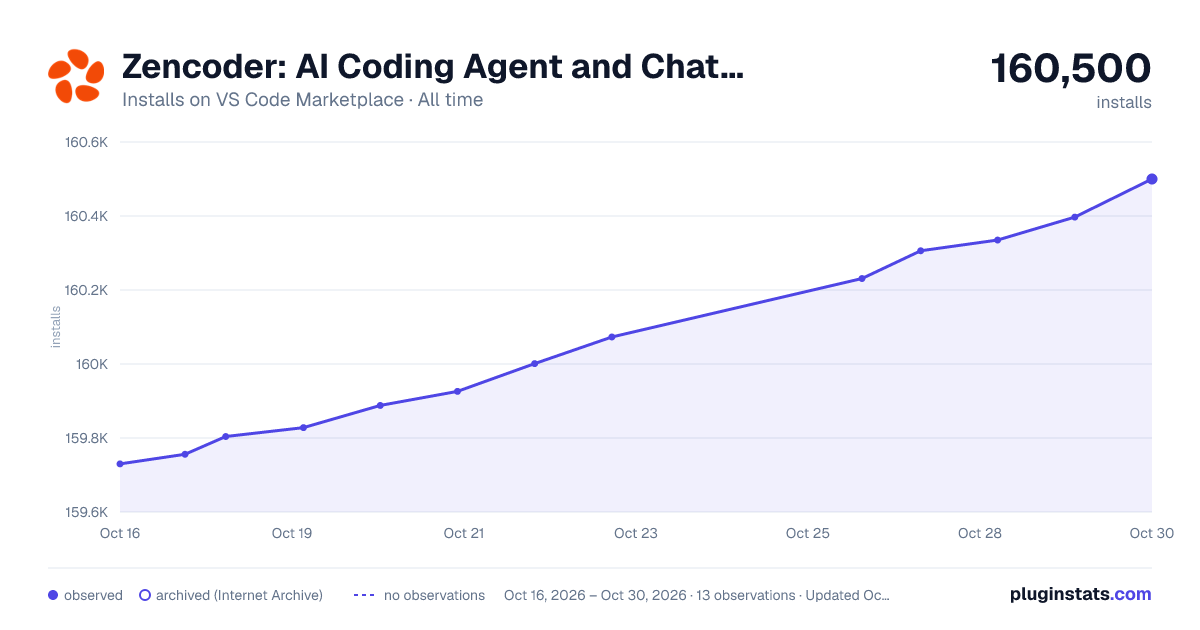

Adoption over time
7/30/90-day growth
Ranking history
Ratings over time
Listing placement
Listing placement
Listing placement
Listing placement
Filled points are observed values; hollow points come from Internet Archive snapshots of the listing page. Dashed segments span periods with no observations — values between points are not interpolated.
Each band is one page of 20. Installs on a linear scale. Placement is projected from installs, so it can differ from the marketplace's own sort order. Hover a dot to see the listing.
Recent observations
Full history (8)Similar VS Code Marketplace Programming Languages plugins
All 20 Zencoder: AI Coding Agent and Chat for Python, Javascript, Typescript, Java, Go, and more alternativesData source
Install counts, average rating, and rating counts come from the public Visual Studio Marketplace gallery API. Installs are cumulative and exclude updates.
Listing: https://marketplace.visualstudio.com/items?itemName=ZencoderAI.zencoder. First seen Oct 16, 2026; last successful collection Oct 23, 2026. See the methodology.