 PluginStats
Element UI Snippets installs statistics
By Snowffer Studio · VS Code Marketplace · Snippets
Code snippets for Element-UI which is a Vue.js 2.0 UI Toolkit for Web
Element UI Snippets has 262,501 recorded installs on VS Code Marketplace, ranking #1263 of 2,501 tracked listings.
Rating: 5.00 / 5 from 1 ratings
About Element UI Snippets
This is Code Snippets of Element UI for VS Code.
Install
Manual Install
Go to the git and download the snippets folder, then copy the files in the folder to the path directly:
- Mac: /Users/< your-user-name >/Library/Application Support/Code/User/snippets/
- Windows: < your-installed-driver > :\Users\ < your-user-name > \AppData\Roaming\Code\User\snippets\
Through VS Code Extensions
- From website: Go to Visual Studio Code Marketplace, and search 'Element UI Snippets', then click the install button.
- From VS Code: click extensions sidebar, and search 'Element UI Snippets', then click the install button.
Special Instruction
- For the components like
el-tablewhich need children components to be its content, usev-forto loop to generate the children components.
Snippets List
- All the Element UI tags below, ignore the closure and more detailed information. Such as
elrto<el-radio>, actually that represents<el-radio v-model="${1}" label="${2}">$3</el-radio> - The sinppets' order follows the order of the components of Guide on Element UI official website basically. <!--Supply extra General and Options parts.-->
- Totally 108 snippets. Will add more if necessary.
- Only work in .vue file for now.
Basic Part
| No. | Trigger Key | Element Tag |
|---|---|---|
| 1. | elrow | <el-row> |
| 2. | elcol | <el-col> |
| 3. | elhc | hidden-xs-only,hidden-sm-only,etc |
| 4. | elcon | <el-container> |
| 5. | elas | <el-aside> |
| 6. | elhe | <el-header> |
| 7. | elma | <el-main> |
| 8. | elfo | <el-footer> |
| 9. | elcb | #409EFF |
| 10. | elcs | #67C23A |
| 11. | elcw | #E6A23C |
| 12. | elcd | #F56C6C |
| 13. | elci | #909399 |
| 14. | elcpt | #303133 |
| 15. | elcrt | #606266 |
| 16. | elcst | #909399 |
| 17. | elcht | #C0C4CC |
| 18. | elcbb | #DCDFE6 |
| 19. | elclb | #E4E7ED |
| 20. | elclrb | #EBEEF5 |
| 21. | elelb | #DCDFE6 |
| 22. | eltypo | font-family: "Helvetica Neue",Helvetica,"PingFang SC","Hiragino Sans GB","Microsoft YaHei","微软雅黑",Arial,sans-serif; |
| 23. | elbbs | box-shadow: 0 2px 4px rgba(0, 0, 0, .12), 0 0 6px rgba(0, 0, 0, .04) |
| 24. | elbls | box-shadow: 0 2px 12px 0 rgba(0, 0, 0, 0.1) |
| 25. | elb | el-button |
| 26. | elbg | el-button-group |
| 27. | ell | el-link |
Form Part
| No. | Trigger Key | Element Tag |
|---|---|---|
| 1. | elr | <el-radio> |
| 2. | elrg | <el-radio-group> |
| 3. | elrbg | <el-radio-group> with <el-radio-button> |
| 4. | elrb | <el-radio-button> |
| 5. | elc | <el-checkbox> |
| 6. | elcg | <el-checkbox-group> |
| 7. | elcbg | <el-checkbox-group> with <el-checkbox-button> |
| 8. | elcbt | <el-checkbox-button> |
| 9. | eli | <el-input> |
| 10. | elit | <el-input type="textarea"> |
| 11. | ela | <el-autocomplete> |
| 12. | elis | <template slot=''> |
| 13. | elin | <el-input-number> |
| 14. | elsel | <el-select> |
| 15. | elselr | <el-select remote> |
| 16. | elop | <el-option> |
| 17. | elopg | <el-option-group> |
| 18. | elca | <el-cascader> |
| 19. | elcap | <el-cascader-panel> |
| 20. | elsw | <el-swtich> |
| 21. | elsl | <el-slider> |
| 22. | eltp | <el-time-picker> |
| 23. | elts | <el-time-select> |
| 24. | eltsr | <el-time-select> * 2 |
| 25. | eltpr | <el-time-picker is-range> |
| 26. | eldp | <el-date-picker> |
| 27. | eldpr | <el-date-picker type="daterange,monthrange"> |
| 28. | eldtp | <el-date-picker type="datetime"> |
| 29. | eldtpr | <el-date-picker type="datetimerange"> |
| 30. | elu | <el-upload> |
| 31. | elra | <el-rate> |
| 32. | elcp | <el-color-picker> |
| 33. | eltr | <el-transfer> |
| 34. | elf | <el-form> |
| 35. | elfi | <el-form-item> |
Data Part
| No. | Trigger Key | Element Tag |
|---|---|---|
| 1. | elt | <el-table> |
| 2. | eltc | <el-table-column> |
| 3. | elta | <el-tag> |
| 4. | elpr | <el-progress> |
| 5. | eltree | <el-tree> |
| 6. | elp | <el-pagination> |
| 7. | elba | <el-badge> |
| 8. | elav | <el-avatar> |
Notice Part
| No. | Trigger Key | Element Tag |
|---|---|---|
| 1. | elal | <el-alert> |
| 2. | elloads | element-loading-* |
| 3. | elme | this.$message({}) |
| 4. | elmebox | this.$msgbox({}) |
| 5. | elmeal | this.$alert({}) |
| 6. | elmecon | this.$confirm({}) |
| 7. | elmepro | this.$prompt({}) |
| 8. | elno | this.$notify({}) |
| 9. | elnot | this.$notify.type({}) |
Navigation Part
| No. | Trigger Key | Element Tag |
|---|---|---|
| 1. | elmen | <el-menu> |
| 2. | elsubmen | <el-submenu> |
| 3. | elmeni | <el-menu-item> |
| 4. | eltabs | <el-tabs> |
| 5. | eltabp | <el-tab-pane> |
| 6. | elbr | <el-breadcrumb> |
| 7. | elbri | <el-breadcrumb-item> |
| 8. | elpa | <el-page-header> |
| 9. | eldr | <el-dropdown> |
| 10. | eldri | <el-dropdown-item> |
| 11. | elsts | <el-steps> |
| 12. | elst | <el-step> |
Others Part
| No. | Trigger Key | Element Tag |
|---|---|---|
| 1. | eldi | <el-dialog> |
| 2. | elto | <el-tooltip> |
| 3. | elpo | <el-popover> |
| 4. | elpoco | <el-popconfirm> |
| 5. | elcard | <el-card> |
| 6. | elcaro | <el-carousel> |
| 7. | elcaroi | <el-carousel-item> |
| 8. | elcolla | <el-collapse> |
| 9. | elcollai | <el-collapse-item> |
| 10. | elti | <el-timeline> |
| 11. | eltii | <el-timeline-item> |
| 12. | eld | <el-divider> |
| 13. | elcal | <el-calendar> |
| 14. | elim | <el-image> |
| 15. | elback | <el-backtop> |
| 16. | elinfi | v-infinite-scroll |
| 17. | eldra | <el-drawer> |
Description from the VS Code Marketplace listing.
- javascript
- snippet
- vuejs
README badge
Show your rank in a README or on your website. The badge updates automatically.
Charts
Images: 30d · 1y · all time · 1600×900 dark


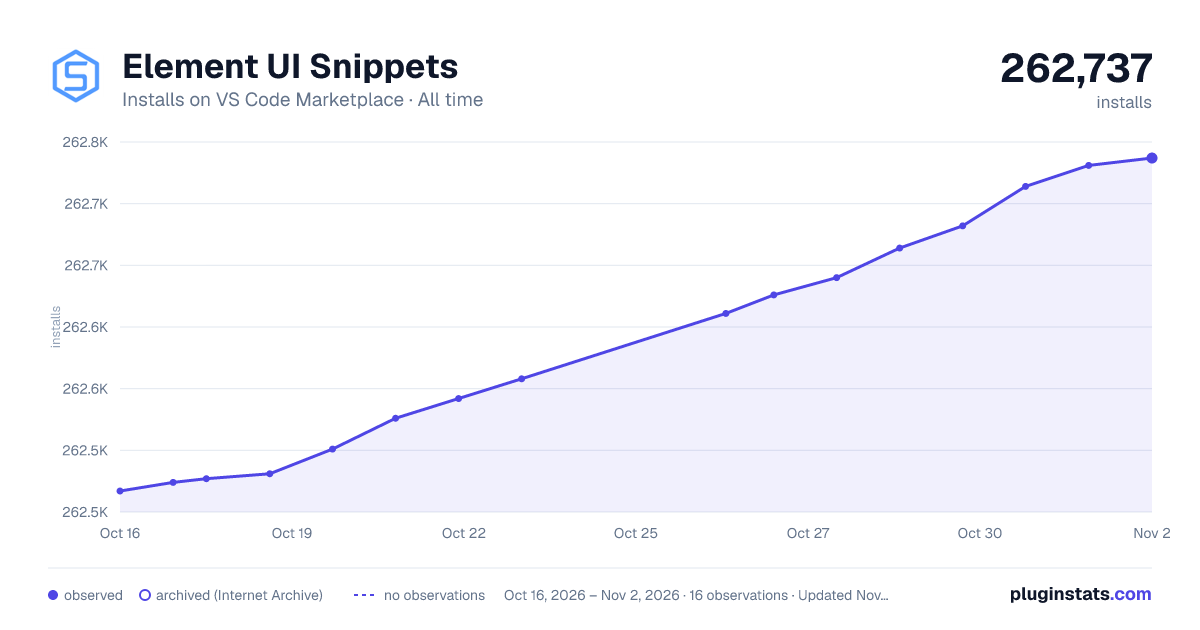

Adoption over time
7/30/90-day growth
Ranking history
Ratings over time
Listing placement
Listing placement
Filled points are observed values; hollow points come from Internet Archive snapshots of the listing page. Dashed segments span periods with no observations — values between points are not interpolated.
Each band is one page of 20. Installs on a linear scale. Placement is projected from installs, so it can differ from the marketplace's own sort order. Hover a dot to see the listing.
Recent observations
Full history (5)Similar VS Code Marketplace Snippets plugins
All 20 Element UI Snippets alternativesData source
Install counts, average rating, and rating counts come from the public Visual Studio Marketplace gallery API. Installs are cumulative and exclude updates.
Listing: https://marketplace.visualstudio.com/items?itemName=SS.element-ui-snippets. First seen Oct 16, 2026; last successful collection Oct 20, 2026. See the methodology.