 PluginStats
MicroProfile Starter installs statistics
By MicroProfile Community (3 listings) · VS Code Marketplace · Programming Languages
Generate Java microservice Maven projects using MicroProfile
MicroProfile Starter has 219,294 recorded installs on VS Code Marketplace.
It ranks #1423 of 2,501 tracked VS Code Marketplace listings by installs.
PluginStats has 4 daily observations since Oct 16, 2026; the latest is from Oct 19, 2026.
About MicroProfile Starter
VS Code Extension for MicroProfile Starter
The MicroProfile Starter extension provides support for generating a MicroProfile Maven project with examples based on the MicroProfile Starter project (https://start.microprofile.io/) in Visual Studio Code. You will be able to generate a project by choosing a MicroProfile version, server and specifications, such as CDI, Config, Health, Metrics, and more. The code for this extension is hosted under the MicroShed organization on GitHub.
Quick Start
• Install the extension • Launch the VS Code command palette (View -> Command Palette...), then select MicroProfile: Generate a new MicroProfile starter project to run the extension
Input
The extension prompts for the following parameters:
1. groupId 2. artifactId 3. MicroProfile version 4. MicroProfile server 5. Java SE version 6. Build tool 7. MicroProfile specifications 8. A folder to generate the project into
The extension will generate a .zip file of the starter project, unzip the file into the specified directory and open it in a VS Code window.
Contributing
Contributions to the MicroProfile starter extension are welcome!
Our CONTRIBUTING document contains details for submitting pull requests.
To build and run the extension locally:
1. Fork this repository 2. Clone your fork: git clone git@github.com:{your-username}/mp-starter-vscode-ext.git 3. cd mp-starter-vscode-ext 4. Create a branch for the issue you are going to work on: git checkout -b branch-name-for-your-issue 5. Install dependencies: npm install 6. Run the extension in VS Code by selecting Run Extension from the debug panel or by pressing F5
Alternatively, build a .vsix file:
• Run vsce package to generate the mp-starter-vscode-ext-xxx.vsix file • Install the extension to VS Code by View/Command Palette • Select Extensions: Install from VSIX... and choose the generated mp-starter-vscode-ext-xxx.vsix file
7. Run the generate project command by launching the VS Code command palette (View -> Command Palette...), then select MicroProfile: Generate a new MicroProfile starter project to run the extension
Issues
Please report bugs, issues and feature requests by creating a GitHub issue
Description from the VS Code Marketplace listing.
- Cloud Native
- Eclipse
- Java
- MicroProfile
- Microservices
Charts
Images: 30d · 1y · all time · 1600×900 dark


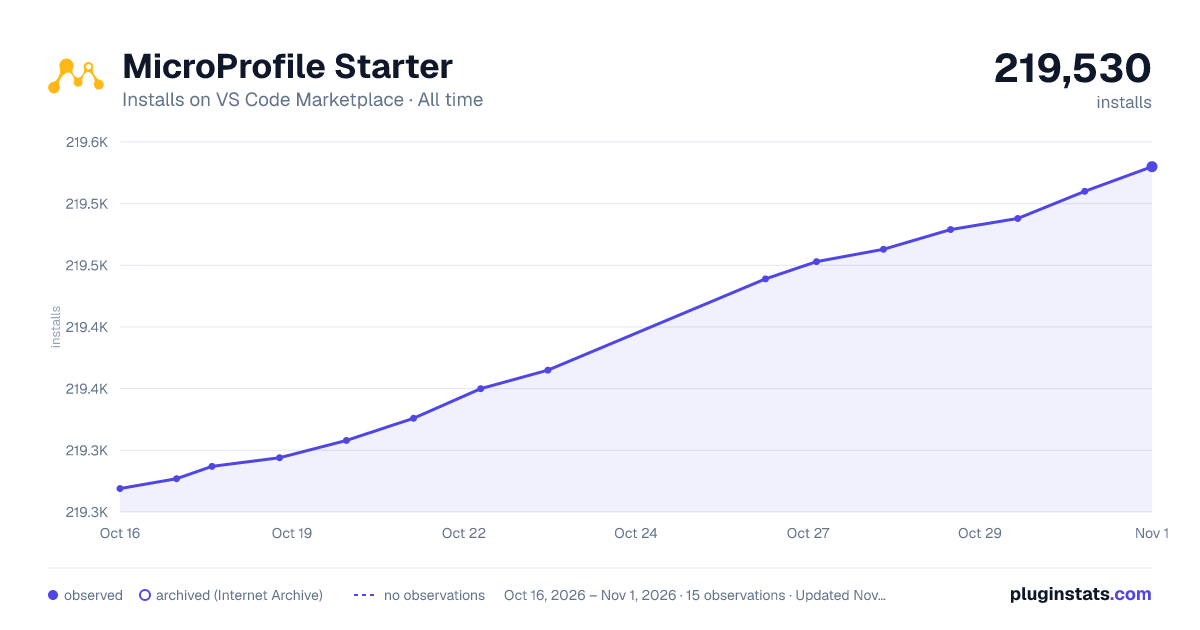

Adoption over time


7/30/90-day growth


Ranking history


Listing placement


Filled points are observed values; hollow points come from Internet Archive snapshots of the listing page. Dashed segments span periods with no observations — values between points are not interpolated.
Each band is one page of 20. Installs on a log scale. Placement is projected from installs, so it can differ from the marketplace's own sort order. Hover a dot to see the listing.
Recent observations
Full history (4)Similar VS Code Marketplace Programming Languages plugins
All 20 MicroProfile Starter alternativesData source
Install counts, average rating, and rating counts come from the public Visual Studio Marketplace gallery API. Installs are cumulative and exclude updates.
Listing: https://marketplace.visualstudio.com/items?itemName=MicroProfile-Community.mp-starter-vscode-ext. First seen Oct 16, 2026; last successful collection Oct 19, 2026. See the methodology.