 PluginStats
Shell Script Command Completion installs statistics
By tetradresearch · VS Code Marketplace · Programming Languages
Complete shell commands and view inline help in shell scripts and BitBake files
Shell Script Command Completion has 119,846 recorded installs on VS Code Marketplace, ranking #2142 of 2,501 tracked listings.
Rating: 5.00 / 5 from 3 ratings
About Shell Script Command Completion
Shell Script Command Completion
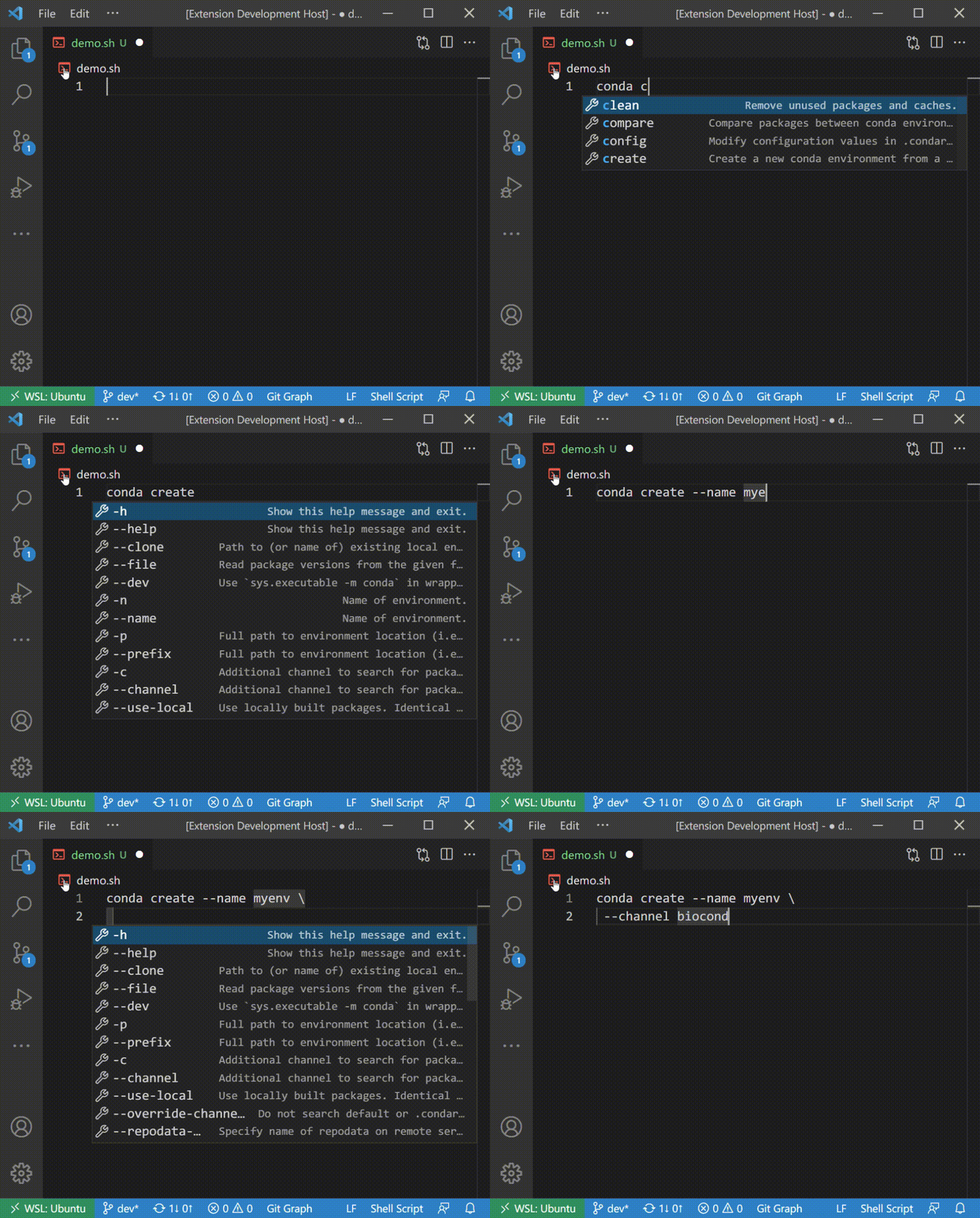
Write shell commands in VS Code with completions for commands, subcommands, options, and flags. Hover over them to see descriptions, usage, and examples without leaving the editor.
- Works with Shell Script files with no configuration required
- Loads specifications for 400+ common CLI tools automatically
- Learns from the
--helpoutput of other commands installed on your machine - Offers an optional collection of 600+ bioinformatics CLI specifications
- Includes experimental BitBake support when a BitBake language mode is installed
Get Started
- Install Shell Script Command Completion.
- Open a shell script and make sure its VS Code language mode is Shell Script.
- Type a command followed by a space to complete its subcommands and options, or hover over an existing command to read its help.
Common command specifications are downloaded automatically and cached by the extension. The first download requires an internet connection.
Completion and hover from downloaded or cached command specifications also work on Windows. Only automatic generation for uncached commands—which runs <command> --help and parses its output—is limited to Linux/WSL and macOS; see Supported Platforms for the exact combinations.
Set shellCompletion.enableCompletion to false to turn off completion suggestions from this extension for the current VS Code window or workspace. Hover information and command-specification management remain available, and the change takes effect without reloading the extension.
Command Coverage
The common collection currently contains more than 400 command specifications, including git, npm, docker, and terraform. See general.txt for the complete list.
When an installed command is not in the cache, the extension can create a specification from its --help output and save it for later use. The bundled command-help parser does not consult man pages.
Local help scans are disabled by default. On Linux, WSL, and macOS, when the extension activates on an Extension Host with neither an explicit setting nor a recorded response, it asks whether it may run commands referenced by Shell Script or BitBake files with --help there. Choosing Allow Local Scans sets shellCompletion.scanUnknownCommands to true; choosing Keep Disabled or dismissing the notification leaves downloaded and previously cached specifications available without executing uncached commands. Windows packages do not include the scanner and do not offer this choice.
You can change shellCompletion.scanUnknownCommands later in user settings, or in remote settings when using a remote Extension Host. The machine-scoped setting is not synchronized, and a workspace cannot override it.
To request another curated command specification, open a request in h2o-curated-data.
Bioinformatics Commands
The optional bioinformatics collection contains more than 600 specifications, including BLAST, GATK, seqkit, and samtools. See bio.txt for the complete list.
With a Shell Script or BitBake editor active, open the Command Palette and run Shell Completion: Load All Bioinformatics CLI Specs. The collection can be removed again with Shell Completion: Remove All Bioinformatics CLI Specs.
Inline Help
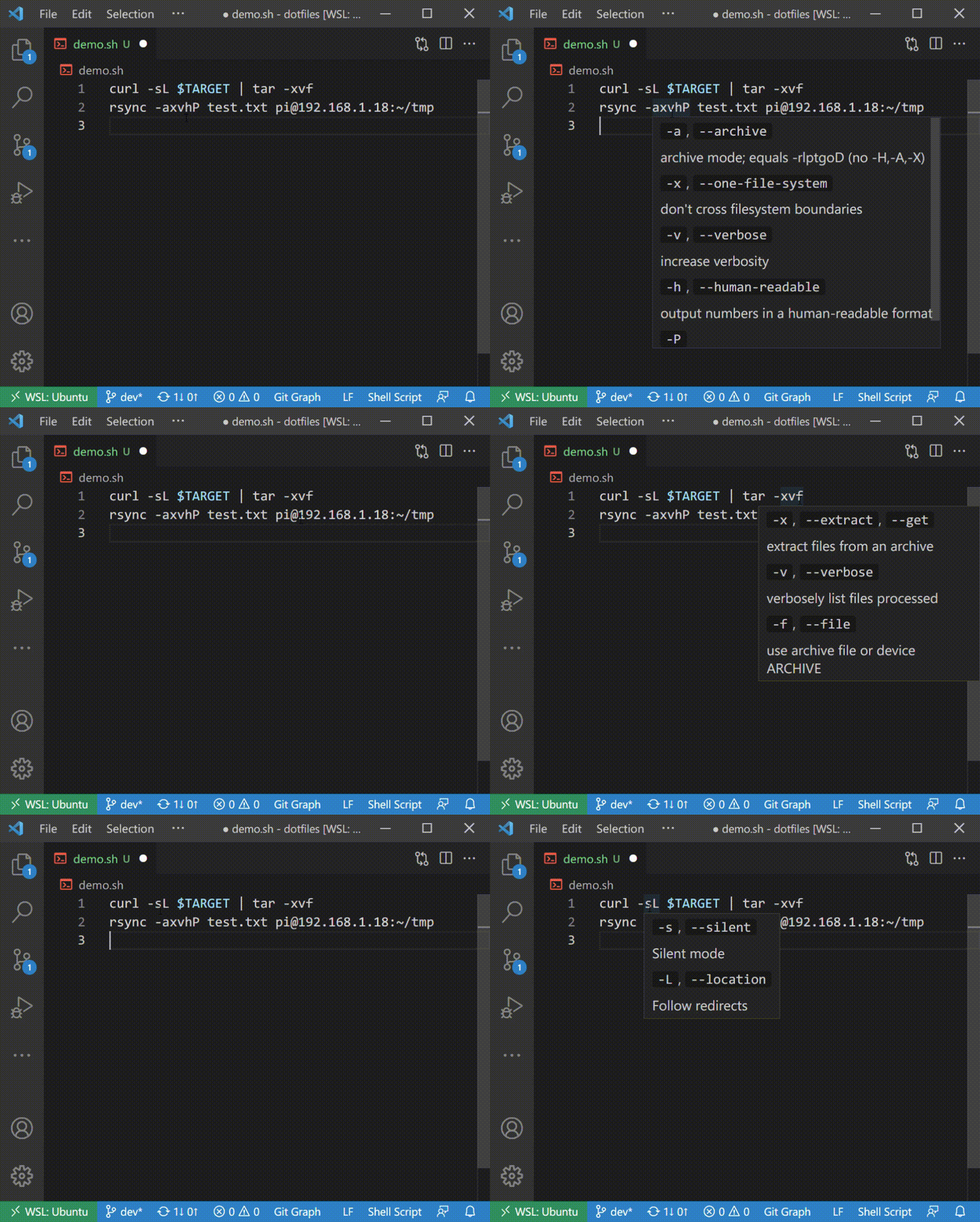
Hover over a recognized command, subcommand, option, or flag to see its description. Command hovers can also include usage and TLDR examples, while subcommand hovers can include usage when the specification provides it.
Manage Command Specifications
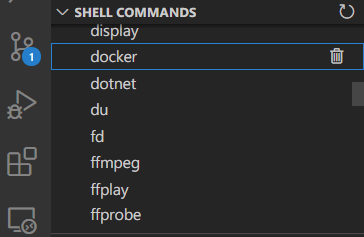
The Shell Commands view in the Explorer lists the specifications currently stored in the extension cache. Use its refresh button to refresh the displayed list or the trash button to remove an entry.
The following commands are available from the Command Palette while a Shell Script or BitBake editor is active:
| Command | Purpose |
|---|---|
| Shell Completion: Load All Common CLI Specs | Download the common collection and replace cached entries with its current versions. |
| Shell Completion: Load All Bioinformatics CLI Specs | Download or update the optional bioinformatics collection. |
| Shell Completion: Remove All Bioinformatics CLI Specs | Remove the bioinformatics collection from the cache. |
| Shell Completion: Load Command Spec (experimental) | Download one specification from the experimental collection. |
| Shell Completion: Remove Command Spec | Remove one cached specification by name. |
| Shell Completion: Inspect Caret Context | Show parser and provider metadata for the active caret in the Shell Completion Debug output channel. |
| Shell Completion: Toggle Live Caret and Cursor Context | Toggle the live Completion, Hover, and Tree-sitter debug views. |
| Shell Completion: Show Live Debug Views | Open the H2O Debug panel, enabling live inspection if necessary. |
Loading, updating, or bulk-removing a collection requires an internet connection because the extension fetches its current bundle or command index.
Inspect Caret Context…
Description from the VS Code Marketplace listing.
- autocomplete
- bash
- bioinformatics
- bitbake
- cli
- completion
- h2o
- hover
- intellisense
- shell
- shellscript
README badge
Show your rank in a README or on your website. The badge updates automatically.
Charts
Images: 30d · 1y · all time · 1600×900 dark


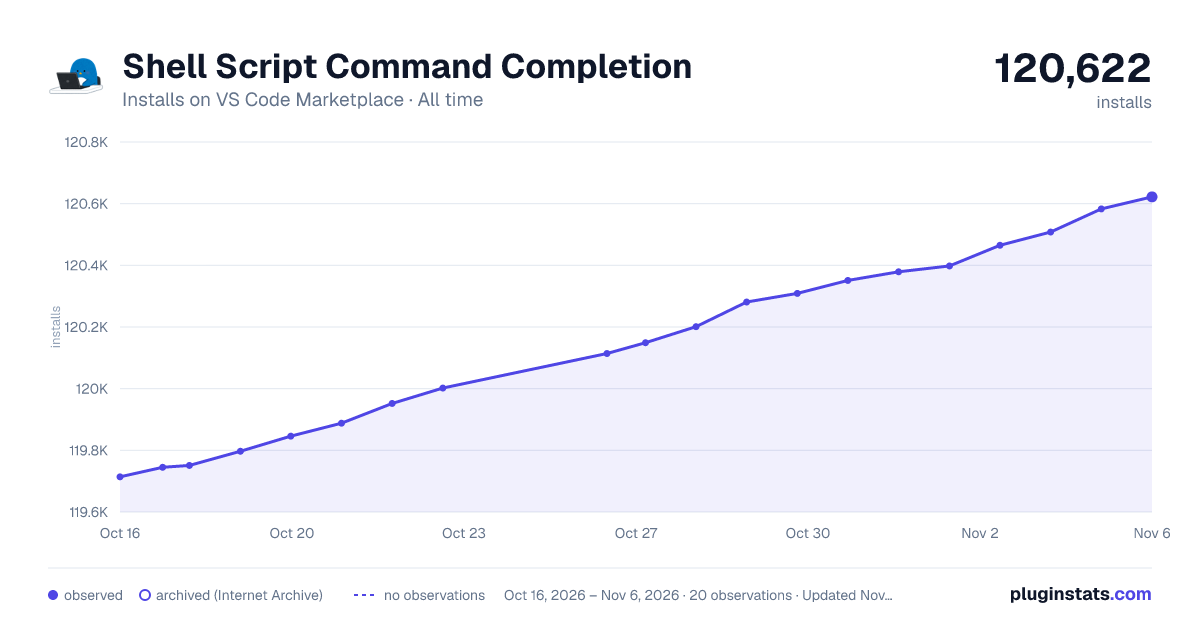

Adoption over time
7/30/90-day growth
Ranking history
Ratings over time
Listing placement
Listing placement
Listing placement
Filled points are observed values; hollow points come from Internet Archive snapshots of the listing page. Dashed segments span periods with no observations — values between points are not interpolated.
Each band is one page of 20. Installs on a linear scale. Placement is projected from installs, so it can differ from the marketplace's own sort order. Hover a dot to see the listing.
Recent observations
Full history (5)Similar VS Code Marketplace Programming Languages plugins
All 20 Shell Script Command Completion alternativesData source
Install counts, average rating, and rating counts come from the public Visual Studio Marketplace gallery API. Installs are cumulative and exclude updates.
Listing: https://marketplace.visualstudio.com/items?itemName=tetradresearch.vscode-h2o. First seen Oct 16, 2026; last successful collection Oct 20, 2026. See the methodology.