 PluginStats
FireFly Pro installs statistics
By Ankit Mishra · VS Code Marketplace · Themes
A Pure Colorful Dark Theme that Glows in Night, inspired by Fireflies.Includes 3 dark variants - Firefly (Pro, Midnight, Bright)
FireFly Pro has 189,613 recorded installs on VS Code Marketplace, ranking #1581 of 2,502 tracked listings.
Rating: 4.95 / 5 from 20 ratings
About FireFly Pro
Description
- 🔥🔥🔥🔥🔥🔥🔥 New FireFly Version is Live. 🔥🔥🔥🔥🔥🔥
- A Pure Colorful Dark Theme that Glows in Night, inspired by Fireflies.
- Includes Three Dark variants - Firefly Pro (New), Firefly Pro Bright & FireFly Pro Midnight.
- For professional Night Coders who Loves Visual Studio Code.
- Fully optimized for eyes, Tested more than 6 hours in night with no eye burn.
- A Theme that motivates you to code at night.
Firefly Pro Demo (New) 🎉🎉🎉🎉🎉🎉
<div align="center"> <img src="https://raw.githubusercontent.com/ankitmlive/firefly-theme/master/assets/firefly-pro-01.png"> <img src="https://raw.githubusercontent.com/ankitmlive/firefly-theme/master/assets/firefly-pro-02.png"> <img src="https://raw.githubusercontent.com/ankitmlive/firefly-theme/master/assets/firefly-pro-03.png"> <img src="https://raw.githubusercontent.com/ankitmlive/firefly-theme/master/assets/firefly-pro-04.png"> </div>Firefly Pro Bright Demo
<div align="center"> <img src="https://raw.githubusercontent.com/ankitmlive/firefly-theme/master/assets/firefly-pro-home.png"> <img src="https://raw.githubusercontent.com/ankitmlive/firefly-theme/master/assets/firefly-pro-python.png"> <img src="https://raw.githubusercontent.com/ankitmlive/firefly-theme/master/assets/firefly-pro-vue.png"> </div>Firefly Pro Midnight Demo
<div align="center"> <img src="https://raw.githubusercontent.com/ankitmlive/firefly-theme/master/assets/firefly-pro-midnight-home.png"> <img src="https://raw.githubusercontent.com/ankitmlive/firefly-theme/master/assets/firefly-pro-midnight-php.png"> <img src="https://raw.githubusercontent.com/ankitmlive/firefly-theme/master/assets/firefly-pro-midnight-python.png"> <img src="https://raw.githubusercontent.com/ankitmlive/firefly-theme/master/assets/firefly-pro-midnight-vue.png"> </div>Getting started
You can install firefly theme through mentioned ways.
Installation
1 - From Visual Studio Code Marketplace
Install this incredible dark theme through the Visual Studio Code Marketplace.
2 - From Command Panel in VsCode
Launch Quick Open:
- <img src="https://www.kernel.org/theme/images/logos/favicon.png" width=16 height=16/> <a href="https://code.visualstudio.com/shortcuts/keyboard-shortcuts-linux.pdf">Linux</a>
Ctrl+P - <img src="https://developer.apple.com/favicon.ico" width=16 height=16/> <a href="https://code.visualstudio.com/shortcuts/keyboard-shortcuts-macos.pdf">macOS</a>
⌘P - <img src="https://www.microsoft.com/favicon.ico" width=16 height=16/> <a href="https://code.visualstudio.com/shortcuts/keyboard-shortcuts-windows.pdf">Windows</a>
Ctrl+P
Paste the following command and press Enter:
ext install firefly
And pick the one by Ankit Mishra.
3 - From Packaged VSIX Extension
Download the latest .vsix release file from the marketplace and install it from the command line
code --install-extension firefly-*.*.*.vsix
or from within VS Code by launching Quick Open and running the Install from VSIX... command.
Activate theme
Launch Quick Open:
- <img src="https://www.kernel.org/theme/images/logos/favicon.png" width=16 height=16/> <a href="https://code.visualstudio.com/shortcuts/keyboard-shortcuts-linux.pdf">Linux</a>
Ctrl + Shift + P - <img src="https://developer.apple.com/favicon.ico" width=16 height=16/> <a href="https://code.visualstudio.com/shortcuts/keyboard-shortcuts-macos.pdf">macOS</a>
⌘ + Shift + P - <img src="https://www.microsoft.com/favicon.ico" width=16 height=16/> <a href="https://code.visualstudio.com/shortcuts/keyboard-shortcuts-windows.pdf">Windows</a>
Ctrl + Shift + P
Type theme, choose Preferences: Color Theme, and select FireFly Pro or FireFly Pro MidNight.
Recommended settings for a better experience
Use Material Icon's -- Install material icon extension
Jetbrains Mono(free), Operator Mono(buy) & Fira Code(free) are best suited fonts with firefly -- Install Jetbrains Mono, Fira Code or Operator Mono
Jetbrains Mono is a New TypeFace for Developers, Firefly looks awesome with it download it here -> https://www.jetbrains.com/lp/mono/
{
    // "Jetbrains Mono" font family OR
    "editor.fontFamily": "Jetbrains Mono",
    // "Operator Mono" font family AND
    "editor.fontFamily": "Operator Mono",
    // Enables font ligatures
    "editor.fontLigatures": true,
}
Issues
If you are facing VsCode Editor background issue, where your editor background show's different colors, use this setting to fix it.
Goto Command Pallete in vscode
Search for 'Configure Runtime Arguments' & enter, it will open argv.json file
Add this in your argv file -> "disable-hardware-acceleration": true
Restart VsCode
Feedback…
Description from the VS Code Marketplace listing.
- awesome
- black
- bright
- colorful
- color-theme
- dark
- dark-theme
- firefly
- midnight
- minimal
- pro
- theme
- vscode
README badge
Show your rank in a README or on your website. The badge updates automatically.
Charts
Images: 30d · 1y · all time · 1600×900 dark


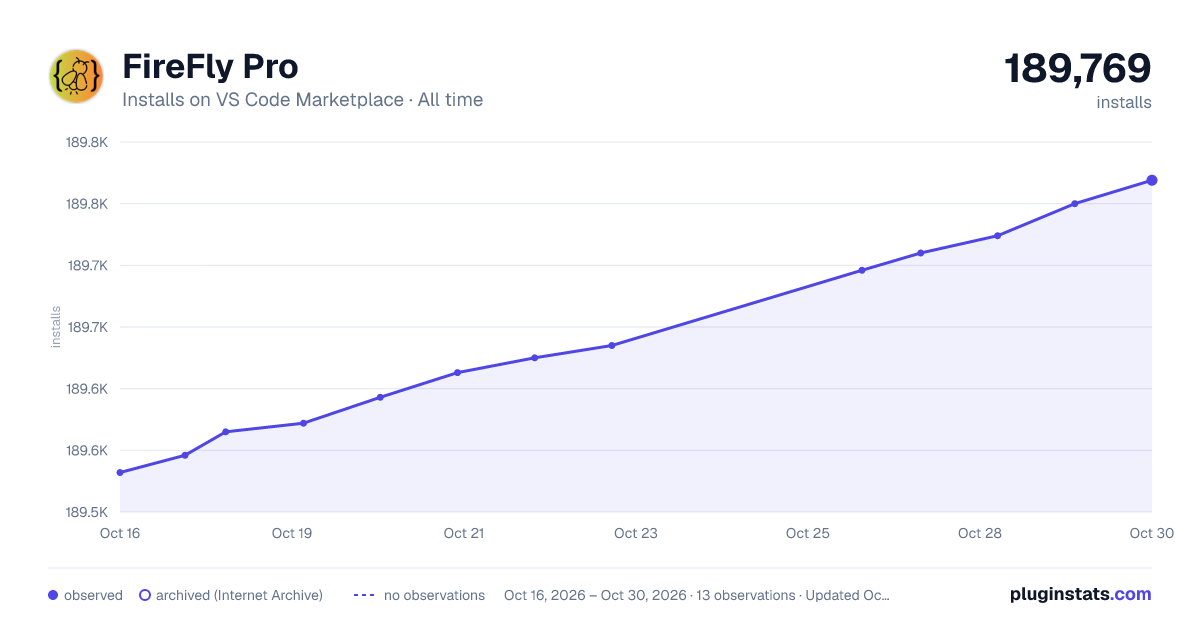

Adoption over time
7/30/90-day growth
Ranking history
Ratings over time
Listing placement
Listing placement
Filled points are observed values; hollow points come from Internet Archive snapshots of the listing page. Dashed segments span periods with no observations — values between points are not interpolated.
Each band is one page of 20. Installs on a linear scale. Placement is projected from installs, so it can differ from the marketplace's own sort order. Hover a dot to see the listing.
Recent observations
Full history (6)Similar VS Code Marketplace Themes plugins
All 20 FireFly Pro alternativesData source
Install counts, average rating, and rating counts come from the public Visual Studio Marketplace gallery API. Installs are cumulative and exclude updates.
Listing: https://marketplace.visualstudio.com/items?itemName=ankitcode.firefly. First seen Oct 16, 2026; last successful collection Oct 21, 2026. See the methodology.