 PluginStats
Bruno installs statistics
By Bruno · VS Code Marketplace · Programming Languages
API client for exploring and testing APIs in VS Code
Bruno has 238,662 recorded installs on VS Code Marketplace, ranking #1340 of 2,501 tracked listings.
Rating: 3.87 / 5 from 38 ratings
About Bruno
Bruno for VS Code
With Bruno VS Code extension, you can develop and test your APIs in Bruno right from Visual Studio Code. You can use the VS Code extension to open bruno files, send API requests, manage collections and environments, and much more. Streamline your development workflow by testing your APIs in the same application you use to develop them.
Why Bruno?
Bruno has a few standout features that make it unique:
• Git-friendly: Bruno stores collections directly in your filesystem as plain text files, making them easy to version control with Git • Offline-first: No cloud dependency, no vendor lock-in. Your data stays on your device • Opensource: Bruno is open source and free to use • Fast & Lightweight: Built for speed and simplicity • Local Storage: All your API collections and data remain on your local machine
Features
The extension provides a comprehensive set of features for API development and testing:
Core Features
• Inline API testing - Send requests directly from VS Code without switching applications • Dual view modes - Switch seamlessly between GUI and text editor views • Collection management - Organize and manage your API collections within VS Code
Advanced Capabilities
• Environment variables - Manage multiple environments and switch between them easily • Request scripting - Write pre-request and post-response scripts for advanced testing • Authentication support - Handle various auth methods including Basic, Bearer, Digest, NTLM, API Key, WSSE, and more • GraphQL support - Send and test GraphQL queries with syntax highlighting and introspection • gRPC support - Send and test gRPC requests with proto file support • WebSocket support - Establish and manage WebSocket connections • Collection runner - Run entire collections or folders with configurable iterations • Code generation - Generate code snippets for your requests in various languages • File uploads - Handle multipart form data and file uploads in requests
Getting Started
- Install the extension from the VS Code Marketplace 2. Click the Bruno icon in the Activity Bar (sidebar) 3. Use Create Collection or Open Collection to get started 4. Right-click folders and requests in the sidebar for context menu actions
Related Projects
• Bruno Desktop - The main Bruno desktop application • Bruno CLI - Command-line interface for Bruno collections • Bruno Website - Official Bruno website and documentation
Community & Support
• GitHub Repository - Source code, issues, and discussions • Documentation - Comprehensive Bruno documentation • Discord Community - Join our community for help and discussions • Twitter - Follow us for updates and announcements
Contributing
We welcome contributions to make Bruno even better! See our Contributing Guide for details on:
• Reporting bugs and requesting features • Setting up the development environment • Submitting pull requests • Code style guidelines
License
This project is licensed under the MIT License - see the LICENSE file for details.
Made with ❤️ by the Bruno team
Love Bruno? Show your support by starring the project on GitHub!
Description from the VS Code Marketplace listing.
- API Client
- bru
- bruno
- Bruno API
- BrunoRequest
- GraphQL
- gRPC
- HTTP
- keybindings
- Postman
- REST
- Testing
- Thunder Client
README badge
Show your rank in a README or on your website. The badge updates automatically.
Charts
Images: 30d · 1y · all time · 1600×900 dark


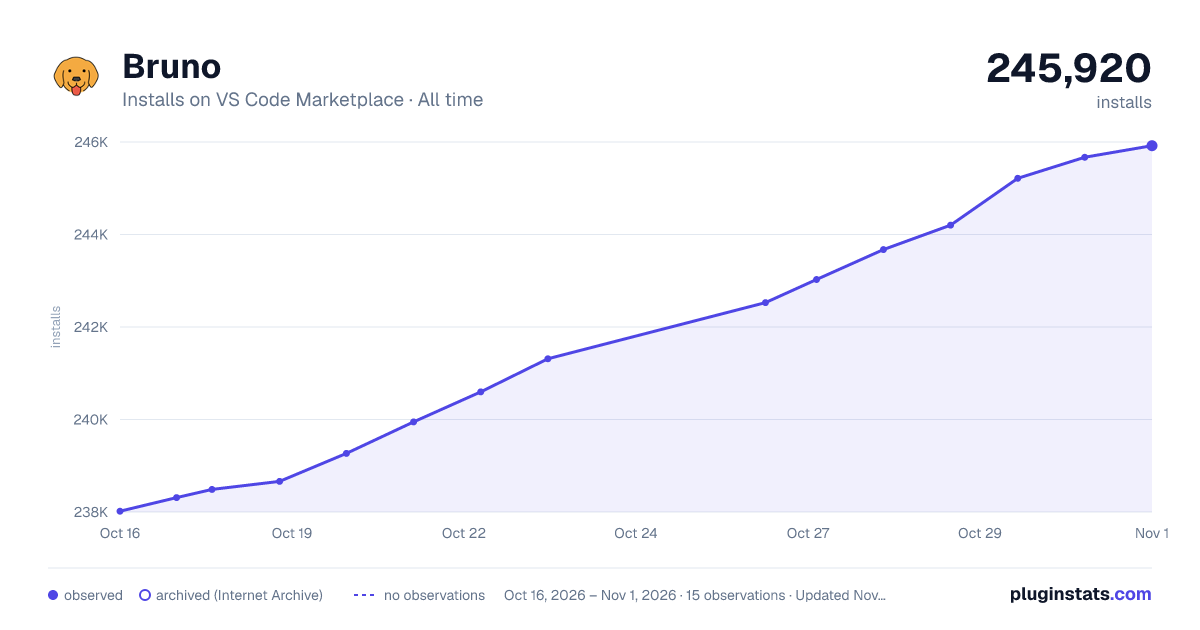

Adoption over time
7/30/90-day growth
Ranking history
Ratings over time
Listing placement
Listing placement
Listing placement
Listing placement
Filled points are observed values; hollow points come from Internet Archive snapshots of the listing page. Dashed segments span periods with no observations — values between points are not interpolated.
Each band is one page of 20. Installs on a linear scale. Placement is projected from installs, so it can differ from the marketplace's own sort order. Hover a dot to see the listing.
Recent observations
Full history (4)Similar VS Code Marketplace Programming Languages plugins
All 20 Bruno alternativesData source
Install counts, average rating, and rating counts come from the public Visual Studio Marketplace gallery API. Installs are cumulative and exclude updates.
Listing: https://marketplace.visualstudio.com/items?itemName=bruno-api-client.bruno. First seen Oct 16, 2026; last successful collection Oct 19, 2026. See the methodology.