 PluginStats
Git Tree Compare installs statistics
By Maik Riechert · VS Code Marketplace · Other
Diff your worktree against a branch, tag, or commit in a tree -- especially useful for pull request preparation or merge preview
Git Tree Compare has 260,372 recorded installs on VS Code Marketplace.
It ranks #1274 of 2,501 tracked VS Code Marketplace listings by installs.
It is rated 5.0 out of 5 from 57 ratings.
PluginStats has 4 daily observations since Oct 16, 2026; the latest is from Oct 19, 2026.
Rating: 4.95 / 5 from 57 ratings
About Git Tree Compare
Git Tree Compare
This Visual Studio Code extension helps you compare your working tree against a branch, tag, or commit in a natural folder tree structure or a flat list.
It is perfect for keeping an eye on what your pull request will look like, a pull request preview one could say. You don't have to leave your editor at all anymore!
In bigger projects with many files it also provides context, it gives you a quick way to figure out which of those files you have been working on in your feature branch. This comes in handy when you work on several branches in parallel, or simply when you forgot where you left off the following day.
Features
• Working tree comparison against any chosen branch, tag, or commit • Compare GitHub Pull Requests • Switch between tree and list view • Compare in merge or full mode • Open Changes or Open File • Open all changes at once in VS Code's multi-file diff editor • Discard Changes • Automatic refresh on file changes • Remembers the chosen comparison base per repository • Log output of all git commands run • Search within changed files • View diffs for linked git worktrees via Change Worktree..., switch back via Switch to Working Tree • Optional commits panel to restrict the comparison to a subset of commits
Location
By default, the tree view is located in its own container accessible from the activity bar on the left. However, it can be freely moved to any other location like Source Control or Explorer by dragging and dropping.
Git worktrees
If you use git worktrees, you can switch the tree view to another linked worktree with Change Worktree... from the view title bar. To return to your workspace checkout, use Switch to Working Tree. It appears as a dedicated button whenever you're viewing a different worktree, and as the first option in the Change Worktree... menu.
The worktree does not have to be part of your workspace, as long as git reports it as a linked worktree of the current repository.
When the view shows a node per repository (multiRepositoryView with more than one repository in the workspace), use Change Worktree... from a repository node's context menu. Each repository node keeps its place in the tree and shows the selected worktree, with the worktree name next to the repository name.
Compare GitHub Pull Requests
You can quickly view GitHub PR changes directly in VS Code using the Compare GitHub Pull Request command:
1. Click the "..." menu button in the Git Tree Compare view title bar 2. Select Compare GitHub Pull Request... 3. Enter the GitHub PR URL (e.g., https://github.com/owner/repo/pull/123) 4. Authenticate with GitHub if prompted (uses VS Code's built-in GitHub authentication) 5. The extension will: • Fetch the PR's head commit • Checkout the PR branch as pr/// • Compare it against the PR's base branch • Display all changes in the tree view
This feature works with both PRs from the same repository and PRs from forks.
Commits panel
Enable gitTreeCompare.showCommitsPanel to show a Commits panel below the tree. It lists the commits between the comparison base and HEAD, newest first, with an Uncommitted Changes entry on top.
Unchecking entries restricts the tree to the changes introduced by the remaining ones. The selection always covers a contiguous range of the timeline, since a range diff cannot leave out intermediate commits: unchecking something in the middle snaps the rest of the selection to a contiguous block.
While a subset is selected, the tree compares two commits rather than the working tree, so discarding changes is unavailable until the full comparison is restored.
The panel follows the repository selected in the tree, and its selection resets whenever the comparison changes (a new base, or new commits on HEAD).
Settings
gitTreeCompare.diffMode Determines how the comparison is performed, either by computing a merge base commit first and then comparing against that (equivalent to pull request diffs, default), or by comparing directly to the given base (useful to see the exact diff).
gitTreeCompare.autoRefresh Option to turn off automatic refresh. This can be useful for huge repositories when diff operations take a long time. As a work-around, disabling auto refresh also prevents locking issues when running git rebase from the integrated terminal (a stand-alone terminal wouldn't cause issues as auto refresh is stopped while the VS Code window is out of focus). A manual refresh can be triggered via the tree menu. Note that automatic refreshs are not triggered by changes to files outside the workspace folder (which can happen when opening a subdirectory of the repository root as workspace folder).
gitTreeCompare.findRenames Option to turn off rename detection when invoking git diff. Leaving this option on may have a performance impact for large diffs, especially when autoRefresh is enabled.
gitTreeCompare.openChanges Option which decides what should happen when clicking on a file in the tree - either open the changes, or the file itself. Default is to open the changes. The other action can always be accessed via the file's context menu.
gitTreeCompare.root Determines what the tree root should be when the workspace folder is not the same as the repository root. Default is to make the workspace folder the tree root. Any changes outside the workspace folder are then displayed in a special / node.
gitTreeCompare.includeFilesOutsideWorkspaceRoot Determines whether to display the special / node when the tree root is not the repository root and there are changes outside the workspace folder. Default is to display the / node.
gitTreeCompare.iconsMinimal Option which enables a compact icon layout where only files have icons, comparable to the Seti file icon theme.
gitTreeCompare.collapsed When enabled, shows folders collapsed instead of expanded. NOTE: Changing this option requires restarting VS Code.…
Description from the VS Code Marketplace listing.
- branch
- compare
- diff
- git
- tree
Where Git Tree Compare sits in the listing
Each band is one page of 20. Installs on a log scale. Placement is projected from installs, so it can differ from the marketplace's own sort order. Hover a dot to see the listing.


Charts
Images: 30d · 1y · all time · 1600×900 dark


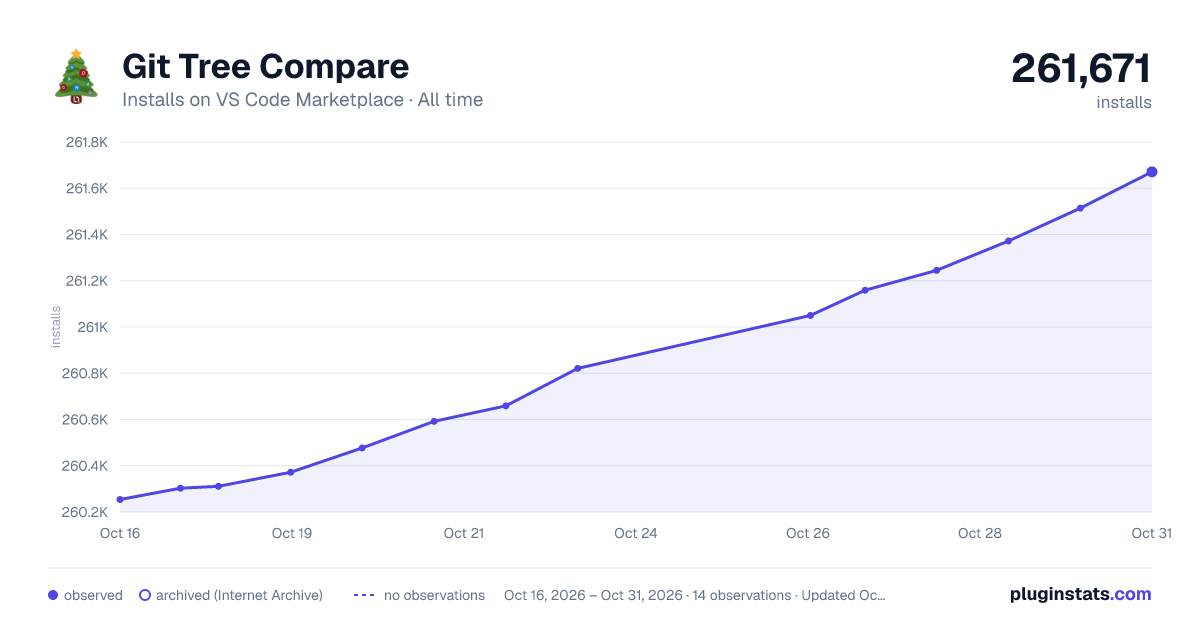

Adoption over time


7/30/90-day growth


Ranking history


Filled points are observed values; hollow points come from Internet Archive snapshots of the listing page. Dashed segments span periods with no observations — values between points are not interpolated.
Recent observations
Full history (4)Similar VS Code Marketplace Other plugins
Data source
Install counts, average rating, and rating counts come from the public Visual Studio Marketplace gallery API. Installs are cumulative and exclude updates.
Listing: https://marketplace.visualstudio.com/items?itemName=letmaik.git-tree-compare. First seen Oct 16, 2026; last successful collection Oct 19, 2026. See the methodology.