 PluginStats
JavaScript Debugger For Luohe React installs statistics
By luohe · VS Code Marketplace · Debuggers
An extension for debugging Node.js programs and Chrome.
JavaScript Debugger For Luohe React has 100,923 recorded installs on VS Code Marketplace, ranking #2353 of 2,501 tracked listings.
About JavaScript Debugger For Luohe React
This is a DAP-based JavaScript debugger. It debugs Node.js, Chrome, Edge, WebView2, VS Code extensions, Blazor, React Native, and more. It is the default JavaScript debugger in Visual Studio Code and Visual Studio, and the standalone debug server can also be used in other tools such as nvim.
Usage
If you're using Visual Studio or Visual Studio Code, js-debug is already installed. Otherwise, please consult your editor's documentation for possible installation instructions. Builds of the VS Code extension and standalone DAP server are available on the releases page.
See OPTIONS.md for a list of options you can use in your launch configurations.
• For usage in VS Code, please check out our guides for Node.js debugging, Browser debugging. • For debugging React Native, install and read through the React Native extension which builds upon js-debug. • For debugging Blazor, check out its documentation here. • For debugging WebView2 apps, check out documentation here.
Nightly Extension
The shipped version of VS Code includes the js-debug version at the time of its release, however you may want to install our nightly build to get the latest fixes and features. The nightly build runs at 5PM PST on each day that there are changes (see pipeline). To get the build:
- Open the extensions view (ctrl+shift+x) and search for @builtin @id:ms-vscode.js-debug 2. Right click on the JavaScript Debugger extension and Disable it. 3. Search for @id:ms-vscode.js-debug-nightly in the extensions view. 4. Install that extension.
Notable Features
In js-debug we aim to provide rich debugging for modern applications, with no or minimal configuration required. Here are a few distinguishing features of js-debug beyond basic debugging capabilities. Please refer to the VS Code documentation for a complete overview of capabilities.
Debug child processes, web workers, service workers, and worker threads
In Node.js, child processes and worker threads will automatically be debugged. In browsers, service workers, webworkers, and iframes will be debugged as well. While debugging workers, you can also step through postMessage() calls.
Preview
Debug WebAssembly with DWARF symbols
The debugger automatically reads DWARF symbols from WebAssembly binaries, and debugs them. The usual debugging features are available, including limited evaluation support via lldb-eval.
Preview
Debug Node.js processes in the terminal
You can debug any Node.js process you run in the terminal with Auto Attach. If auto attach isn't on, you can run the command Debug: Toggle Auto Attach to turn it on. Next time you run a command like npm start, we'll debug it.
Preview
Once enabled, you can toggle Auto Attach by clicking the Auto Attach: On/Off button in the status bar on the bottom of your screen. You can also create a one-off terminal for debugging via the Debug: Create JavaScript Debug Terminal command.
Profiling Support
You can capture and view performance profiles natively in VS Code, by clicking on the ⚪ button in the Call Stack view, or through the Debug: Take Performance Profile command. The profile information collected through VS Code is sourcemap-aware.
We support taking and visualizating CPU profiles, heap profiles, and heap snapshots.
Preview
Instrumentation breakpoints
When debugging web apps, you can configure instrumentation breakpoints from VS Code in the "Event Listener Breakpoints" view.
Preview
Return value interception
On a function's return statement, you can use, inspect, and modify the $returnValue.
Preview
Note that you can use and modify properties on the $returnValue, but not assign it to--it is effectively a const variable.
Pretty-print minified sources
The debugger can pretty print files, especially useful when dealing with minified sources. You can trigger pretty printing by clicking on the braces {} icon in editor actions, or via the Debug: Pretty print for debugging command.
Preview
Experimental Network View
The debugger allows viewing network traffic of browser targets and Node.js >22.6.0. This requires enabling the debug.javascript.enableNetworkView setting.
Preview
Advanced Rename Support
When using a tool that emits renames in its sourcemap, the debugger maps renamed variables in all displayed views, and also rewrites evaluation requests to use the renamed identifiers, allowing near-source-level debugging of minified code.
Conditional Exception Breakpoints
As in most debuggers, you can pause on caught exceptions, but you can also filter the exceptions you want to pause on by checking against the error object. In VS Code, you can do this by clicking the pencil icon in the Breakpoints view.
Preview
Excluded Callers
If you have a breakpoint you want to pause on, but not when called from certain frames, you can right click on call frames in the stack trace view to "exclude caller" which prevents pausing on that breakpoint when the requested caller is in the stack trace.
Preview
Step-in Targets
When paused on a location with multiple calls or expressions, the debugger supports the Debug: Step Into Target action that allows you to request a specific expression you wish to step into.
Description from the VS Code Marketplace listing.
- chrome
- debugger
- debuggers
- javascript
- keybindings
- node
- pwa
- wat
- WebAssembly Text Format
README badge
Show your rank in a README or on your website. The badge updates automatically.
Charts
Images: 30d · 1y · all time · 1600×900 dark


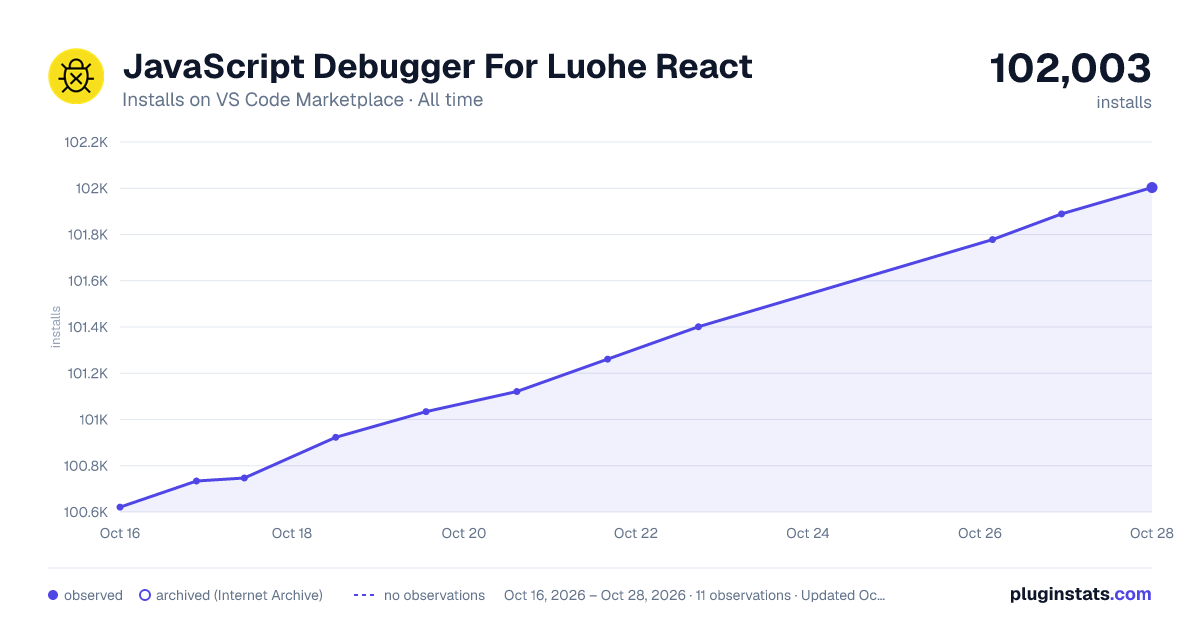

Adoption over time
7/30/90-day growth
Ranking history
Ratings over time
Listing placement
Listing placement
Filled points are observed values; hollow points come from Internet Archive snapshots of the listing page. Dashed segments span periods with no observations — values between points are not interpolated.
Each band is one page of 20. Installs on a linear scale. Placement is projected from installs, so it can differ from the marketplace's own sort order. Hover a dot to see the listing.
Recent observations
Full history (4)Similar VS Code Marketplace Debuggers plugins
All 20 JavaScript Debugger For Luohe React alternativesData source
Install counts, average rating, and rating counts come from the public Visual Studio Marketplace gallery API. Installs are cumulative and exclude updates.
Listing: https://marketplace.visualstudio.com/items?itemName=luohe.js-debug-for-luohe-react. First seen Oct 16, 2026; last successful collection Oct 19, 2026. See the methodology.