 PluginStats
Dotenv Official installs statistics
By Dotenv · VS Code Marketplace · Programming Languages
Official Dotenv Extension – from the creator of dotenv.
Dotenv Official has 301,891 recorded installs on VS Code Marketplace, ranking #1156 of 2,501 tracked listings.
Rating: 3.82 / 5 from 11 ratings
About Dotenv Official
dotenv-vscode
Official Dotenv Extension – from the creator of dotenv.
• auto-cloaking • auto-completion • secret peeking • syntax highlighting • NEW: decryption peeking (for encrypted .env files)
auto-cloaking
auto-completion
secret peeking
syntax highlighting
decryption peeking
FAQ
Does it automatically cloak my secrets? Yes.
By default, open a .env file and its values start masked.
Click Toggle auto-cloaking at the top of the file or run Dotenv: Toggle auto-cloaking from the Command Palette to reveal or hide them.
Switching tabs hides them again in the Dotenv Editor when auto-cloaking is enabled. Set dotenv.enableAutocloaking to false to keep values visible, including after reopening files or switching tabs. This disables the cloaking feature and removes its toggle controls. Changes apply to open editors immediately.
Does it support .env variants? Yes.
.env, .env.example, .env.development, .env.staging, .env.production, other .env.* files, *.env, and .flaskenv are supported.
Can I autocomplete environment variables? Yes.
Start typing process.env. or your language's environment-variable expression.
Suggestions come from your dotenv files, with values masked and source filenames shown.
Can I reveal a value inside an autocomplete popup? Yes.
Open a suggestion's details and click Reveal value. Click Hide value to mask it again.
Only that source's value is revealed. The suggestion row stays masked, and your secret-peeking setting stays unchanged.
Can I peek at secrets without opening my .env file? Yes.
Hover over a reference such as process.env.SECRET_KEY or ENV["SECRET_KEY"].
Every new hover or expanded autocomplete peek starts cloaked. Click Reveal value to reveal that popup, or Hide value to cloak it again. Editor cloaking toggles never reveal peek values. Uncheck Dotenv: Enable Secretpeeking to disable dotenv hovers and in-code Reveal actions, including the expanded value details in autocomplete. Completion suggestions remain available with masked values.
Can I peek at encrypted values with dotenvx? Yes.
In the Dotenv Editor, hover over an encrypted: value and click Decrypt value. The file stays encrypted.
Click Hide value, leave the popup, or switch tabs to clear the displayed plaintext.
You'll need a saved file, a trusted workspace, and the dotenvx CLI installed locally. The CLI isn't bundled with this extension.
Install it using the dotenvx installation instructions.
dotenvx finds the matching private key through its usual lookup, such as .env.keys or its key store. A key stored only in GitHub Actions isn't available locally.
If dotenvx isn't on your PATH, set dotenv.dotenvxPath to its executable.
Does it highlight .env syntax? Yes.
Variable names, values, comments, and quoted strings have syntax highlighting. The Dotenv Editor also highlights numeric values.
Does it support languages other than JavaScript? Yes.
Auto-completion and secret peeking support JavaScript, TypeScript, Ruby, Python, PHP, Go, Java, .NET (C#, F#, Visual Basic), C/C++, Julia, Erlang, Perl, Swift, Clojure, Rust, Dart, Kotlin, and Elixir.
Values come from your dotenv files, rather than the running application's environment.
Does it support importing env from node:process? Yes.
Both node:process and process imports work, including named aliases and multiline imports.
Does it support .NET? Yes.
C#, F#, and Visual Basic support Environment.GetEnvironmentVariable, including System.Environment and the overload with an EnvironmentVariableTarget.
Type ( or " in the first argument, or request completion while typing a name. Hover over the name to peek at its value.
Values come from dotenv files. The extension doesn't read Windows registry values, appsettings.json, or IConfiguration.
Does it support C and C++? Yes.
Complete and hover over names in getenv calls. C++ also supports std::getenv and ::getenv.
Does it support Julia and Erlang? Yes.
Complete and hover over names in these expressions:
Erlang files need the erlang language mode provided by an Erlang extension. Fallback arguments aren't evaluated when a key is missing from your dotenv files.
Does it support Perl? Yes.
Suggestions preserve bare keys, single quotes, or double quotes. Hover over a name to peek at its value.
Does it support Swift and Clojure? Yes.
Complete names inside quotes and hover over them to peek at their values.
Swift also supports Foundation.ProcessInfo.processInfo.environment, Darwin.getenv, and Glibc.getenv.
Does it work with monorepos? Yes.
Completion and secret peeking look in the source file's directory and each parent directory up to its workspace root.
Sibling projects and other workspace folders stay separate. Your project doesn't need to install the dotenv package.
Can I see values from multiple .env files? Yes.
Each key appears once in completion, with its source filenames.
Hover and completion details show the values with their filenames, nearest directories first. The extension doesn't guess which environment your application runs.
Unsaved dotenv edits appear immediately in completion and secret peeking.
Can I use custom dotenv filenames? Yes.
Associate them with the dotenv language in your project's .vscode/settings.json:
This enables syntax highlighting, cloaking, and the toggle in the native editor, and includes those files in completion and secret-peeking discovery.
Open files with Dotenv selected as their language are included too.
Can I edit and copy values while they're cloaked? Yes.
Cloaking is visual: copied text contains the actual value.
The Dotenv Editor supports line numbers, multiple cursors, find/replace, folding, comments, and normal editing. Save, undo, and redo use the usual shortcuts and update the underlying document.
If another edit conflicts with yours, your draft stays available to copy instead of overwriting the other edit.
Does the Dotenv Editor prevent secrets from flashing when I switch tabs? Yes.…
Description from the VS Code Marketplace listing.
- .env
- blur
- cloak
- config
- development
- dotenv
- env
- environment
- environment variables
- environmentvariables
- hide
- mask
- official
- productivity
- secrets
- settings
- variables
README badge
Show your rank in a README or on your website. The badge updates automatically.
Charts
Images: 30d · 1y · all time · 1600×900 dark


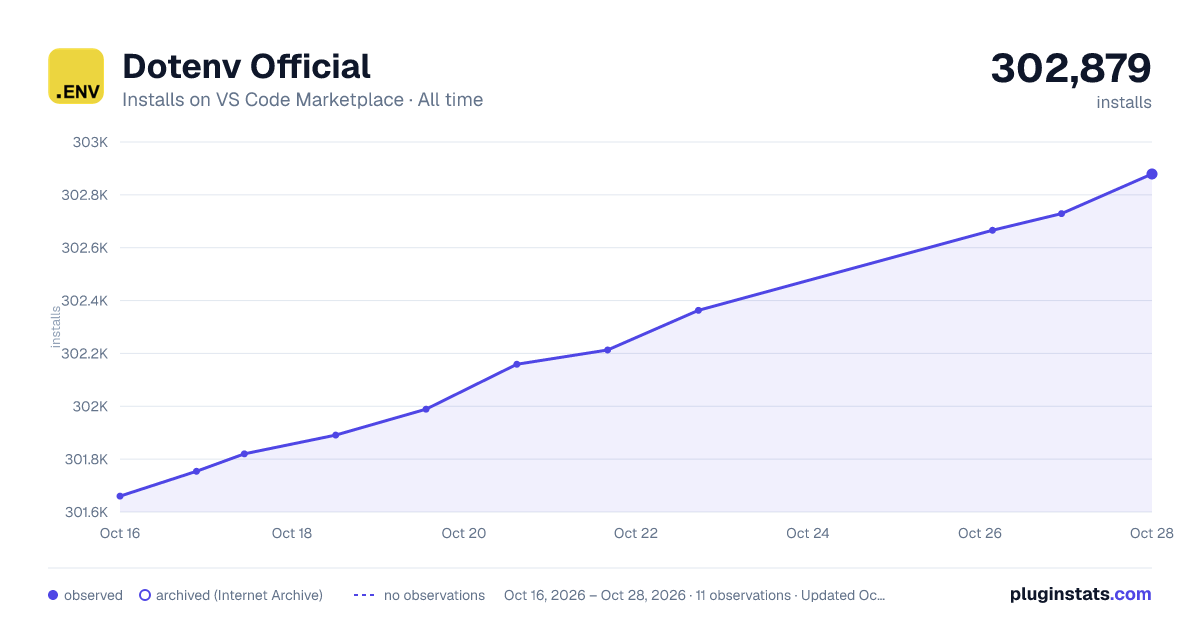

Adoption over time
7/30/90-day growth
Ranking history
Ratings over time
Listing placement
Listing placement
Filled points are observed values; hollow points come from Internet Archive snapshots of the listing page. Dashed segments span periods with no observations — values between points are not interpolated.
Each band is one page of 20. Installs on a linear scale. Placement is projected from installs, so it can differ from the marketplace's own sort order. Hover a dot to see the listing.
Recent observations
Full history (4)Similar VS Code Marketplace Programming Languages plugins
All 20 Dotenv Official alternativesData source
Install counts, average rating, and rating counts come from the public Visual Studio Marketplace gallery API. Installs are cumulative and exclude updates.
Listing: https://marketplace.visualstudio.com/items?itemName=dotenv.dotenv-vscode. First seen Oct 16, 2026; last successful collection Oct 19, 2026. See the methodology.