 PluginStats
JetBrains IDE Keymap installs statistics
By isudox · VS Code Marketplace · Keymaps
JetBrains IDE Keymap Extension for VS Code.
JetBrains IDE Keymap has 322,158 recorded installs on VS Code Marketplace, ranking #1101 of 2,502 tracked listings.
Rating: 4.81 / 5 from 16 ratings
About JetBrains IDE Keymap
JetBrains-like Keymap for Visual Studio Code.




Inspired by the Sublime Text Keymap extension from Microsoft.
This extension imports keybindings from JetBrains to VS Code. After installing the extension and restarting VS Code you can use VS Code just like IntelliJ IDEA, Webstorm, PyCharm etc.
This keymap has covered most of keyboard shortcuts of VS Code, and makes VS Code more 'JetBrains IDE like'.
But this extension hasn't transfer all keybindings of JetBrains yet. If you want more feature, go to GitHub Issues and make it more effective for your developement.
Contributing
All of the customed keymap in this extension is configured in ./package.json file. You can add or modify keymap configurations as seen below.
{
    "mac": "<keyboard shortcut for mac>",
    "linux": "<keyboard shortcut for linux>",
    "win": "<keyboard shortcut for windows>",
    "key": "<default keyboard shortcut>",
    "command": "<name of the command in VS Code>"
}
Usually the keybinding in Windows and Linux is same, while macOS is always different.
You can read more about how to contribute keybindings in extensions in the official documentation.
Tip: If you want to use <kbd>ctrl</kbd> (or <kbd>cmd</kbd> in macOS) + click to jump to definition change
editor.multiCursorModifiertoaltand restart VS Code.
What keybindings are included in this extension?
You can see all the keyboard shortcuts in the tables as followed
General
| Command | Feature | Linux/Win | macOS | |
|---|---|---|---|---|
| workbench.action.files.saveAll | Save all | ctrl+s | cmd+s | ✅ |
| Open corresponding tool window | alt+[0-9] | cmd+[0,9] | ✅ | |
| workbench.action.sync | Synchronize | ctrl+alt+y | cmd+alt+y | ✅ |
| workbench.action.maximizeEditor | Toggle maximizing editor | ctrl+shift+f12 | cmd+shift+f12 | ✅ |
| N/A | Inspect current file with current profile | alt+shift+i | alt+shift+i | ❌ |
| workbench.action.selectTheme | Quick switch current scheme | ctrl+` | ctrl+` | ✅ |
| workbench.action.openGlobalSettings | Open Settings dialog | ctrl+alt+s | cmd+, | ✅ |
| workbench.action.tasks.configureTaskRunner | Open Project Structure dialog | ctrl+alt+shift+s | cmd+; | |
| workbench.action.showCommands | Find Action | ctrl+shift+a | shift+cmd+a | ✅ |
Debugging
| Command | Feature | Linux/Win | macOS | |
|---|---|---|---|---|
| workbench.action.debug.stepOver | Step over / into | f8 | f8 | ✅ |
| workbench.action.debug.stepOut | Step out | shift+f8 | shift+f8 | ✅ |
| workbench.action.debug.stepOut | Smart Step into | shift+f7 | shift+f7 | ❌ |
| editor.debug.action.runToCursor | Run to cursor | alt+f9 | alt+f9 | ✅ |
| editor.debug.action.selectionToRepl | Evaluate expression | alt+f8 | alt+f8 | ✅ |
| workbench.action.debug.continue | Resume program | f9 | f9 | ✅ |
| editor.debug.action.toggleBreakpoint | Toggle breakpoint | ctrl+f8 | cmd+f8 | ✅ |
| workbench.view.debug | View breakpoints | ctrl+shift+f8 | cmd+shift+f8 | ✅ |
Search / Replace
| Command | Feature | Linux/Win | macOS |
|---|---|---|---|
| workbench.action.quickOpenNavigateNext | Switch between tabs and tool window | ctrl+tab | ctrl+tab |
| workbench.action.quickOpen | Go to file | ctrl+shift+n | cmd+shift+o |
| workbench.action.closeActiveEditor | Close active editor tab | ctrl+f4 | cmd+w |
| workbench.action.openGlobalSettings | Open Settings dialog | ctrl+alt+s | cmd+, |
| editor.action.clipboardCutAction | Cut current line to clipboard | ctrl+x | cmd+x |
| editor.action.clipboardCopyAction | Copy current line to clipboard | ctrl+c | cmd+c |
Editing
| Command | Feature | Linux/Win | macOS |
|---|
Refactoring
| Command | Feature | Linux/Win | macOS |
|---|
Navigation
| Command | Feature | Linux/Win | macOS |
|---|
Compile and Run
| Command | Feature | Linux/Win | macOS |
|---|
Usage Search
| Command | Feature | Linux/Win | macOS |
|---|
VCS / Local History
| Command | Feature | Linux/Win | macOS |
|---|
Live Templates
| Command | Feature | Linux/Win | macOS |
|---|
License
Description from the VS Code Marketplace listing.
- intellij
- jetbrains
- keybindings
- keymap
README badge
Show your rank in a README or on your website. The badge updates automatically.
Charts
Images: 30d · 1y · all time · 1600×900 dark


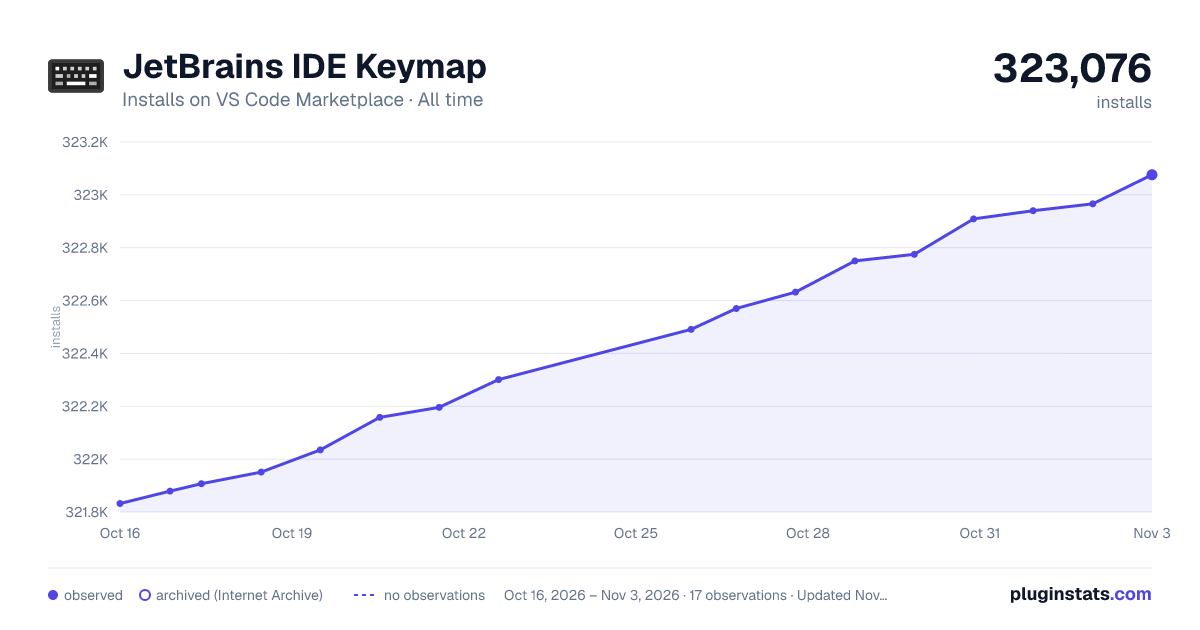

Adoption over time
7/30/90-day growth
Ranking history
Ratings over time
Listing placement
Listing placement
Filled points are observed values; hollow points come from Internet Archive snapshots of the listing page. Dashed segments span periods with no observations — values between points are not interpolated.
Each band is one page of 20. Installs on a linear scale. Placement is projected from installs, so it can differ from the marketplace's own sort order. Hover a dot to see the listing.
Recent observations
Full history (6)Similar VS Code Marketplace Keymaps plugins
All 20 JetBrains IDE Keymap alternativesData source
Install counts, average rating, and rating counts come from the public Visual Studio Marketplace gallery API. Installs are cumulative and exclude updates.
Listing: https://marketplace.visualstudio.com/items?itemName=isudox.vscode-jetbrains-keybindings. First seen Oct 16, 2026; last successful collection Oct 21, 2026. See the methodology.