 PluginStats
AHK++ (AutoHotkey Plus Plus) installs statistics
By Mark Wiemer · VS Code Marketplace · Programming Languages
AutoHotkey v1 and v2 language support for Visual Studio Code: IntelliSense, debugging, formatting, and more!
AHK++ (AutoHotkey Plus Plus) has 446,841 recorded installs on VS Code Marketplace, ranking #900 of 2,502 tracked listings.
Rating: 4.77 / 5 from 30 ratings
About AHK++ (AutoHotkey Plus Plus)
Maintenance mode announcement
AHK++ will go into maintenance mode on January 1, 2027. Critical bugs and security issues will still be addressed, but no new features will be added. See the announcement for more details.
Install
AHK++ is available for: VS Code | Theia IDE | VSCodium | any other IDE that supports *.vsix extensions
Download from a trusted source: Visual Studio Marketplace | Open VSX Registry | GitHub releases
Commands
With AHK++, you can compile, debug, and run your scripts with keyboard shortcuts. You can also run a selection as a standalone script.
- Compile:
Ctrl+Shift+F9 - Debug:
Ctrl+Alt+F9 - Open help:
Ctrl+F1 - Run:
Ctrl+F9 - Run selection:
Ctrl+F8 - Stop:
Ctrl+F6
Debug
There are some known issues with the debugger. If you need an advanced setup, we recommend zero-plusplus.vscode-autohotkey-debug for now. Please open an issue if the built-in debugger does not support your needs. As
zero-plusplus.vscode-autohotkey-debugis closed-source, we will be working to introduce advanced debugger features to ensure an open-source, collaborative, complete extension is available to the AHK community 🙂
-
Click the debug button in the editor title menu (at the top right of the editor) or press
Ctrl+Alt+F9. -
The debugger supports breakpoints, stack tracing, and variable watching
<details><summary>Demo GIF</summary>
</details>
Debug features
-
Output message: You can use
OutputDebugcommand instead ofMsgBoxto log values.
-
Evaluate: Set and get variable values through the debug console.

This extension provides basic debugging functions. If you need more debugging functions (such as conditional breakpoints), you can add an additional extension: Install vscode-autohotkey-debug.
Language features
Go to definition
- Supports navigation to symbol definition.
- Usage: Ctrl-click on the symbol to navigate to its definition.

Find symbol references
Select a symbol, then:
- Right-click and select
Find All References. - Or press
Shift+F12.
Hover tip
Usage: Hover over symbol to see IntelliSense documentation.

Outline
Assign name to block of code via double semicolon comment ;;Name and go to it from outline.

Folding
Custom folding regions:
;region
MsgBox % "Collapse me!"
;endregion

; Block comments with regions
/* ;region
Collapse me!
*/ ;endregion
Code format
Supports standard VS Code formatting with a few options.

Formatter directives
Formatter directives instruct the formatter to behave a certain way on sections of code.
-
FormatBlockComment:;@AHK++FormatBlockCommentOn /* ;All text inside block comment will be formatted like regular code. */ ;@AHK++FormatBlockCommentOff -
AlignAssignment:;@AHK++AlignAssignmentOn a = 5 ; number five str = legacy text = with equal symbol inputFile := "movie.mkv" abc := "abc" ; string abc := a + b ;@AHK++AlignAssignmentOff
💚 Acknowledgements
This extension relies heavily on open-source code. A huge thank you to all these open-source contributors who made the extension what it is today!…
Description from the VS Code Marketplace listing.
- ~ahk2-output
- ahk
- ahk v1
- ahk v2
- ahk2
- autohotkey
- AutoHotkeyv1
- AutoHotkeyv2
- debuggers
- keybindings
- snippet
- vscode
README badge
Show your rank in a README or on your website. The badge updates automatically.
Charts
Images: 30d · 1y · all time · 1600×900 dark


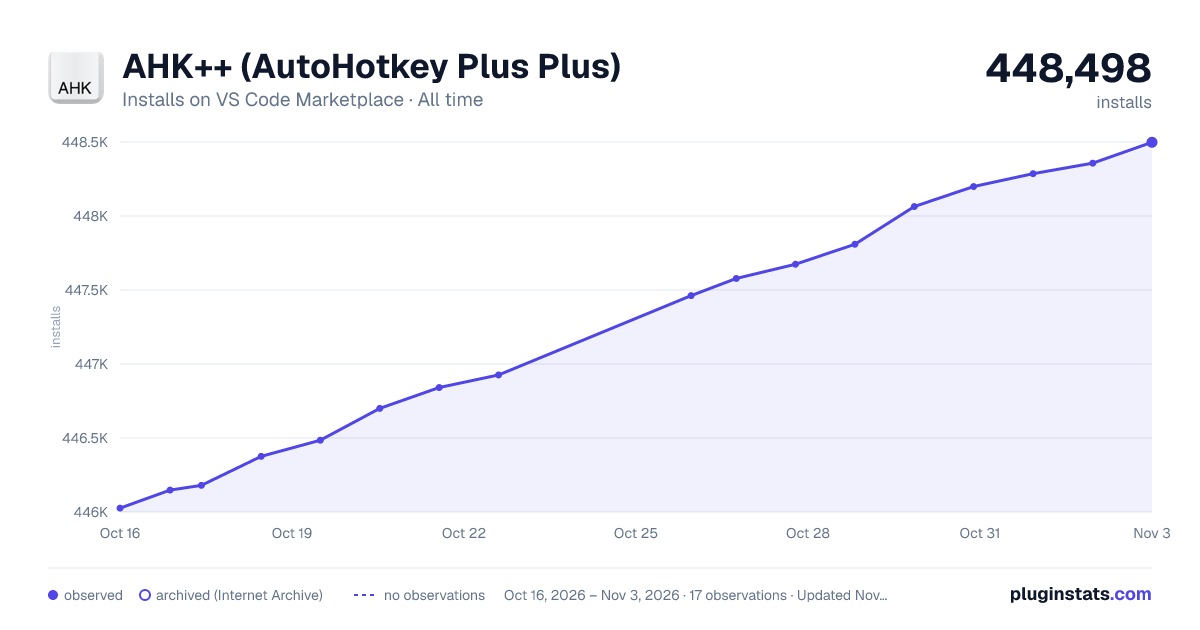

Adoption over time
7/30/90-day growth
Ranking history
Ratings over time
Listing placement
Listing placement
Listing placement
Listing placement
Filled points are observed values; hollow points come from Internet Archive snapshots of the listing page. Dashed segments span periods with no observations — values between points are not interpolated.
Each band is one page of 20. Installs on a linear scale. Placement is projected from installs, so it can differ from the marketplace's own sort order. Hover a dot to see the listing.
Recent observations
Full history (7)Similar VS Code Marketplace Programming Languages plugins
All 20 AHK++ (AutoHotkey Plus Plus) alternativesData source
Install counts, average rating, and rating counts come from the public Visual Studio Marketplace gallery API. Installs are cumulative and exclude updates.
Listing: https://marketplace.visualstudio.com/items?itemName=mark-wiemer.vscode-autohotkey-plus-plus. First seen Oct 16, 2026; last successful collection Oct 22, 2026. See the methodology.