 PluginStats
Settings Sync installs statistics
By Shan Khan · VS Code Marketplace · Other
Synchronize Settings, Snippets, Themes, File Icons, Launch, Keybindings, Workspaces and Extensions Across Multiple Machines Using GitHub Gist.
Settings Sync has 4,277,241 recorded installs on VS Code Marketplace, ranking #198 of 2,501 tracked listings.
Rating: 4.49 / 5 from 715 ratings
About Settings Sync
Settings Sync
Previously known as Visual Studio Code Settings Sync
Support
While being free and open source, if you find it useful, please consider supporting it by donating via PayPal or Open Collective. If you are using it in office as a team, please ask your company to support us via Open Collective from just 2$ per month!
*2$ Per Month
Type Sync in command Palette in order to view all commands.
Key Features
It Syncs
Shortcuts
Configure Settings Sync
Settings Sync Configuration page will be opened automatically on code start and requires two things to setup:
- GitHub Token 2. GitHub Gist Id
GitHub Token needs to be retrived by your GitHub account while Settings Sync creates GIST if you are first time user.
Following are the steps you need to perform to configure.
• Click on Login with GitHub . • Login GitHub on Browser and close the browser tab once you get Success message. • If you are using Settings Sync first time GIST will be created automatically when you upload your settings. • If you already have GitHub Gist, new window will be opened to allow you to select the GitHub Gist or Skip to create new Gist.
You can always verify created gist by going to https://gist.github.com and checking for a gist named cloudSettings
Upload Your Settings
Press Shift + Alt + U (macOS: Shift + Option + U)
Type ">Sync" In Command Palette into order download / upload
When downloading or uploading for the first time, the welcome page will automatically open, where you can configure the Settings Sync.
Once you select upload, after uploading the settings. You will see the Summary details with the list of each files and extensions uploaded.
Download your Settings
Press Shift + Alt + D (macOS: Shift + Option + D)
Type ">Sync" In Command Palette into order download / upload
When downloading or uploading for the first time, the welcome page will automatically open, where you can configure the Settings Sync.
Once you select download, after downloading. Settings Sync will display you Summary containing the list of each files and extension being downloaded.
New popup will be opened to allow you to restart the code to apply the settings.
Reset Extension Settings
Select "> Sync : Reset Extension Settings" in the Command Palette to reset your settings
Settings
Settings can be changed through the settings page, which can be accessed through "> Sync : Advanced Options > Open Settings Page"
There are two types of settings in Settings Sync. I will recommend you to read the configurations details here.
Gist Settings
Gist Settings are stored in settings.json file of Code. You can customize the settings in gist settings like:
Global Settings
Global settings are present in syncLocalSettings.json inside User folder. These settings will be shared across multiple Gist Environments.
You can customize the sync:
I will recommend you to read the configurations details here.
Features
Toggle Auto-Upload on change
Auto-upload is disabled by default. When the settings are changed and saved this feature will automatically start the upload process and save the settings online.
Please make sure you have valid github Token and Gist available to make it work properly.
Select Command "Sync : Advanced Options > Toggle Auto-Upload on Settings Change" command to Turn ON / OFF the auto-upload.
Toggle Auto Download
Auto Download is disabled by default. It will sync all the setting by default when the editor starts. Please make sure you have valid github Token and Gist available to make it work properly.
Select Command "Sync : Advanced Options > Toggle Auto-Download On Startup" command to Turn ON / OFF the auto download.
Toggle Force Download
Force Download is disabled by default. By default, extension won't download the latest settings if you already have the latest downloaded version, but sometimes when you delete some extension locally and don't upload the settings it will still show that you have latest versions by date or time checks, by turning this ON it will always download the cloud settings on startup.
Please make sure you have valid github Token and Gist available to make it work properly.
Select Command "Sync : Advanced Options > Toggle Force Download" command to Turn ON / OFF the force download.
Toggle Force Upload
Force Upload is disabled by default. By default, extension won't upload the settings if the gist has newer or identical content. By turning this ON it will always upload without checking for newer settings in the gist.
Please make sure you have valid github Token and Gist available to make it work properly.
Select Command "Sync : Advanced Options > Toggle Force Upload" command to Turn ON / OFF the force upload.
Toggle Summary
Summary is enabled by default which shows all files and extensions that are added or deleted on a single page. You may turn it off in order to make a upload and download process clean and quiet.
Select Command "Sync : Advanced Options > Show Summary Page On Upload / Download" command to Turn ON / OFF the auto download.
Custom Sync
Settings Sync allows you to sync the files other from User folder. For example, your workspace settings and much more. Its upon you to utilize the full potential of Settings Sync across your machines or your teams machines. Read about custom sync here.
Sync Pragmas
You can even manage which settings you want to ignore from being upload or download. Settings Sync even allows you to manage your home and office computer specific settings even OS related settings in single GitHub Gist. Read details about Sync Pragmas here.
Share Settings Across Teams & Users
If you are looking to share your settings. Read the details here. Settings Sync needs to create new Public GitHub Gist to share your settings with other users.
Troubleshooting…
Description from the VS Code Marketplace listing.
- code-settings-sync
- keybindings
- multi-root ready
- settings-sync
- vscode-settings-sync
- vscode-sync
- workspace-sync
README badge
Show your rank in a README or on your website. The badge updates automatically.
Charts
Images: 30d · 1y · all time · 1600×900 dark


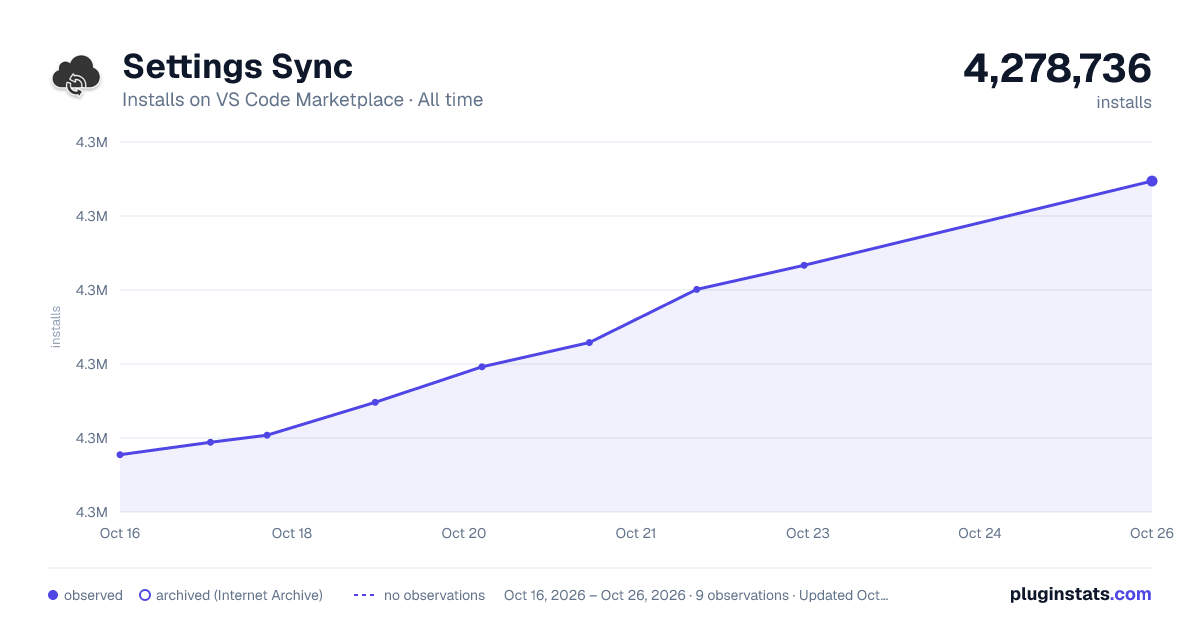

Adoption over time
7/30/90-day growth
Ranking history
Ratings over time
Listing placement
Listing placement
Filled points are observed values; hollow points come from Internet Archive snapshots of the listing page. Dashed segments span periods with no observations — values between points are not interpolated.
Each band is one page of 20. Installs on a linear scale. Placement is projected from installs, so it can differ from the marketplace's own sort order. Hover a dot to see the listing.
Recent observations
Full history (4)Similar VS Code Marketplace Other plugins
All 20 Settings Sync alternativesData source
Install counts, average rating, and rating counts come from the public Visual Studio Marketplace gallery API. Installs are cumulative and exclude updates.
Listing: https://marketplace.visualstudio.com/items?itemName=Shan.code-settings-sync. First seen Oct 16, 2026; last successful collection Oct 19, 2026. See the methodology.