 PluginStats
Astyle installs statistics
By Chieh Yu · VS Code Marketplace · Programming Languages
Format C/C++/Obj-C/C#/Java code with Astyle in VSCode
Astyle has 166,091 recorded installs on VS Code Marketplace.
It ranks #1738 of 2,501 tracked VS Code Marketplace listings by installs.
It is rated 3.7 out of 5 from 3 ratings.
PluginStats has 4 daily observations since Oct 16, 2026; the latest is from Oct 19, 2026.
Rating: 3.67 / 5 from 3 ratings
About Astyle
VSCode Astyle Format
This extension allows you to run Artistic Style(Astyle) on Visual Studio Code to format C/C++/Objective-C/C#/Java code.
Installation
Open the command palette (Ctrl-Shift-P / Cmd-Shift-P)
ext install vscode-astyle
How to Start
1. Download Astyle from http://astyle.sourceforge.net/. (On Linux, you can use apt-get) 1. Prepare your style by editting astylerc and put it in the search path. (see the link first: http://astyle.sourceforge.net/astyle.html#_Option_Files) 1. Make sure Astyle executable is in your system $PATH or add path to configration. 1. Enable supported languages in configration. (C and C++ are enabled by default) 1. When you open a supoprted language file, you can find 'Format' in context menu or just shortcut Shift-Alt-F.
Configuration
• astyle.astylerc: specify path of astylerc file. ${workspaceRoot} is supported to enable using different astyle file between projects. e.g. '${workspaceRoot}/.vscode/astylerc'. (default: null, lookup astylerc in original order of astyle) • astyle.cmd_options: array of command line options for astyle. (You should avoid conflicted options) For example: ["--indent=tab", "--break-blocks"] • astyle.max_buffer_multipler: multiplier to indicate how large an output buffer to allocate for the transformed source code file after Astyle processes it. (default: 2, assumes most formatting/whitespace expansion will result in less than a 2x increase in file size). • astyle.additional_languages: array of additional languages to use astyle as code formatter. For example: ["haxe"]. (You don't have to enable the language in astyle config)
FAQ
• Q1. How to avoid conflict with ClangFormat in C/C++ package • A1. VSCode is not support dominate code formatter but with scores, and it two formatter has same score, it choose the later one. However, in the latest version of C/C++ package, you can disable ClangFormat with options "C_Cpp.formatting" : "disabled". (Thanks to @BillDenton notes.)
Source code
Available on github: https://github.com/welkineins/vscode-astyle Issue on github: https://github.com/welkineins/vscode-astyle/issues
Description from the VS Code Marketplace listing.
- C
- C#
- C++
- Java
- Objective-C
Where Astyle sits in the listing
Each band is one page of 20. Installs on a log scale. Placement is projected from installs, so it can differ from the marketplace's own sort order. Hover a dot to see the listing.


Charts
Images: 30d · 1y · all time · 1600×900 dark


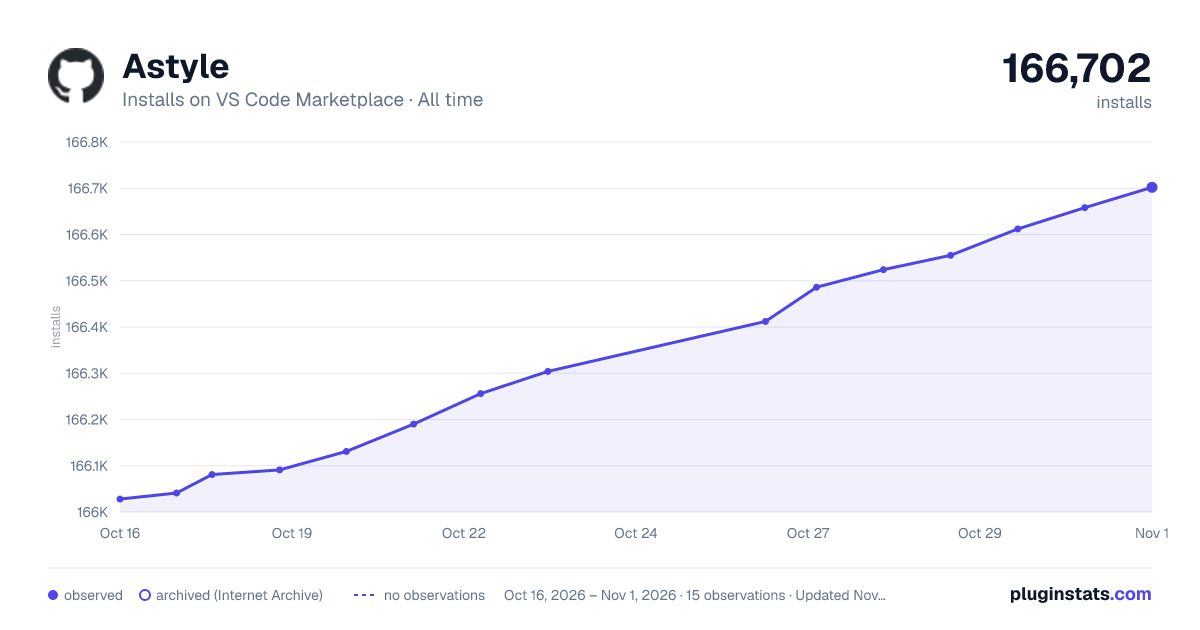

Adoption over time


7/30/90-day growth


Filled points are observed values; hollow points come from Internet Archive snapshots of the listing page. Dashed segments span periods with no observations — values between points are not interpolated.
Recent observations
Full history (4)Similar VS Code Marketplace Programming Languages plugins
Data source
Install counts, average rating, and rating counts come from the public Visual Studio Marketplace gallery API. Installs are cumulative and exclude updates.
Listing: https://marketplace.visualstudio.com/items?itemName=chiehyu.vscode-astyle. First seen Oct 16, 2026; last successful collection Oct 19, 2026. See the methodology.