 PluginStats
Path Intellisense installs statistics
By Christian Kohler (2 listings) · VS Code Marketplace · Other
Visual Studio Code plugin that autocompletes filenames
Path Intellisense has 19,573,419 recorded installs on VS Code Marketplace, ranking #55 of 2,502 tracked listings.
Rating: 4.85 / 5 from 124 ratings
About Path Intellisense
Path Intellisense
Visual Studio Code plugin that autocompletes filenames.
Installation
In the command palette (cmd-shift-p) select Install Extension and choose Path Intellisense.
To use Path Intellisense instead of the default autocompletion, the following configuration option must be added to your settings:
{ "typescript.suggest.paths": false }
{ "javascript.suggest.paths": false }
Usage
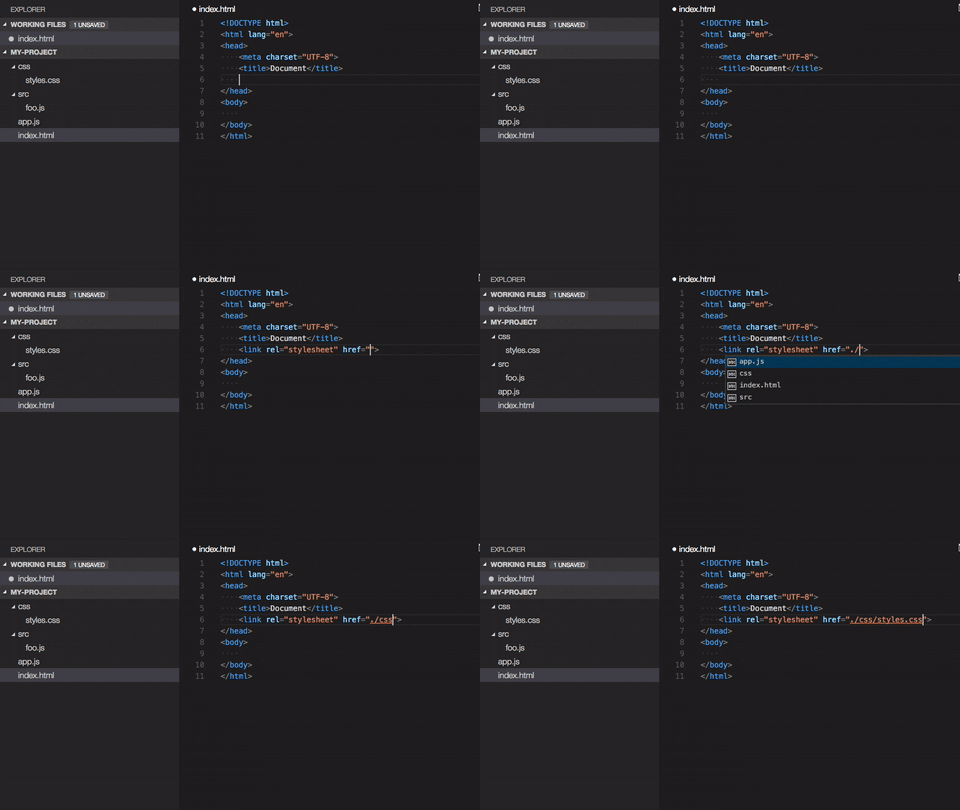
Node packages intellisense
Use npm intellisense
Contributing
Something missing? Found a bug? - Create a pull request or an issue. Github
Are you a windows user?
There is an issue on windows with the period key. See Issue https://github.com/ChristianKohler/NpmIntellisense/issues/12
Add this to the keybinding:
{ "key": ".", "command": "" }
TsConfig support
BaseUrl
Pathintellisense uses the ts.config.compilerOptions.baseUrl as a mapping. So no need to define it twice.
For example:
# Folderstructure

src/
module-a
foo.ts
module-b
// tsconfig

{
	"baseUrl": "src",
}
would allow to type:
{
  import {} from "module-a/foo.ts";
}
You can disable this behaviour by setting it to true:
{
	"path-intellisense.ignoreTsConfigBaseUrl": true,
}
Paths
Pathintellisense uses the ts.config.compilerOptions.paths as a mapping.
For example:
{
  "compilerOptions": {
    "paths": {
      "@/*": ["src/*"]
    }
  }
}
Note: Fallbacks are not supported.
Settings
File extension in import statements
Path Intellisense removes the file extension by default if the statement is a import statement. To enable file extensions set the following setting to true:
{
	"path-intellisense.extensionOnImport": true,
}
Show hidden files
Per default, hidden files are not displayed. Set this to true to show hidden files.
{
	"path-intellisense.showHiddenFiles": true,
}
If set to false, PathIntellisense ignores the default "files.exclude" as well:
{
	"files.exclude": {
		"**/*.map.js": true
	}
}
Auto slash when navigating to folder
Per default, the autocompletion does not add a slash after a directory.
{
	"path-intellisense.autoSlashAfterDirectory": false,
}
Automatically trigger next suggestion
When a suggestion was selected, the next suggestion will automatically pop up.
This setting will override the autoSlashAfterDirectory setting.
{
	"path-intellisense.autoTriggerNextSuggestion": false,
}
Absolute paths
Per default, absolute paths are resolved within the current workspace root path. Set it to false to resolve absolute paths to the disk root path.
{
	"path-intellisense.absolutePathToWorkspace": true,
}
Mappings
Define custom mappings which can be useful for using absolute paths or in combination with webpack resolve options.
{
	"path-intellisense.mappings": {
		"/": "${workspaceFolder}",
		"lib": "${workspaceFolder}/lib",
		"global": "/Users/dummy/globalLibs"
	},
}
Use ${workspaceFolder} when the path should be relative to the current root of the current project. V2.2.1 and lower used ${workspaceRoot}. Newer version support both placeholders.
History
See changelog
License
This software is released under MIT License
Description from the VS Code Marketplace listing.
README badge
Show your rank in a README or on your website. The badge updates automatically.
Charts
Images: 30d · 1y · all time · 1600×900 dark


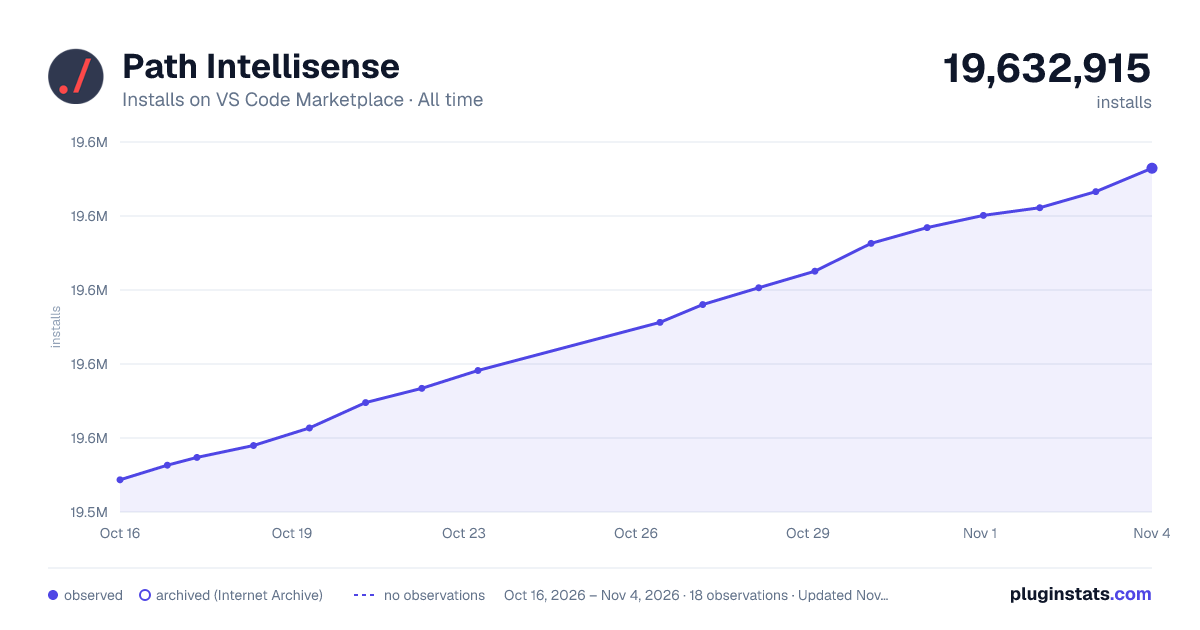

Adoption over time
7/30/90-day growth
Ranking history
Ratings over time
Listing placement
Listing placement
Filled points are observed values; hollow points come from Internet Archive snapshots of the listing page. Dashed segments span periods with no observations — values between points are not interpolated.
Each band is one page of 20. Installs on a linear scale. Placement is projected from installs, so it can differ from the marketplace's own sort order. Hover a dot to see the listing.
Recent observations
Full history (7)Similar VS Code Marketplace Other plugins
All 20 Path Intellisense alternativesData source
Install counts, average rating, and rating counts come from the public Visual Studio Marketplace gallery API. Installs are cumulative and exclude updates.
Listing: https://marketplace.visualstudio.com/items?itemName=christian-kohler.path-intellisense. First seen Oct 16, 2026; last successful collection Oct 22, 2026. See the methodology.