 PluginStats
VSCode Animations installs statistics
By Brandon Kirbyson · VS Code Marketplace · Themes
Clean and customizable animations for VSCode
VSCode Animations has 374,945 recorded installs on VS Code Marketplace, ranking #1003 of 2,501 tracked listings.
Rating: 4.19 / 5 from 21 ratings
About VSCode Animations
VSCode Animations is a Visual Studio Code extension that adds clean animations to the vscode UI. This is the first and only extension to add animations to vscode and is a must-have because vscode lacks many needed animations that this extension easily provides, not to mention that it also adds many more animations and is all customizable.
<!-- > This extension is actively being developed and will gain many more animations over time. Feel free to request any animations you would like to see added! --> <!-- [Demo Video](https://github.com/BrandonKirbyson/VSCode-Animations/assets/86384607/b6f951e4-b246-4410-89ea-46cbc170ca6a) --> <img src="https://github.com/BrandonKirbyson/VSCode-Animations/raw/HEAD/static/gifs/Demo.gif" />The theme used in the demo is Solarized Palenight.
Check it out on github!
@IgorBabko made a good video about this extension: https://youtu.be/Cd6NcXY4Exg?si=tSOhA3OxPVPrUBwF. He goes through the initial setup, the options, and shows his cool vscode setup using this! Also the official VSCode youtube made a short on it: https://www.youtube.com/watch?v=QN0Pfz_ji6I
Note: Apc Customize UI++ is currently not working as of this issue, use Custom CSS and JS Loader or Custom UI Style instead.
Table of Contents
Getting Started
-
Install the extension with either of these methods:
-
Get it from the VSCode Marketplace
-
Search for
VSCode Animationsin the extensions tab in the editor
-
-
Install the injection extension, window will reload after install:
-
Note: Apc Customize UI++ is currently not working as of this issue.
-
There are 3 options Custom CSS and JS Loader(default), Custom UI Style, and Apc Customize UI++ (NOT WORKING), see Injection Extensions for more info
<img src="https://github.com/BrandonKirbyson/VSCode-Animations/raw/HEAD/static/images/installPrompt.png" height=100/>
-
-
Install the animations when prompted, window will reload final time
-
This is the injection extension installing the animations for you
<img src="https://github.com/BrandonKirbyson/VSCode-Animations/raw/HEAD/static/images/install.png" height=100/>
-
- Enjoy the animations!
If you have any issues, see Troubleshooting.
<!-- ### For Other Custom Injection Extension or Open VSX > **Note:** If you are using the Custom CSS and JS extension on vscode, you do not need to do this. This is for people that either could not get the Custom CSS and JS extension to work, want to use the extension on Open VSX, or want to use another extension that injects custom css and js. If you want to do this, follow these steps: - Disable `Auto Install` by setting `Auto Install` to `false` in settings, this will prevent the extension from trying to install via the Custom CSS and JS extension on startup. - Use the command `Animations: Get Script Path` to get the path to the animations extension script, should copy to clipboard - Add the path to your custom css and js loader and install however the extension requires Here is a possible extension on Open VSX: [Apc Customize UI++](https://open-vsx.org/extension/drcika/apc-extension). I haven't tested it but it looks like it should work if you follow the instructions above and then use [apc.imports](https://open-vsx.org/extension/drcika/apc-extension#apc.imports) in that extension. **ONLY DO THIS IF YOU KNOW WHAT YOU ARE DOING** but if you want to use another extension then you probably know what you are doing. If you do have any issues or questions feel free to open an issue.…For Custom CSS and JS: You might see a prompt that says:
"VSCode installation is corrupt"
- To fix, click the settings icon on the notification and
"Do not show again".- Unfortunately custom js and css needs to be embedded into vscode's UI itself so vscode will throw a warning.
Description from the VS Code Marketplace listing.
- animate
- animation
- animations
- clean
- custom
- smooth
- theme
- visual studio code
- vscode
README badge
Show your rank in a README or on your website. The badge updates automatically.
Charts
Images: 30d · 1y · all time · 1600×900 dark


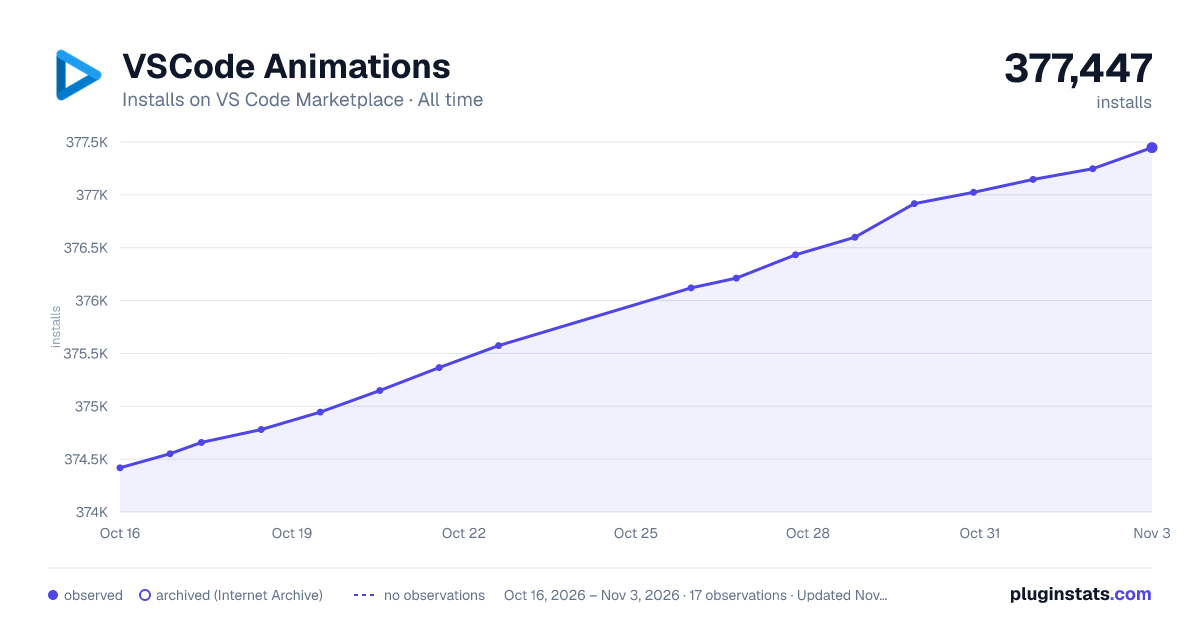

Adoption over time
7/30/90-day growth
Ranking history
Ratings over time
Listing placement
Listing placement
Filled points are observed values; hollow points come from Internet Archive snapshots of the listing page. Dashed segments span periods with no observations — values between points are not interpolated.
Each band is one page of 20. Installs on a linear scale. Placement is projected from installs, so it can differ from the marketplace's own sort order. Hover a dot to see the listing.
Recent observations
Full history (5)Similar VS Code Marketplace Themes plugins
All 20 VSCode Animations alternativesData source
Install counts, average rating, and rating counts come from the public Visual Studio Marketplace gallery API. Installs are cumulative and exclude updates.
Listing: https://marketplace.visualstudio.com/items?itemName=BrandonKirbyson.vscode-animations. First seen Oct 16, 2026; last successful collection Oct 20, 2026. See the methodology.