 PluginStats
Symfony for VSCode installs statistics
By TheNouillet · VS Code Marketplace · Other
Debug and autocomplete of Symfony container
Symfony for VSCode has 324,994 recorded installs on VS Code Marketplace, ranking #1095 of 2,501 tracked listings.
Rating: 2.56 / 5 from 9 ratings
About Symfony for VSCode
Symfony for VSCode
This extension aims to help developing Symfony2+ projects, by providing basic autocompletion and visualization of the Symfony container.

Features
This extension provides the following features :
- Autocompletion in YML and XML files of services and parameters
- Hover details on services and parameters name
- Go to implementation of a service
- A custom view to visualize the current project container, with services, routes and parameters

How does it works ?
To detect Symfony projects, this extension rely on composer.json files with symfony/symfony as one of its dependencies.
The composer.json file is supposed to be at the root of your Symfony project.
When the project is detected, it simply uses the debug:container and debug:router console commands to hydrate the views and autocompletions.
Extension settings
Here are the settings that can be overridden for convenience :
phpExecutablePath: Path to the PHP executable. This path is ignored if theshellExecutableparameter is different than false (default value :/usr/bin/php).shellExecutable: The shell executable path. If differant that false, console commands will be called via shell instead of just calling the PHP executable. Useful for particular setup, such as Dockerized projects (default value :false).shellCommand: The shell command. Only used when calling the shell to do console commands. Useful for particular setup, such as Dockerized projects (default value :false).consolePath: Path to the Symfony console, relative to the root directeory. If null, the extension try to guess the path with the Symfony version from the composer.json file (default value :null).showConsoleErrors: If false, the extension doesn't show error messages caused by compilation errors (default value :true).enableFileWatching: If false, the extension refresh automatically when a YAML file is modified (default value :true).fileWatchingPatterns: Files with one of these extensions will trigger a container refresh on save. By default, watches only*.ymland*.xmlfiles.servicesFilters,routesFiltersandparametersFilters: Filters out container elements. Filtered elements doesn't show in the Symfony view, nor does they appear in autocompletion.
Various environments
If your Symfony app is not running on a conventional installation (for example, you are running a Symfony app on a Docker container), you can find different configuration recipes here.
Contribution
If you want to contribute to this extension, everything you want to know is here.
Release Notes
See the changelog for releases notes.
Acknowledgments
Icons from www.flaticon.com, by :
Description from the VS Code Marketplace listing.
README badge
Show your rank in a README or on your website. The badge updates automatically.
Charts
Images: 30d · 1y · all time · 1600×900 dark


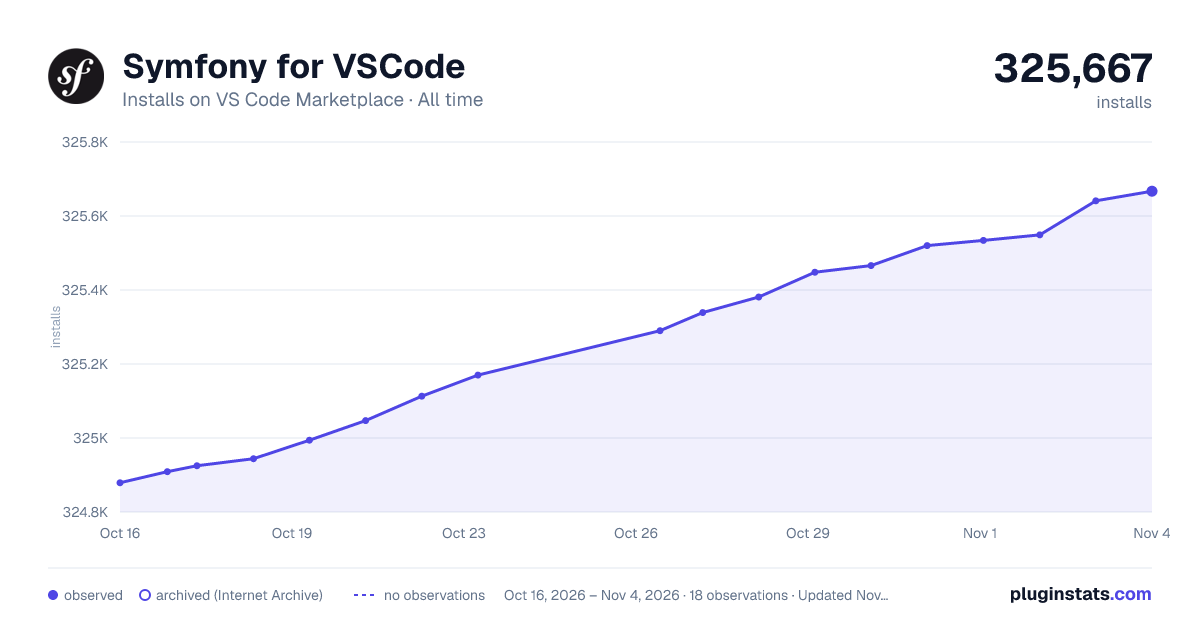

Adoption over time
7/30/90-day growth
Ranking history
Ratings over time
Listing placement
Listing placement
Filled points are observed values; hollow points come from Internet Archive snapshots of the listing page. Dashed segments span periods with no observations — values between points are not interpolated.
Each band is one page of 20. Installs on a linear scale. Placement is projected from installs, so it can differ from the marketplace's own sort order. Hover a dot to see the listing.
Recent observations
Full history (5)Similar VS Code Marketplace Other plugins
All 20 Symfony for VSCode alternativesData source
Install counts, average rating, and rating counts come from the public Visual Studio Marketplace gallery API. Installs are cumulative and exclude updates.
Listing: https://marketplace.visualstudio.com/items?itemName=TheNouillet.symfony-vscode. First seen Oct 16, 2026; last successful collection Oct 20, 2026. See the methodology.