 PluginStats
MagicPython installs statistics
By MagicStack Inc. (2 listings) · VS Code Marketplace · Programming Languages
Syntax highlighter for cutting edge Python.
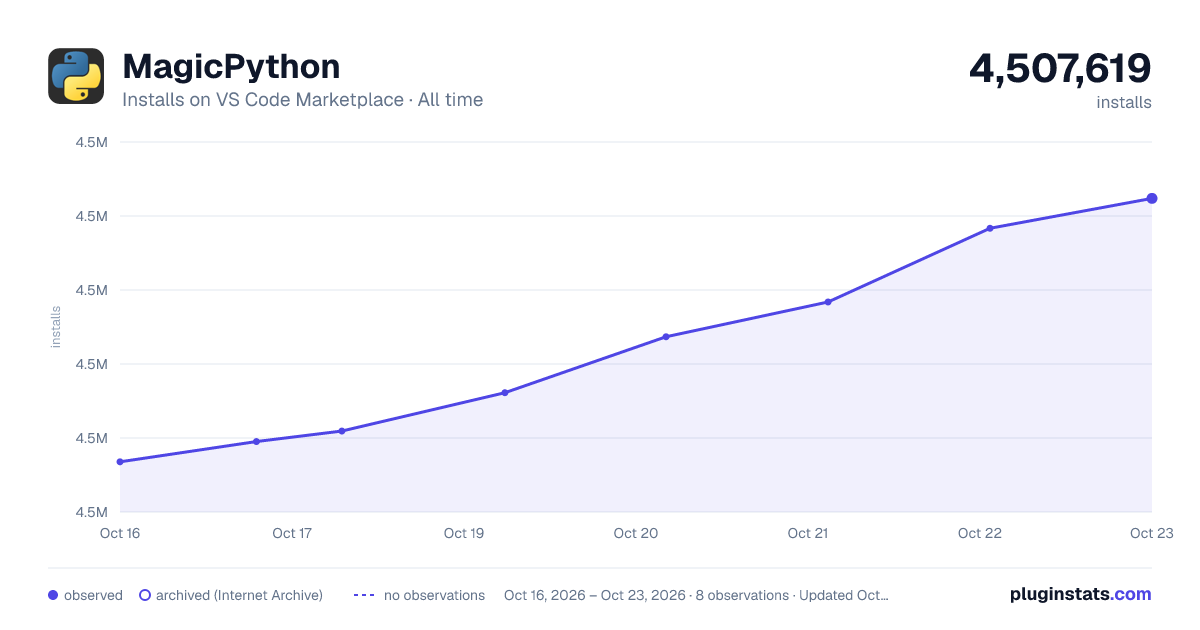
MagicPython has 4,506,047 recorded installs on VS Code Marketplace.
It ranks #190 of 2,500 tracked VS Code Marketplace listings by installs.
It is rated 3.3 out of 5 from 12 ratings.
PluginStats has 3 daily observations since Oct 16, 2026; the latest is from Oct 18, 2026.
Rating: 3.33 / 5 from 12 ratings
About MagicPython
Magic Python
This is a package with preferences and syntax highlighter for cutting edge Python 3, although Python 2 is well supported, too. The syntax is compatible with Sublime Text, Atom and Visual Studio Code. It is meant to be a drop-in replacement for the default Python package.
We are proud to say that MagicPython is used by GitHub to highlight Python.
Attention VSCode users: MagicPython is used as the _default_ Python highlighter in Visual Studio Code. Don't install it unless you want or need the cutting edge version of it. You will likely see no difference because you're already using MagicPython.
MagicPython correctly highlights all Python 3 syntax features, including type annotations, f-strings and regular expressions. It is built from scratch for robustness with an extensive test suite.
Type hints in comments require support by the color scheme. The one used in the screenshot is Chromodynamics.
Installation Instructions
This is meant to be a drop-in replacement for the default Python package.
In Atom, install the MagicPython package and disable the built-in language-python package.
In Sublime Text, install MagicPython package via "Package Control" and disable the built-in Python package (using Package Control -> Disable Package, or directly by adding "Python" to "ignored_packages" in the settings file).
In VSCode, starting with version 0.10.1, install MagicPython with Install Extension command.
Alternatively, the package can be installed manually in all editors:
• copy the MagicPython package into the Sublime/Atom/VSCode user packages directory; • disable Python package; • enjoy.
Changes and Improvements
The main motivation behind this package was the difficulty of using modern Python with other common syntax highlighters. They do a good job of the 90% of the language, but then fail on the nuances of some very useful, but often overlooked features. Function annotations tend to freak out the highlighters in various ways. Newly introduced keywords and magic methods are slow to be integrated. Another issue is string highlighting, where all raw strings are often assumed to be regular expressions or special markup used by .format is completely ignored. Bumping into all of these issues on daily basis eventually led to the creation of this package.
Overall, the central idea is that it should be easy to notice something odd or special about the code. Odd or special doesn't necessarily mean incorrect, but certainly worth the explicit attention.
Annotations
Annotations should not break the highlighting. They should be no more difficult to read at a glance than other code or comments.
A typical case is having a string annotation that spans several lines by using implicit string concatenation. Multi-line strings are suboptimal for use in annotations as it may be highly undesirable to have odd indentation and extra whitespace in the annotation string. Of course, there is no problem using line continuation or even having comments mixed in with implicit string concatenation. All of these will be highlighted as you'd expect in any other place in the code.
A more advanced use case for annotations is to actually have complex expressions in them, such as lambda functions, tuples, lists, dicts, sets, comprehensions. Admittedly, all of these might be less frequently used, but when they are, you can rely on them being highlighted normally in all their glorious details.
Result annotations are handled as any other expression would be. No reason to worry that the body of the function would look messed up.
Strings
Strings are used in many different ways for processing and presenting data. Making the highlighter more friendly towards these uses can help you concentrate your efforts on what matters rather than visual parsing.
Raw strings are often interpreted as regular expressions. This is a bit of a problem, because depending on the application this may actually not be the most common case. Raw strings can simply be the input to some other processor, in which case regexp-specific highlighting is really hindering the overall readability. MagicPython follows a convention that a lower-case r prefix means a regexp string, but an upper-case R prefix means just a raw string with no special regexp semantics. This convention holds true for all of the legal combinations of prefixes. As always the syntax is biased towards Python 3, thus it will mark Python-2-only prefixes (i.e. variations of ur) as deprecated.
String formatting is often only supported for '%-style formatting', however, the recommended and more readable syntax used by .format is ignored. The benefits of using simple and readable {key} replacement fields are hindered by the fact that in a complex or long string expression it may not be easily apparent what parameters will actually be needed by .format. This is why MagicPython highlights both kinds of string formatting syntax within the appropriate string types (bytes don't have a .format method in Python 3, so they don't get the special highlighting for it, raw and unicode strings do). Additionally, the highlighter also validates that the formatting is following the correct syntax. It can help noticing an error in complex formatting expressions early.
Python 3.6 f-strings are supported in both the raw and regular flavors. The support for them is somewhat more powerful than what can be done in regular strings with .format, because the f-string spec allows to highlight them with less ambiguity.
Numeric literals
Most numbers are just regular decimal constants, but any time that octal, binary, hexadecimal or complex numbers are used it's worth noting that they are of a special type. Highlighting of Python 2 'L' integers is also supported.
Underscores in numeric literals are also supported (PEP 515, introduced in Python 3.6):
Python 3.5 features…
Description from the VS Code Marketplace listing.
- highlighter
- MagicPython
- python
- python3
- syntax
Where MagicPython sits in the listing
Each band is one page of 20. Installs on a log scale. Placement is projected from installs, so it can differ from the marketplace's own sort order. Hover a dot to see the listing.


Charts
Images: 30d · 1y · all time · 1600×900 dark



Adoption over time


7/30/90-day growth


Ranking history


Filled points are observed values; hollow points come from Internet Archive snapshots of the listing page. Dashed segments span periods with no observations — values between points are not interpolated.
Recent observations
Full history (3)Similar VS Code Marketplace Programming Languages plugins
Data source
Install counts, average rating, and rating counts come from the public Visual Studio Marketplace gallery API. Installs are cumulative and exclude updates.
Listing: https://marketplace.visualstudio.com/items?itemName=magicstack.MagicPython. First seen Oct 16, 2026; last successful collection Oct 18, 2026. See the methodology.