 PluginStats
Metadata Visualizer installs statistics
By Salesforce (33 listings) · VS Code Marketplace · Visualization
VS Code Extension to visualize Salesforce metadata with interactive diagrams
Metadata Visualizer has 131,005 recorded installs on VS Code Marketplace, ranking #2020 of 2,501 tracked listings.
Rating: 5.00 / 5 from 1 ratings
About Metadata Visualizer
Metadata Visualizer
Overview
The Metadata Visualizer extension by Salesforce makes it easier to understand complex metadata by transforming raw files into clear, intuitive visual representations. This enables developers to quickly grasp structure, relationships, and configurations without the need for deep code analysis.
The extension is available in the VS Code Marketplace and Open VSX.
Go to Metadata Visualizer Documentation to learn more.
Metadata Visualizer is enabled by default. Any developer with access to a Salesforce org can use the extension and visualize metadata in their code.
- Data Model: Navigate through metadata relationships with zoom, pan, and click interactions.
- Agent Script: Navigate an agent structure and routing paths with clickable cards and drill-down interactions.
- Flow: Navigate flow execution paths with collapsible elements and clickable nodes.
- Real-Time Visualizations: Get real-time visualizations as you edit metadata files.
- Agentforce Vibes Integration: Visualize metadata generated by Agentforce Vibes.
Note: Salesforce does not use customer data to train our LLMs.
Prerequisites
Before you set up Salesforce Metadata Visualizer, make sure that you have these essentials.
- Visual Studio Code. See Minimum Version.
- Salesforce Extensions for Visual Studio Code and its prerequisites.
What can Salesforce Metadata Visualizer Do?
Use Salesforce Metadata Visualizer extension to:
- Visualize metadata generated by AI using Agentforce Vibes or from your SFDX project.
- Easily understand complex metadata through visual representation.
- See customizable views based on a selected theme.
- See key elements such as fields, relationships, and properties.
Accessing Visualizations
For supported metadata files, use the extension to view an interactive visual representation.
- From a file tab: Open a metadata file and click Visualize in the upper-right corner of the editor tab.
- From the context menu: In the Explorer pane, right-click a metadata file and click Visualize.
- From Agentforce Vibes: When Agentforce Vibes creates or modifies a metadata file, a card appears with a Visualize button.
A split panel opens by default displaying the visualization. You can switch to a full-screen view.
Settings
- Auto Load Visualization: Click the Settings icon in the visualization pane and select the checkbox to automatically visualize files when you open them.
- Plugin Visibility: Use the Settings icon to show or hide visualizations for specific plugins.
Bugs and Feedback
To report issues with Salesforce Metadata Visualizer, open a bug on GitHub. If you would like to suggest a feature, create a feature request on GitHub. You can also visit Discussions for questions and feedback.
Description from the VS Code Marketplace listing.
- metadata
- salesforce
- visualizer
README badge
Show your rank in a README or on your website. The badge updates automatically.
Charts
Images: 30d · 1y · all time · 1600×900 dark


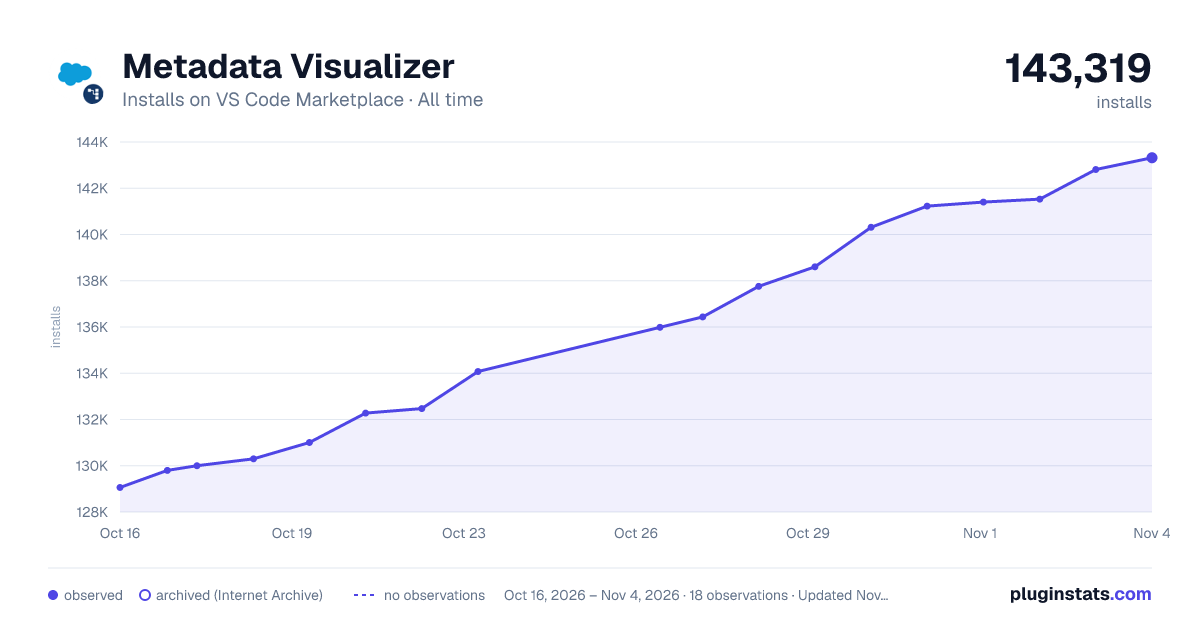

Adoption over time
7/30/90-day growth
Ranking history
Ratings over time
Listing placement
Listing placement
Filled points are observed values; hollow points come from Internet Archive snapshots of the listing page. Dashed segments span periods with no observations — values between points are not interpolated.
Each band is one page of 20. Installs on a linear scale. Placement is projected from installs, so it can differ from the marketplace's own sort order. Hover a dot to see the listing.
Recent observations
Full history (5)Similar VS Code Marketplace Visualization plugins
All 20 Metadata Visualizer alternativesData source
Install counts, average rating, and rating counts come from the public Visual Studio Marketplace gallery API. Installs are cumulative and exclude updates.
Listing: https://marketplace.visualstudio.com/items?itemName=salesforce.salesforcedx-metadata-visualizer-vscode. First seen Oct 16, 2026; last successful collection Oct 20, 2026. See the methodology.