 PluginStats
Azure Resource Manager (ARM) Tools installs statistics
By Microsoft (224 listings) · VS Code Marketplace · Programming Languages
Language server, editing tools and snippets for Azure Resource Manager (ARM) template files.
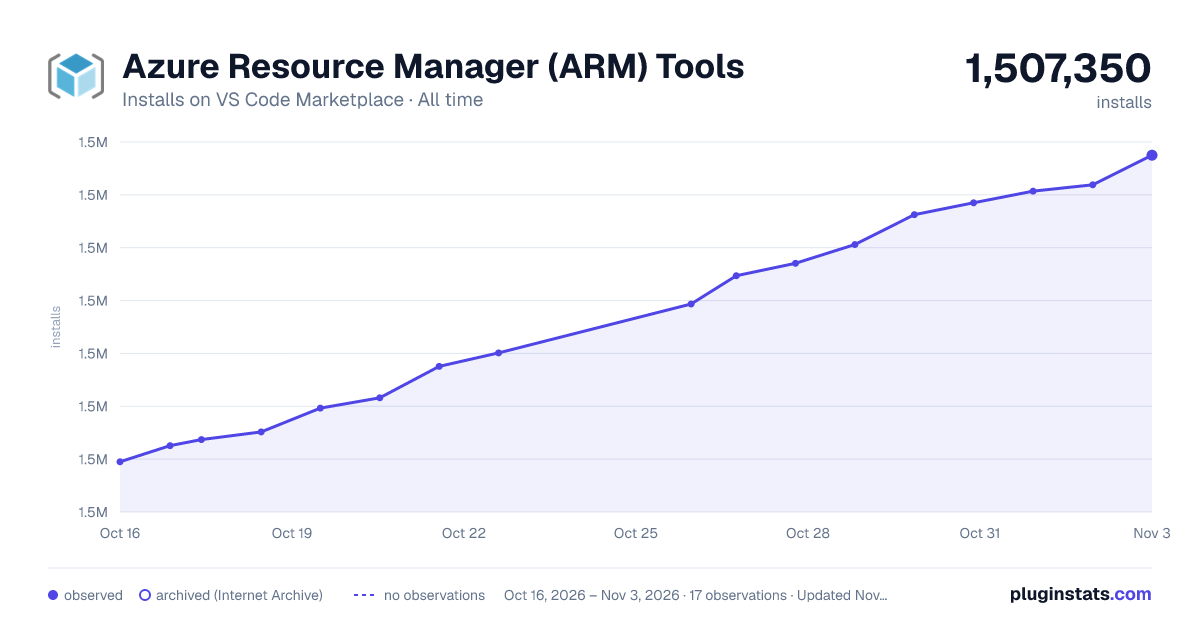
Azure Resource Manager (ARM) Tools has 1,506,432 recorded installs on VS Code Marketplace, ranking #419 of 2,502 tracked listings.
Rating: 4.23 / 5 from 26 ratings
About Azure Resource Manager (ARM) Tools
Azure Resource Manager (ARM) Tools for Visual Studio Code (Preview)


Important notice
The ARM Tools extension is now in Maintenance Mode. That means that we will continue to support currently implemented features and capabilities, but we will not be able to prioritize adding new features. To take advantage of the best experience for deploying to Azure with infrastructure-as-code, we recommend switching to Bicep. Please note, that while this VS Code extension is in maintenance mode, ARM Template deployments as a whole are still fully supported and new features are still being added to the ARM Template language and runtime to support new capabilities in Bicep. If you wish to use these same capabilities directly in Bicep, they will be supported from a runtime perspective, but not in the ARM Tools VS Code extension.
Overview
The Azure Resource Manager (ARM) Tools for Visual Studio Code provides language support, resource snippets, and resource auto-completion to help you create and validate Azure Resource Manager templates.
Getting Started
The following guides detail how to use the ARM Tools extension features.
- Snippets
- Azure schema integration
- Parameter file support
- Linked template support
- Template navigation
- Completions
- Other features
- Extension configuration
Snippets
Snippets are used to create basic templates and add elements such as parameters, resources, and outputs to existing templates.
Create a new ARM template
When in an empty JSON file, typing arm produces a list of scaffolding snippets. These snippets can be used to create an empty template for any ARM deployment scope (Tenant, Subscription, Management Group, and Resource Group).

Notice that adding scaffolding for an ARM template changes the Visual Studio Code language mode to Azure Resource Manager Template.

Add Azure resource to an ARM template
Once you are working in an ARM template, placing your cursor in the resource and typing arm, CTRL + Space, or { produces a list of 70+ snippets for Azure resources. Selecting a snippet adds an instance of the resource type to the ARM template.

Each snippet includes tab stops to help navigate through commonly modified configurations. Press the tab key to navigate to the next stop, and shift + tab to navigate to the previous stop. As seen in the following example, some stops are pre-populated with a list of common values for quick selection.

Snippet Reference
The following table lists the available ARM Tools snippets.…
Description from the VS Code Marketplace listing.
- ARM
- arm-template
- Azure
- Azure Resource Manager Template
- Azure Template
- json
- jsonc
- Resource Manager
- Snippets
README badge
Show your rank in a README or on your website. The badge updates automatically.
Charts
Images: 30d · 1y · all time · 1600×900 dark



Adoption over time
7/30/90-day growth
Ranking history
Ratings over time
Listing placement
Listing placement
Listing placement
Listing placement
Filled points are observed values; hollow points come from Internet Archive snapshots of the listing page. Dashed segments span periods with no observations — values between points are not interpolated.
Each band is one page of 20. Installs on a linear scale. Placement is projected from installs, so it can differ from the marketplace's own sort order. Hover a dot to see the listing.
Recent observations
Full history (6)Similar VS Code Marketplace Programming Languages plugins
All 20 Azure Resource Manager (ARM) Tools alternativesData source
Install counts, average rating, and rating counts come from the public Visual Studio Marketplace gallery API. Installs are cumulative and exclude updates.
Listing: https://marketplace.visualstudio.com/items?itemName=msazurermtools.azurerm-vscode-tools. First seen Oct 16, 2026; last successful collection Oct 21, 2026. See the methodology.