 PluginStats
Azure Virtual Machines installs statistics
By Microsoft (224 listings) · VS Code Marketplace · Azure
An Azure Virtual Machines extension for Visual Studio Code.
Azure Virtual Machines has 2,487,117 recorded installs on VS Code Marketplace, ranking #295 of 2,502 tracked listings.
Rating: 5.00 / 5 from 3 ratings
About Azure Virtual Machines
Azure Virtual Machines for Visual Studio Code (Preview)
<!-- region exclude-from-marketplace -->Create and manage Azure Virtual Machines directly from VS Code.
Sign up today for your free Azure account and receive 12 months of free popular services, $200 free credit and 25+ always free services 👉 Start Free.
Installation
- Download and install the Azure Virtual Machines extension for Visual Studio Code
- Once complete, you'll see an Azure icon in the Activity Bar
If your activity bar is hidden, you won't be able to access the extension. Show the Activity Bar by clicking View > Appearance > Show Activity Bar
- Sign in to your Azure Account by clicking Sign in to Azure
If you don't already have an Azure Account, click "Create a Free Azure Account" or you can try Azure for free
Features
- View, create, delete, start, and stop Azure Virtual Machines
- Add SSH key to existing Azure Virtual Machines
Create a New Virtual Machine
- Once you are signed in, you can create your Azure Virutal machine by clicking the "+" button or by right-clicking your subscription.

- Select "Create Virtual Machine..."

- Type a name for your VM. Alphanumeric characters are all valid.
- Type a passphrase or leave it empty for no passphrase.
For security reasons, it's highly recommended that you use a passphrase for your SSH key. It is what will be used to connect to your VM via SSH.
The VM will be Standard D2s V3 (2 CPU Cores & 8 GB of ram) with the image Ubuntu 18.04-LTS. An SSH key will be created and your SSH Config file (~/.ssh/config) will be updated so you can immediately connect via SSH ($ ssh vm-name) or using the Remote-SSH extension.
Add SSH key to existing Virtual Machine
If you have an existing VM that you would like to add your own SSH key too, you can do that by right-clicking the VM tree item, clicking Add SSH Key..., and selecting an existing SSH key. You can generate an SSH key using SSH Keygen if you don't have any keys on your system.
Your SSH Config (~/.ssh/config) file will be updated so you can connect via SSH using $ ssh vm-name.
NOTE: This command is only available for Linux virtual machines.

Remote into Azure VM via SSH
- Use Visual Studio Code Remote - SSH to seamlessly connect to your Azure VM from VS Code.

<!-- region exclude-from-marketplace -->NOTE: This command is only available for Linux virtual machines.
Contributing
There are a couple of ways you can contribute to this repo:
- Ideas, feature requests and bugs: We are open to all ideas and we want to get rid of bugs! Use the Issues section to either report a new issue, provide your ideas or contribute to existing threads.
- Documentation: Found a typo or strangely worded sentences? Submit a PR!
- Code: Contribute bug fixes, features or design changes:
- Clone the repository locally and open in VS Code.
- Run "Extensions: Show Recommended Extensions" from the command palette and install all extensions listed under "Workspace Recommendations"
- Open the terminal (press
CTRL+`) and runnpm install. - To build, press
F1and type inTasks: Run Build Task. - Debug: press
F5to start debugging the extension.
Legal
Before we can accept your pull request you will need to sign a Contribution License Agreement. All you need to do is to submit a pull request, then the PR will get appropriately labelled (e.g. cla-required, cla-norequired, cla-signed, cla-already-signed). If you already signed the agreement we will continue with reviewing the PR, otherwise system will tell you how you can sign the CLA. Once you sign the CLA all future PR's will be labeled as cla-signed.
Code of Conduct
This project has adopted the Microsoft Open Source Code of Conduct. For more information see the Code of Conduct FAQ or contact opencode@microsoft.com with any additional questions or comments.
<!-- endregion exclude-from-marketplace -->Telemetry
VS Code collects usage data and sends it to Microsoft to help improve our products and services. Read our privacy statement to learn more. If you don’t wish to send usage data to Microsoft, you can set the telemetry.enableTelemetry setting to false. Learn more in our FAQ.
License
Description from the VS Code Marketplace listing.
- Azure
- multi-root ready
- Remote
- SSH
- Virtual Machines
- VMs
README badge
Show your rank in a README or on your website. The badge updates automatically.
Charts
Images: 30d · 1y · all time · 1600×900 dark


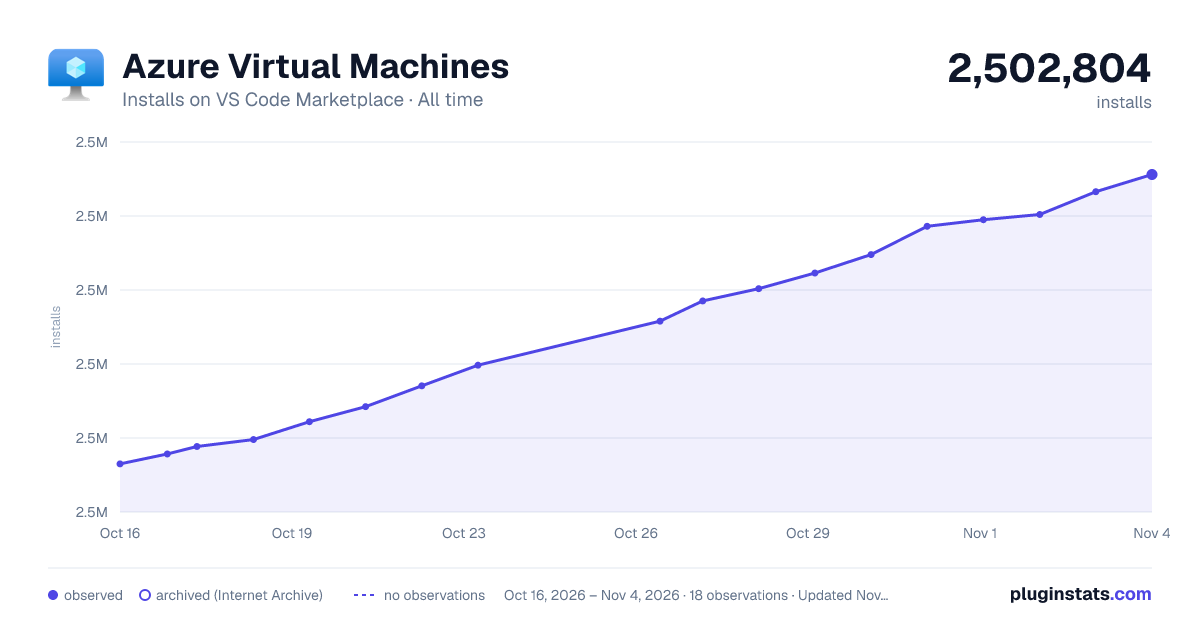

Adoption over time
7/30/90-day growth
Ranking history
Ratings over time
Listing placement
Listing placement
Filled points are observed values; hollow points come from Internet Archive snapshots of the listing page. Dashed segments span periods with no observations — values between points are not interpolated.
Each band is one page of 20. Installs on a linear scale. Placement is projected from installs, so it can differ from the marketplace's own sort order. Hover a dot to see the listing.
Recent observations
Full history (6)Similar VS Code Marketplace Azure plugins
All 20 Azure Virtual Machines alternativesData source
Install counts, average rating, and rating counts come from the public Visual Studio Marketplace gallery API. Installs are cumulative and exclude updates.
Listing: https://marketplace.visualstudio.com/items?itemName=ms-azuretools.vscode-azurevirtualmachines. First seen Oct 16, 2026; last successful collection Oct 21, 2026. See the methodology.