 PluginStats
Tailwind CSS IntelliSense installs statistics
By Tailwind Labs · VS Code Marketplace · Linters
Intelligent Tailwind CSS tooling for VS Code
Tailwind CSS IntelliSense has 14,781,862 recorded installs on VS Code Marketplace.
It ranks #75 of 2,501 tracked VS Code Marketplace listings by installs.
It is rated 4.5 out of 5 from 118 ratings.
PluginStats has 4 daily observations since Oct 16, 2026; the latest is from Oct 19, 2026.
Rating: 4.47 / 5 from 118 ratings
About Tailwind CSS IntelliSense
Tailwind CSS IntelliSense enhances the Tailwind development experience by providing Visual Studio Code users with advanced features such as autocomplete, syntax highlighting, and linting.
Installation
Install via the Visual Studio Code Marketplace →
In order for the extension to activate you must have tailwindcss installed and one of these:
• For v4 and later, a .css file that imports a Tailwind CSS stylesheet (e.g. @import "tailwindcss") • For v3 and earlier, a Tailwind CSS config file named tailwind.config.{js,cjs,mjs,ts,cts,mts} in your workspace. • For v3 and earlier, a stylesheet that points to a config file via @config
Features
Autocomplete
Intelligent suggestions for class names, as well as CSS functions and directives.
Linting
Highlights errors and potential bugs in both your CSS and your markup.
Hover Preview
See the complete CSS for a Tailwind class name by hovering over it.
Tailwind CSS Language Mode
An alternative to VS Code's built-in CSS language mode which maintains full CSS IntelliSense support even when using Tailwind-specific at-rules. Syntax definitions are also provided so that Tailwind-specific syntax is highlighted correctly in all CSS contexts.
Recommended VS Code Settings
files.associations
Use the files.associations setting to tell VS Code to always open .css files in Tailwind CSS mode:
editor.quickSuggestions
By default VS Code will not trigger completions when editing "string" content, for example within JSX attribute values. Updating the editor.quickSuggestions setting may improve your experience:
Extension Commands
Tailwind CSS: Show Output
Reveal the language server log panel. This command is only available when there is an active language server instance.
Tailwind CSS: Sort Selection (pre-release)
When a list of CSS classes is selected this command can be used to sort them in the same order that Tailwind orders them in your CSS. This command is only available when the current document belongs to an active Tailwind project and the tailwindcss version is 3.0.0 or greater.
Extension Settings
tailwindCSS.includeLanguages
This setting allows you to add additional language support. The key of each entry is the new language ID and the value is any one of the extensions built-in languages, depending on how you want the new language to be treated (e.g. html, css, or javascript):
tailwindCSS.files.exclude
Configure glob patterns to exclude from all IntelliSense features. Inherits all glob patterns from the files.exclude setting. Default: ["\*\*/.git/\*\*", "\*\*/node_modules/\*\*", "\*\*/.hg/\*\*", "\*\*/.svn/\*\*"]
tailwindCSS.emmetCompletions
Enable completions when using Emmet-style syntax, for example div.bg-red-500.uppercase. Default: false
tailwindCSS.classAttributes
The HTML attributes for which to provide class completions, hover previews, linting etc. Default: class, className, ngClass, class:list
tailwindCSS.classFunctions
Functions in which to provide completions, hover previews, linting etc. Currently, this works for both function calls and tagged template literals in JavaScript / TypeScript.
Each entry is treated as regex pattern that matches on a function name. You *cannot* match on content before or after the function name — matches are limited to function names only.
Example:
tailwindCSS.colorDecorators
Controls whether the editor should render inline color decorators for Tailwind CSS classes and helper functions. Default: true
Note that editor.colorDecorators must be enabled for color decorators to be shown.
tailwindCSS.showPixelEquivalents
Show px equivalents for rem CSS values in completions and hovers. Default: true
tailwindCSS.rootFontSize
Root font size in pixels. Used to convert rem CSS values to their px equivalents. See tailwindCSS.showPixelEquivalents. Default: 16
tailwindCSS.hovers
Enable hovers. Default: true
tailwindCSS.suggestions
Enable autocomplete suggestions. Default: true
tailwindCSS.codeActions
Enable code actions. Default: true
tailwindCSS.validate
Enable linting. Rules can be configured individually using the tailwindcss.lint settings:
• ignore: disable lint rule entirely • warning: rule violations will be considered "warnings," typically represented by a yellow underline • error: rule violations will be considered "errors," typically represented by a red underline
tailwindCSS.lint.invalidScreen
Unknown screen name used with the @screen directive. Default: error
tailwindCSS.lint.invalidVariant
Unknown variant name used with the @variants directive. Default: error
tailwindCSS.lint.deprecatedAtRule
Deprecated Tailwind CSS at-rules. Default: warning
tailwindCSS.lint.invalidTailwindDirective
Unknown value used with the @tailwind directive. Default: error
tailwindCSS.lint.invalidApply
Unsupported use of the @apply directive. Default: error
tailwindCSS.lint.invalidConfigPath
Unknown or invalid path used with the theme helper. Default: error
tailwindCSS.lint.cssConflict
Class names on the same HTML element which apply the same CSS property or properties. Default: warning
tailwindCSS.lint.recommendedVariantOrder
Class variants not in the recommended order (applies in JIT mode only). Default: warning
tailwindCSS.lint.usedBlocklistedClass
Usage of class names that have been blocklisted via @source not inline(…). Default: warning
tailwindCSS.lint.suggestCanonicalClasses
Detect usage of class names that are not in the most optimal form. Default: warning
Some examples of the changes this makes:
| Class | Canonical Form |
| [color:red]/100 | text-[red] | | [@media_print]:[display:flex] | print:flex |
tailwindCSS.inspectPort
Enable the Node.js inspector agent for the language server and listen on the specified port. Default: null
Experimental Extension Settings
_Experimental settings may be changed or removed at any time._
tailwindCSS.experimental.configFile
Default: null…
Description from the VS Code Marketplace listing.
- autocomplete
- css
- intellisense
- tailwind
- Tailwind CSS
- tailwindcss
- vscode
Where Tailwind CSS IntelliSense sits in the listing
Each band is one page of 20. Installs on a log scale. Placement is projected from installs, so it can differ from the marketplace's own sort order. Hover a dot to see the listing.


Charts
Images: 30d · 1y · all time · 1600×900 dark


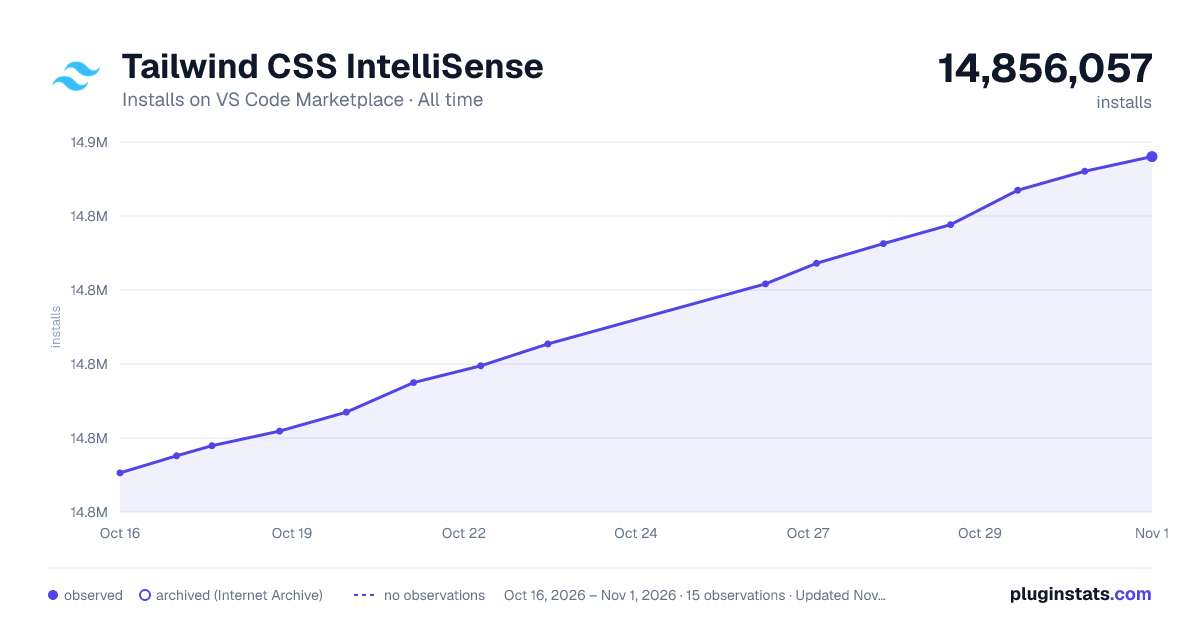

Adoption over time


7/30/90-day growth


Ranking history


Filled points are observed values; hollow points come from Internet Archive snapshots of the listing page. Dashed segments span periods with no observations — values between points are not interpolated.
Recent observations
Full history (4)Similar VS Code Marketplace Linters plugins
Data source
Install counts, average rating, and rating counts come from the public Visual Studio Marketplace gallery API. Installs are cumulative and exclude updates.
Listing: https://marketplace.visualstudio.com/items?itemName=bradlc.vscode-tailwindcss. First seen Oct 16, 2026; last successful collection Oct 19, 2026. See the methodology.