 PluginStats
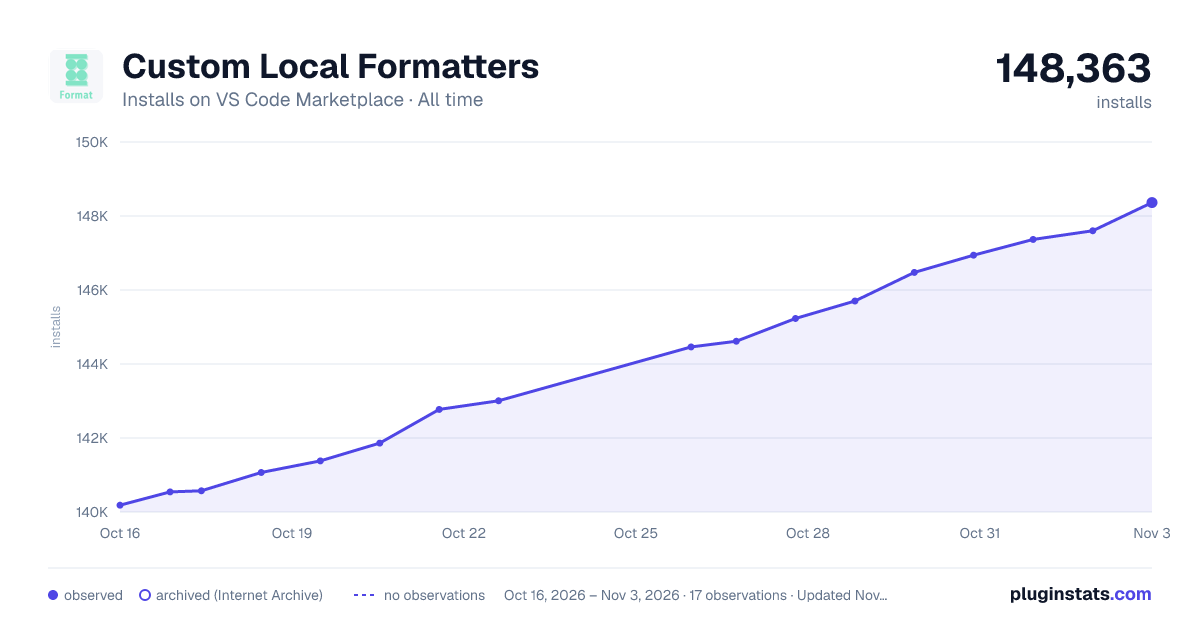
Custom Local Formatters installs statistics
By jkillian · VS Code Marketplace · Formatters
Allows users to register custom local formatters for any language.
Custom Local Formatters has 141,068 recorded installs on VS Code Marketplace.
It ranks #1930 of 2,501 tracked VS Code Marketplace listings by installs.
It is rated 4.5 out of 5 from 4 ratings.
PluginStats has 4 daily observations since Oct 16, 2026; the latest is from Oct 19, 2026.
Rating: 4.50 / 5 from 4 ratings
About Custom Local Formatters
VSCode Custom Local Formatters
Lets users add formatters to VSCode that run locally defined scripts.
Motivation
VSCode's formatter features lets you quickly format code through the Format Document command (shift+alt+f) or automatically on save with the editor.formatOnSave option.
However, the only way to add new formatters to VSCode is by installing an extension. If you have custom formatting tools or scripts you want to run, there's no easy way to integrate them with VSCode currently.
This extension solves that problem by providing an easy way to register custom scripts as VSCode formatters. Here's an example of a custom python script that sorts imports and reformats code being run on a python file:
Quickstart
0. Install this extension through the VSCode extensions panel or VSCode extensions marketplace.
1. Define your custom formatting script. Scripts will receive the contents of the file to be formatted over STDIN. They should output the formatted results over STDOUT. 2. Configure the extension to run your script on files of the right type. The script will be run with a working directory of the workspace root. Valid language identifiers can be found here.
3. That's it! Your script is now integrated with VSCode as an official formatter. You can now format your code though the Format Document command (shift+alt+f), enable the editor.formatOnSave option, or use the formatter however else VSCode allows.
Extension Settings
Basic usage is just to set a command and an array of languages it should apply to:
You can also specify platform-specific commands instead if needed:
Full extension configuration schema and documentation can be found in the package.json file.
Known Limitations
VSCode doesn't seem to provide a way to name the formatter which an extension creates. This means that if you register multiple formatters for the same language, they will unfortunately both show up as 'Custom Local Formatters' and it will be difficult to tell them apart.
Description from the VS Code Marketplace listing.
- custom
- format
- formatter
- local
- script
Charts
Images: 30d · 1y · all time · 1600×900 dark



Adoption over time


7/30/90-day growth


Ranking history


Ratings over time


Listing placement


Filled points are observed values; hollow points come from Internet Archive snapshots of the listing page. Dashed segments span periods with no observations — values between points are not interpolated.
Each band is one page of 20. Installs on a log scale. Placement is projected from installs, so it can differ from the marketplace's own sort order. Hover a dot to see the listing.
Recent observations
Full history (4)Similar VS Code Marketplace Formatters plugins
All 20 Custom Local Formatters alternativesData source
Install counts, average rating, and rating counts come from the public Visual Studio Marketplace gallery API. Installs are cumulative and exclude updates.
Listing: https://marketplace.visualstudio.com/items?itemName=jkillian.custom-local-formatters. First seen Oct 16, 2026; last successful collection Oct 19, 2026. See the methodology.