 PluginStats
Markdown+Math installs statistics
By goessner · VS Code Marketplace · Programming Languages
LaTeX Math for Markdown ... with macros and more
Markdown+Math has 428,200 recorded installs on VS Code Marketplace.
It ranks #926 of 2,500 tracked VS Code Marketplace listings by installs.
It is rated 4.5 out of 5 from 29 ratings.
PluginStats has 3 daily observations since Oct 16, 2026; the latest is from Oct 18, 2026.
Rating: 4.55 / 5 from 29 ratings
About Markdown+Math
Markdown+Math
What is it ...
mdmath allows to use *Visual Studio Code* as a markdown editor capable of typesetting and rendering TeX math.K, In fact it now reuses the built in markdown viewer. KaTeX works inside as a fast math renderer.
You can install the extension directly from Visual Studio Code Marketplace.
What is new in mdmath 2.7.0 ...
• Different themes for HTML export are supported now. Users can choose • default • minimal • publication (LaTeX style)
theme in user settings. • about *LaTeX style publication theme*: • view HTML publication. • view PDF publication • Download PDF paper • Commutative diagrams are working now. • Insert *Table Of Content* command available. Inject ToC at cursor location via Insert Table of Content from Command Palette (Ctrl+K T). • User notification on HTML export can be suppressed via boolean user setting Silent (default: false). • Enforce inline math $...$ pair being enclosed by space characters as a guard against misinterpretation of single $'s in normal markdown via user setting Outerspace (default: false for backward compatibility).
Features
Simplify the process of authoring and live previewing markdown documents containing math formulas. This extension is a comfortable tool for scientists, engineers and students with markdown as their first choice document format.
• Inline math • Display math (Pandoc compatible) • Formula numbering • Inline math with tables • Works offline. • Integrated in native markdown viewer. So after installing the extension, TeX math is properly displayed in the markdown preview window. • Based on markdown-it plugin markdown-it-texmath. • Using vscode's Markdown Extension API. • Editor view and Preview are synchronized while scrolling. • Copy resulting HTML code to the system clipboard. • Due to markdown-it-texmath's support of different formula delimiters, these are also available and user configurable with mdmath: • 'dollars' (default) • inline: $...$ • display: $$...$$ • display + equation number: $$...$$ (1) • 'brackets' • inline: \(...\) • display: \[...\] • display + equation number: \[...\] (1) • 'gitlab' • inline: `$...$` • display: ` ` • display + equation number: ` (1)` • 'julia' • inline: $...$ or • display: ` ` • display + equation number: ` (1)` • 'kramdown' • inline: `$$...$$` • display: $$...$$ • display + equation number: $$...$$ (1)
Installation ...
... from inside of VSCode
Press F1 key inside of *Visual Studio Code* and type extension. Choose Extensions: Install Extension and then select the Markdown+Math extension from the list.
... from Mac & Linux Command Line
... from Windows Command Line
Usage
• Launch *VS Code*, create or open a markdown file (.md). • Open a preview window. • Typeset in your markdown source window and see the preview window live updating. • Press Ctrl+K , or run the command Save Markdown+Math to HTML to save the corresponding HTML source to the file system. • Press Ctrl+K . or run the command Clip Markdown+Math to HTML to copy the corresponding HTML source to the underlying systems clipboard. • Press Ctrl+K T or run the command Insert Table of Content to insert a generated Table of Content at cursor location.
User Settings
Default Settings
Example Settings
Dependencies
• markdown-it: The markdown renderer also used in VS Code. • katex: This is where credits for fast rendering TeX math in HTML go to.
FAQ
• How to define my own CSS file for HTML export ? • Define it by the user setting mdmath.style as an absolute URL. So for an example you might choose mdmath.style: "file://c:/mystyle/mystyle.css" with windows. • How to define and use macros ? • Define them in user settings. For example ... • Use them in your markdown document. For example ... • How to define macros in a user macro file? • Create a JSON file containing the macros and define its path in user settings. For example ... • Define the macros the same way as in the user settings. • User macro definition file has priority over user defined macro settings, which are ignored then. • Are there global predefined macros ? • No. Macros are user defined with user settings mdmath.macros. So they are available in all user specific markdown documents. • Can I write the HTML source to a file ? • Yes. Use the Markdown: Save Markdown+Math to Html command or the key binding Ctrl+K,. • The Html file is written to the folder where the markdown file resides in. This is the default. • You can change the destination folder by specifying a relative path to your working directory with the help of the user setting mdmath.savePath. So for an example you might choose mdmath.savePath: "./html/${file.name}.html". • Can I synchronously let the HTML source file update ? • Yes. Simply set the user setting mdmath.autosave: true for this (default is false). • Now, whenever you save your markdown file, the corresponding Html file is also saved. • The destination folder mdmath.savePath is used for this. • Formula highlighting is broken ? • It is implemented only for $ delimiters at present. • $ characters in markdown text are sometimes confused with math delimiters. Enclose them by backticks (`) then. • Formula highlighting is possible only for formulas on a single line. It breaks with every newline character. • Math highlighting is completely different from LaTeX math parsing. • Which functions does KaTeX support ? • See them listed at KaTeX Supported Functions and KaTeX Support Table. • What if I need to use the currency symbol $ also in my markup ? • It should be safe to use it. If in doubt escape it. • What are the restrictions with inline formulas ? • Whitespace after opening $ and before closing $ is not allowed. • Numeric character before opening $ and after closing $ is not allowed. • At least one character (whitespace ?) is required between two consecutive inline formulas. • Line break inside is not allowed. • What are the restrictions with display formulas ? • Not allowed inline of text. • Not allowed inside of tables. Use…
Description from the VS Code Marketplace listing.
- katex
- keybindings
- latex
- markdown
- markdown-it
- math
- multi-root ready
- source.markdown.math
- TeX
Where Markdown+Math sits in the listing
Each band is one page of 20. Installs on a log scale. Placement is projected from installs, so it can differ from the marketplace's own sort order. Hover a dot to see the listing.


Charts
Images: 30d · 1y · all time · 1600×900 dark


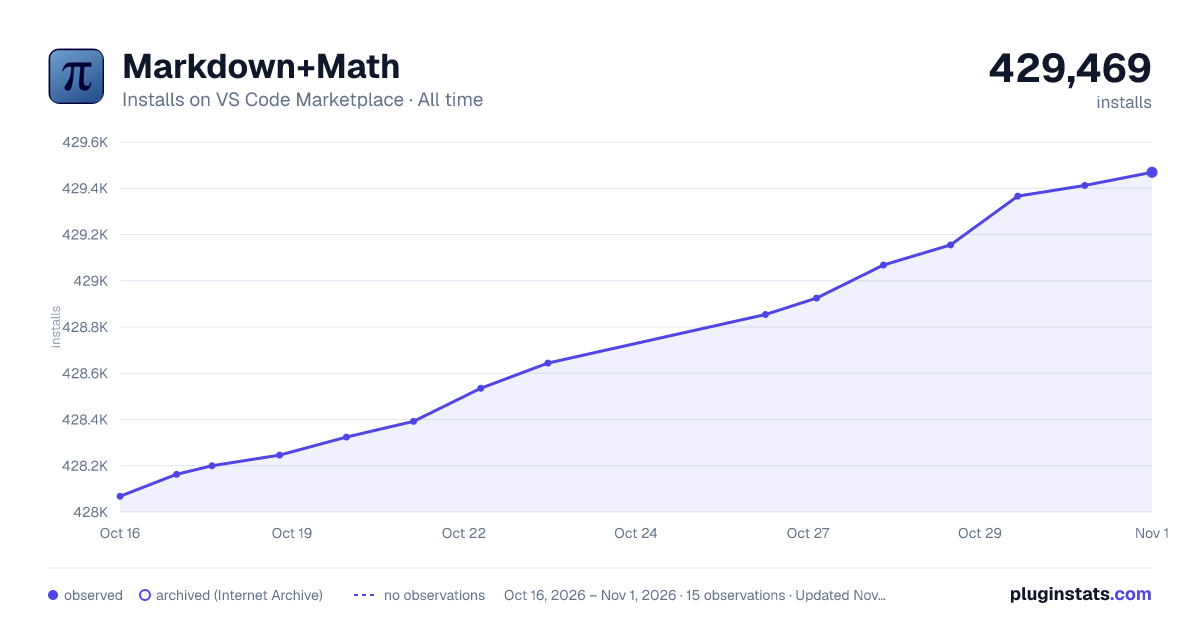

Adoption over time


7/30/90-day growth


Ranking history


Filled points are observed values; hollow points come from Internet Archive snapshots of the listing page. Dashed segments span periods with no observations — values between points are not interpolated.
Recent observations
Full history (3)Similar VS Code Marketplace Programming Languages plugins
Data source
Install counts, average rating, and rating counts come from the public Visual Studio Marketplace gallery API. Installs are cumulative and exclude updates.
Listing: https://marketplace.visualstudio.com/items?itemName=goessner.mdmath. First seen Oct 16, 2026; last successful collection Oct 18, 2026. See the methodology.