 PluginStats
YAML ❤️ JSON installs statistics
By Daniel Hillmann · VS Code Marketplace · Formatters
Convert YAML to or from JSON in one click. Batch convert folders, preview without saving, preserve comments, and auto-convert on save or rename.
YAML ❤️ JSON has 150,356 recorded installs on VS Code Marketplace, ranking #1852 of 2,501 tracked listings.
Rating: 4.60 / 5 from 10 ratings
About YAML ❤️ JSON
YAML :heart: JSON



Convert YAML to or from JSON directly in VS Code — single files, entire folders, text selections, or via live preview. Preserves comments when converting to JSONC.
Any good ideas or feature requests? Please, do not hesitate to open a new issue!
Features and usage
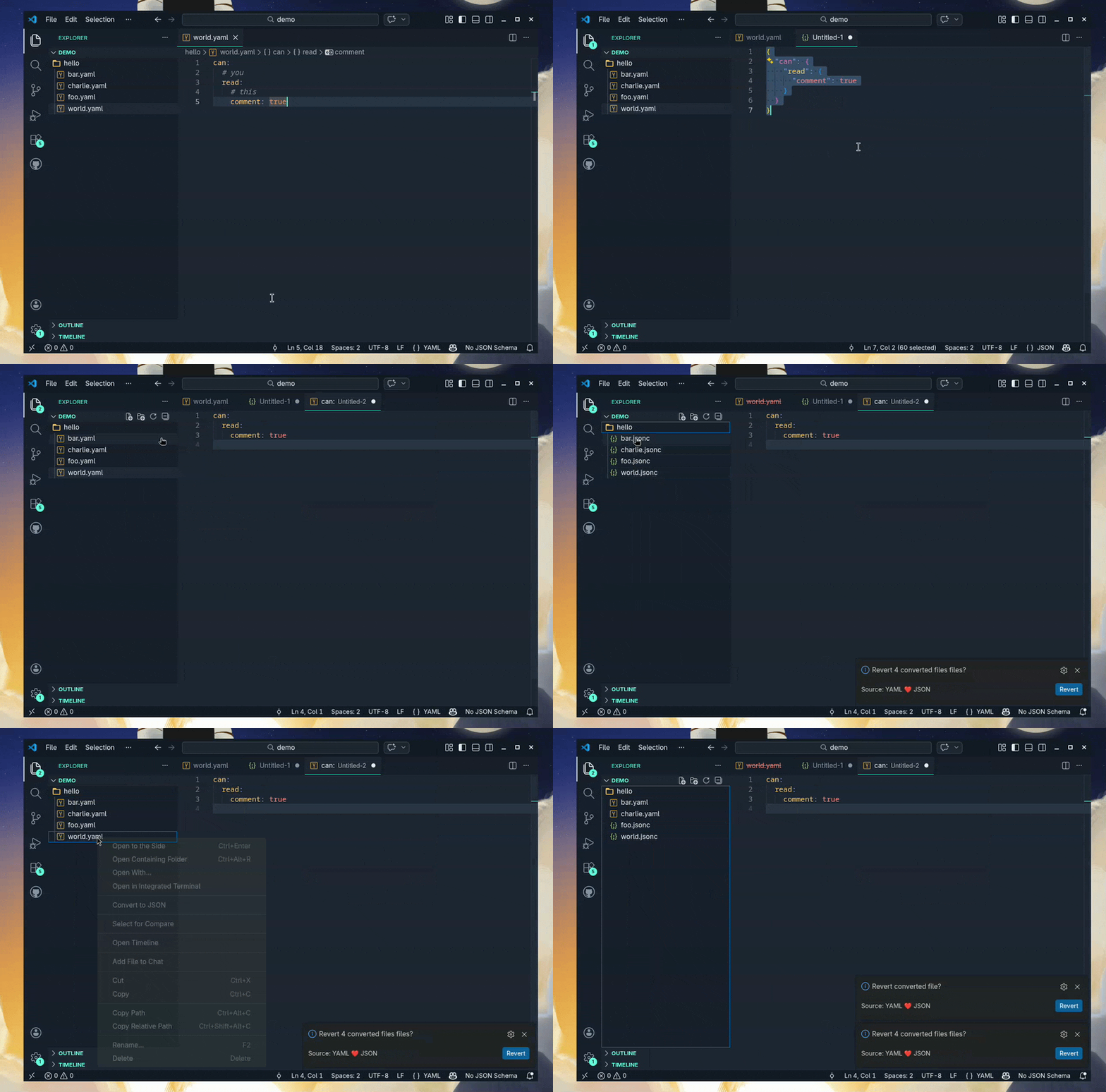
See more usage examples in the docs directory.
- Convert a single file:
- Convert a YAML file to JSON or JSONC by right clicking it and selecting
Convert to JSON. - Convert a YAML file to JSON or JSONC by changing file extension to
.jsonor.jsonc. - Convert a JSON or JSONC file to YAML by right clicking it and selecting
Convert to YAML. - Convert a JSON or JSONC file to YAML by changing file extension to
.yamlor.yml.
- Convert a YAML file to JSON or JSONC by right clicking it and selecting
- Convert selection as preview:
- Convert YAML selection as preview by using command
YAML+JSON: Preview as JSON (from YAML. Opens in new file) - Convert JSON selection as preview by using command
YAML+JSON: Preview as YAML (from JSON. Opens in new file)
- Convert YAML selection as preview by using command
- Convert text selection:
- Convert YAML selection by using command
Convert selection to JSON- does not change file extension. - Convert JSON selection by using command
Convert selection to YAML- does not change file extension.
- Convert YAML selection by using command
- Converting multiple files:
- Convert a selection of JSON files to YAML by right clicking one of the selected files and selecting
Convert selected files to YAML. - Convert a selection of YAML files to JSON by right clicking one of the selected files and selecting
Convert selected files to JSON. - Convert YAML files in a directory to JSON by right clicking the directory and selecting
Convert YAML files to JSON. - Convert JSON files in a directory to YAML by right clicking the directory and selecting
Convert JSON files to YAML.
- Convert a selection of JSON files to YAML by right clicking one of the selected files and selecting
- Comment preservation (YAML to or from JSONC):
- When converting between YAML and JSONC, comments are preserved by default (
preserveComments: true). - YAML
#comments map to JSONC//comments and vice versa. - To use this feature, set
fileExtensions.jsonto".jsonc". - Plain
.jsonfiles cannot hold comments, so comment preservation only applies to.jsonc. - Note: Multi-document YAML files fall back to plain JSON array output (no comment preservation).
- When converting between YAML and JSONC, comments are preserved by default (
- Convert on save: When
convertOnSaveis enabled, saving a YAML or JSON file will automatically create (or update) its counterpart file. The original file is always kept. TheoverwriteExistentFilessetting controls what happens when the counterpart already exists. - Reverting converted files: When a file has been reverted, a "revert" prompt will be shown to revert it. Using this will return the entirety of the original file, including YAML comments.
- Overwriting existent files: When trying to convert a file into a destination that already exist, you can use the
overwriteExistentFilesconfiguration to overwrite such. Notice if you use the revert feature after overwriting a file, the extension cannot (currently) revert the overwritten file. Also, due to limitation in vscode of active user prompts, if you set it to"ask"you will only be prompted to overwrite N number of files, while others will be skipped.
Config
All configurations should be defined in the yaml-plus-json object of your vscode settings (e.g. in a workspace file .vscode/settings.json). Example:
{
  "yaml-plus-json": {
    "convertOnRename": true,
    "convertOnSave": false,
    "yamlIndent": 2,
    "yamlLineWidth": 0,
    "yamlMerge": false,
    "fileExtensions": {
      "yaml": ".yaml",
      "json": ".jsonc", // use ".jsonc" for comment preservation
    },
    "preserveComments": true,
    // for more advanced parser configurations
    // see the YAML module documentation for details:
    // https://github.com/eemeli/yaml/blob/main/docs/03_options.md#options
    // note specific extension configs set takes precedence ("yamlIndent" for example)
    "yamlOptions": {
      "indent": 2,
      "lineWidth": 0,
    },
  },
}
Description from the VS Code Marketplace listing.
- json
- json to yaml
- jsonc
- yaml
- yaml to json
- yaml2json
README badge
Show your rank in a README or on your website. The badge updates automatically.
Charts
Images: 30d · 1y · all time · 1600×900 dark


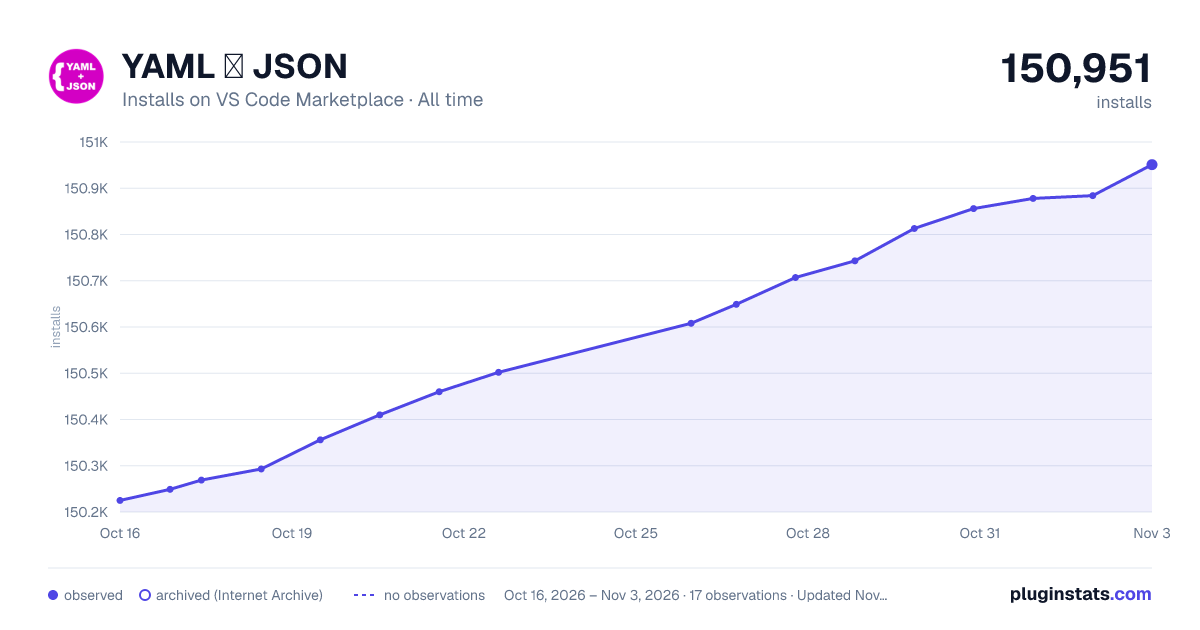

Adoption over time
7/30/90-day growth
Ranking history
Ratings over time
Listing placement
Listing placement
Filled points are observed values; hollow points come from Internet Archive snapshots of the listing page. Dashed segments span periods with no observations — values between points are not interpolated.
Each band is one page of 20. Installs on a linear scale. Placement is projected from installs, so it can differ from the marketplace's own sort order. Hover a dot to see the listing.
Recent observations
Full history (5)Similar VS Code Marketplace Formatters plugins
All 20 YAML ❤️ JSON alternativesData source
Install counts, average rating, and rating counts come from the public Visual Studio Marketplace gallery API. Installs are cumulative and exclude updates.
Listing: https://marketplace.visualstudio.com/items?itemName=hilleer.yaml-plus-json. First seen Oct 16, 2026; last successful collection Oct 20, 2026. See the methodology.