 PluginStats
Agentforce Vibes installs statistics
By Salesforce (33 listings) · VS Code Marketplace · Machine Learning
Extension for developing on the Salesforce Platform with the help of generative AI
Agentforce Vibes has 941,878 recorded installs on VS Code Marketplace, ranking #559 of 2,501 tracked listings.
Rating: 2.47 / 5 from 15 ratings
About Agentforce Vibes
Agentforce Vibes Extension
Overview
Agentforce Vibes version v4.0+ is the latest evolution of the Agentforce Vibes extension. This version of the extension has received a major facelift — reimagined from the ground up and replatformed on the Agentforce SDK.
Agentforce Vibes is an AI-powered tool available to Salesforce customers as an easy-to-install Visual Studio Code extension. Built on Salesforce's Coding Agent Platform and powered by the robust Claude and Mastra agent orchestration engines, which together provide intelligent coding support.
The extension is available in the VS Code Marketplace and the Open VSX registry, and as a part of the Salesforce Extension Pack.
Agentforce Vibes is included in Salesforce orgs. When used along with IntelliSense, this tool makes Salesforce development in Visual Studio Code and Code Builder even richer.
Go to Agentforce Vibes Extension Set Up Documentation to learn more.
Note: Agentforce Vibes uses generative AI, which can produce inaccurate or harmful responses. The output generated by AI is often nondeterministic. Before using the generated output, review it for accuracy and safety. You assume responsibility for how the outcomes of Agentforce Vibes are applied to your organization.
Prerequisites
Before you set up the Agentforce Vibes extension, make sure that you have these essentials.
- Visual Studio Code version 1.101.0 or later.
- Salesforce Extensions for Visual Studio Code and its prerequisites.
- Windows only: Microsoft Visual C++ Redistributable (latest version). The extension fails to activate without it.
What Can Agentforce Vibes Do?
Use Agentforce Vibes, an AI-powered developer tool, to enhance developer productivity across all aspects of Salesforce development.
Chat
Use agentic chat to get programming help in natural language. Describe what you want to build, debug, or understand — the agent determines the best approach and works directly in your workspace. Chat supports streaming responses, multi-tab conversations, inline diff review for file changes, and automatic context compaction for long sessions.
Plan Mode
For complex tasks, use Plan Mode to review and approve a structured plan before anything executes. Describe your feature, iterate on the plan in conversation, and click Approve Plan to start execution. No files change until you approve.
Model Picker
Choose from a range of AI models including the latest Claude and GPT models. Switch models mid-session from the bottom bar.
Context
Pull relevant information into your conversation using @-mentions: workspace files, Salesforce object schemas, workspace problems, terminal output, git history, and active plans.
MCP Servers
Connect to Salesforce-hosted Model Context Protocol (MCP) servers — including Metadata Experts and API Context — that give the agent live access to your org's metadata and API surface. MCP servers activate automatically once your admin enables them in Setup.
Rules and Skills
Author and manage Rules (always-on constraints the agent respects) and Skills (on-demand instruction packages the agent applies when relevant) from the Toolkit panel. Store them in .vibes/rules/ and .vibes/skills/ and commit them to version control so your whole team benefits.
Permissions and Safety
Control agent autonomy with three session modes — Ask every time**, Run safe defaults, and Bypass — and a configurable command allowlist. Safety guardrails prevent destructive actions from running without your approval.
Inline Code Completions
Get AI-based inline code suggestions as you type in Apex, JavaScript, HTML, and CSS files, including Lightning Web Component files. Completions appear as ghost text and are accepted with Tab.
Get Started
See Set Up Agentforce Vibes for installation and configuration steps.
Description from the VS Code Marketplace listing.
- agent
- agentforce
- ai
- apex
- autocomplete
- chat
- code generation
- einstein
- lwc
- salesforce
README badge
Show your rank in a README or on your website. The badge updates automatically.
Charts
Images: 30d · 1y · all time · 1600×900 dark


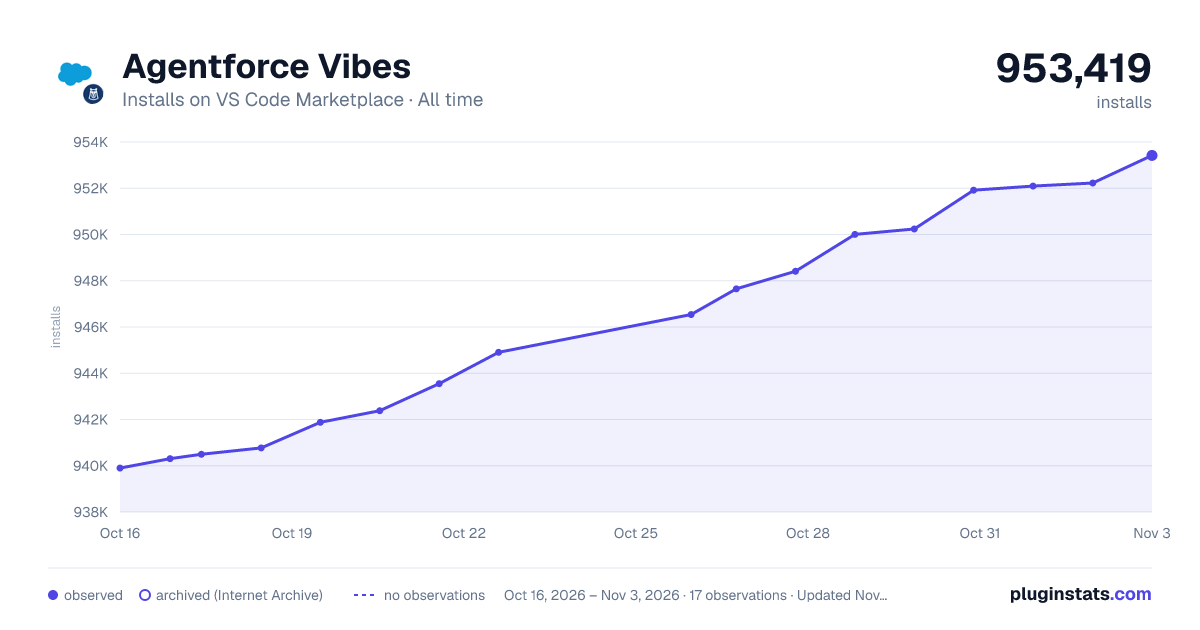

Adoption over time
7/30/90-day growth
Ranking history
Ratings over time
Listing placement
Listing placement
Listing placement
Listing placement
Filled points are observed values; hollow points come from Internet Archive snapshots of the listing page. Dashed segments span periods with no observations — values between points are not interpolated.
Each band is one page of 20. Installs on a linear scale. Placement is projected from installs, so it can differ from the marketplace's own sort order. Hover a dot to see the listing.
Recent observations
Full history (5)Similar VS Code Marketplace Machine Learning plugins
All 20 Agentforce Vibes alternativesData source
Install counts, average rating, and rating counts come from the public Visual Studio Marketplace gallery API. Installs are cumulative and exclude updates.
Listing: https://marketplace.visualstudio.com/items?itemName=salesforce.salesforcedx-einstein-gpt. First seen Oct 16, 2026; last successful collection Oct 20, 2026. See the methodology.