 PluginStats
AZ AL Dev Tools/AL Code Outline installs statistics
By Andrzej Zwierzchowski · VS Code Marketplace · Other
AZ AL Development Tools: AL code outline, object browser, object creators
AZ AL Dev Tools/AL Code Outline has 333,248 recorded installs on VS Code Marketplace, ranking #1081 of 2,502 tracked listings.
Rating: 4.95 / 5 from 37 ratings
About AZ AL Dev Tools/AL Code Outline
AZ AL Dev Tools/AL Code Outline for Visual Studio Code
This extension was originally named 'AL Code Outline' because it started as AL code outline panel from which it was possible to run different code generators on AL syntax nodes. Each new version has been adding new features, some of them were no longer related to the AL code outline panel. Current version of the extension is a collection of different al development tools and al outline panel is just one of them, so it seems that the name should be updated to reflect functionality changes.
Features
"AZ AL Dev Tools/AL Code Outline" extension is a collection of these tools designed to help with AL extension development:
- AL objects wizards
- Symbols browser
- AL symbols outline panel
- Symbols tree view
- AL code generators
- Code actions
- Code transformation commands
- Action images browser
- Custom editors
- Documentation comments support
- Duplicate code search
- Warning directives panel
- Code analyzers rules viewer
- Document syntax visualizer
- Code completion
- Multiple build configurations (app.json) support
AL objects wizards
Extensions add new "New AL File Wizard" item to EXPLORER context menu. It allows to run one of these wizards to create new AL object file:
- Table Wizard
- Table Extension Wizard
- Page Wizard
- Codeunit Wizard
- Interface Wizard
- XmlPort Wizard
- Report Wizard
- Query Wizard
- Enum Wizard
- Enum Extension Wizard
- PermissionSet Wizard
- PermissionSetExtension Wizard

Symbols browser
Symbols browser shows list of AL objects, allows to select one of them and then display details of that symbol. It is also possible to select multiple objects (by clicking on nodes with Ctrl key or using Ctrl+A) and then use context menu to run one of code generators on them. Browser can display symbols in 2 modes - list and tree view. In tree view screen is split into two parts showing objects tree on the left side and selected symbol on the right. In list view browser shows flat list of symbols and uses "AL Outline" panel to show details of selected object.
Both views support keyboard navigation with arrow keys and allow to filter data by using filter fields at the top of the screen.
Symbols browser can display symbols from:
- *.app symbols files - extension registers default custom read only editor for these files so symbols browser can be opened by just clicking on the file in the EXPLORER panel. If it does not work, it means that other editor has been selected as default. In that case symbols browser can still be open by right clicking on the file, selecting "Open With..." from the context menu and choosing "AL App Viewer" editor.
- current project symbols with all dependencies defined in app.json by running "AZ AL Dev Tools: Show All Project Symbols" from the "Command Palette"
- current project symbols without dependencies by running "AZ AL Dev Tools: Show Project Symbols without Dependencies" from the "Command Palette"


AL symbols outline panel
'AL Outline' panel displays code outline of the currently active editor. Basic functionality allows user to click on one of the symbols tree nodes to move cursor to that symbol in the code editor. It looks like standard VS Code Outline view, but supports syntax node types specific to AL, display custom icons and allows to invoke some commands on them using context menu. Currently symbol context menu allows user to run pages, reports and tables in the web client and run code generators to create new card and list pages, reports, xmlports and queries with all fields from selected table symbols. For tables and pages it is also possible to create page or table extension.
It also supports other document types, so it can be used instead of standard outline view if AL project contains other files (i.e. javascript or css control add-ins files).


Symbols tree view
This view shows symbols tree looking similar to content of "AL symbols outline panel", but uses WebView to display it and can be opened on one of the editor tabs. If there is an editor in which user changes definition of the object displayed in the tree view, tree content will be updated, but switching active editor to other file does not change the tree. It can be used to display table symbols when user edits page object or page symbols when developers edits page extension. View can be opened from:
- AL Symbols Browser by using object list context menu and selecting "Open symbol in new tab" option
- "Show Document Symbols Tree" command from "Command Palette" when there is an acive text editor with AL file
- Editor context menu by selecting "Show Definition in the Symbols Tree" menu item

AL code generators
Extension contains code generators that can create new card and list pages, reports, xmlports and queries with all fields from selected table symbols. It can also create empty page or table extension from page or table symbols. Generators can be invoked using context menu on symbols in "AL Outline" view and in "Symbols Browser".…
Description from the VS Code Marketplace listing.
- al
- alapp
- json
README badge
Show your rank in a README or on your website. The badge updates automatically.
Charts
Images: 30d · 1y · all time · 1600×900 dark


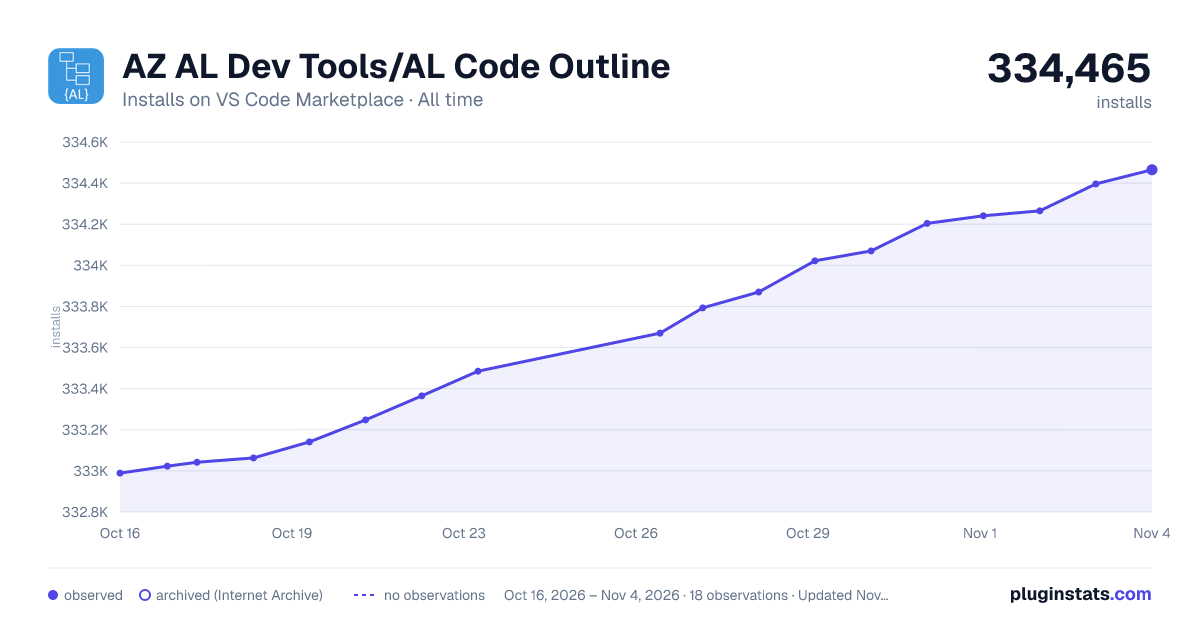

Adoption over time
7/30/90-day growth
Ranking history
Ratings over time
Listing placement
Listing placement
Filled points are observed values; hollow points come from Internet Archive snapshots of the listing page. Dashed segments span periods with no observations — values between points are not interpolated.
Each band is one page of 20. Installs on a linear scale. Placement is projected from installs, so it can differ from the marketplace's own sort order. Hover a dot to see the listing.
Recent observations
Full history (6)Similar VS Code Marketplace Other plugins
All 20 AZ AL Dev Tools/AL Code Outline alternativesData source
Install counts, average rating, and rating counts come from the public Visual Studio Marketplace gallery API. Installs are cumulative and exclude updates.
Listing: https://marketplace.visualstudio.com/items?itemName=andrzejzwierzchowski.al-code-outline. First seen Oct 16, 2026; last successful collection Oct 21, 2026. See the methodology.