 PluginStats
SystemVerilog - Language Support installs statistics
By Eirik Prestegårdshus · VS Code Marketplace · Programming Languages
Language support for Verilog and SystemVerilog.
SystemVerilog - Language Support has 172,006 recorded installs on VS Code Marketplace.
It ranks #1693 of 2,501 tracked VS Code Marketplace listings by installs.
It is rated 4.4 out of 5 from 12 ratings.
PluginStats has 4 daily observations since Oct 16, 2026; the latest is from Oct 19, 2026.
Rating: 4.42 / 5 from 12 ratings
About SystemVerilog - Language Support
SystemVerilog - Language Support
This VS Code extension provides features to read, navigate and write SystemVerilog code much faster.
Features
• Elaborate syntax highlighting • Go to symbol in document (Ctrl+Shift+O) • Go to symbol in workspace folder (indexed modules/interfaces/programs/classes/packages) (Ctrl+T) • Go to definition (_works for module/interface/program/class/package names and for ports too!_) (Ctrl+LeftClick) • Find references (_works for module/interface/program/class/package names and for ports too!_) (Ctrl+LeftClick) • Member auto-completion for struct/union fields, class members, package members (pkg::) and module ports — automatically after . / ::, or with Ctrl+Space • Quick-start on already indexed workspaces • Code snippets for many common blocks • Instantiate module from already indexed module • Linter capabilites with simulators (more info on the wiki) • Fast real-time error identification through an integrated SystemVerilog parser and IntelliSense (fully accurate to IEEE Standard 1800-2017) • If you find a bug or would like a feature, request it as an Issue or submit a Pull Request
Examples
Syntax Highlighting
Go To Definition
Find References
Module Instantiation
Member Auto-Completion
Type . after a variable or :: after a package name to get context-aware member suggestions:
• my_struct. → fields of the struct/union type • my_object. → properties and methods of the class type • my_package:: → members declared in the package (parameters, typedefs, functions, …) • inside a module instantiation, . → the instantiated module's ports
Recommendations
• If you have netlists in your workspace you can exclude them in the settings with systemverilog.excludeIndexing, e.g.: /syn/ • When running in workspaces with a large number of files, the systemverilog.documentSymbolsPrecision setting may need to be reduced down to 'full_no_references'. Doing this will turn off the 'find references' feature which will dramatically speedup the parsing. • When you have large files, the systemverilog.maxLineCountIndexing setting can be tuned to prevent full parsing of these files, which will improve extension performance. • _Disclaimer_: This is not a functional tool that will compile and simulate HDL, but it will make it easier and more user-friendly to write and navigate SystemVerilog and Verilog.
Settings
• systemverilog.includeIndexing: _Array_, Files included for indexing \(glob pattern\). Examples: • Include files within the workspace's rtl folder (* at front of pattern denotes path is relative to workspace root): /rtl//*.{sv,v,svh,vh} • Add all files with a '.svp' extension: **/*.svp • Add files only when in a specific workspace: /abs/path/to/workspace/rtl/**/*.{sv,v,svh,vh} • systemverilog.disableIndexing: _Boolean_, Disable indexing • systemverilog.excludeIndexing: _String_, Exclude files from indexing based on a glob pattern. Examples: • Exclude all files in the 'synth' folder: **/synth/* • Exclude more than one folder: /{synth,pnr}/ • Exclude .v files in the 'compile' folder: **/compile/*.v • Exclude .v files in the 'compile' dir and exclude all files in the 'synth' folder: {/synth/,**/compile/*.v} • systemverilog.forceFastIndexing: _Boolean_, Use fast regular expression parsing • systemverilog.enableIncrementalIndexing: _Boolean_, Enable incremental indexation as files are opened • systemverilog.parallelProcessing: _Integer_, Number of files to process in parallel during indexing • systemverilog.forceFastIndexing: _Boolean_, force indexer to bo basic parsing. Good for when the extension takes too long to initialize. • systemverilog.enableIncrementalIndexing: _Boolean_, Enable incremental indexation as you open files. • systemverilog.maxLineCountIndexing: _Boolean_, When indexing a file, if the line count is larger than this number, _fast_ indexing will be used to improve symbol lookup performance, as fewer symbols will be parsed. • systemverilog.documentSymbolsPrecision: _String_, The level of detail the parser should use when looking for symbols: • _full_: detect blocks, ports, parameters, classes, methods, typedefs, defines, labels, instantiations, assertions, and _references across files_. • _full_no_references_: detect blocks, ports, parameters, classes, methods, typedefs, defines, labels, instantiations, and assertions. • _declarations_: detect blocks, ports, parameters, classes, methods, typedefs, and defines. • _fast_: detect only common blocks (module, class, interface, package, program) without hierarchy. • systemverilog.antlrVerification: _Boolean_, Use ANTLR parser to verify code in real-time • systemverilog.verifyOnOpen: _Boolean_, Run ANTLR verification on all files when opened. • systemverilog.launchConfigurationVerilator: _String_, Command to run when launching verilator • Default: _verilator --sv --lint-only --language 1800-2012 --Wall_ • If not in path, replace _verilator_ with the appropriate command • systemverilog.launchConfigurationVCS: _String_, Command to run when launching VCS • Default: _vcs_ • If not in path, replace _vcs_ with the appropriate command • systemverilog.launchConfigurationVerible: _String_, Command to run when launching Verible • Default: _verible-verilog-lint_ • If not in path, replace _verible-verilog-lint_ with the appropriate command • systemverilog.excludeCompiling: _String_, Files excluded from compiling when saved based on a glob pattern • systemverilog.compileOnSave: _Boolean_, Compile files when saved • Default: true • systemverilog.compilerType: _String_, Dropdown list to select a compiler type • Default: Verilator • systemverilog.trace.server: _String_, Dropdown to select verbosity of LSP message tracing • systemverilog.compileOnOpen: _Boolean_, Compile all files when opened • Default: false
Customizations
Use the provided settings in a user or workspace settings.json as appropriate. Here are a few examples:
Handling Spaces In Executable Paths…
Description from the VS Code Marketplace listing.
- Dot-F File
- hdl
- json
- lsp
- sdc
- snippet
- Synopsys Design Constraints
- System Verilog
- systemverilog
- systemverilogheader
- verilog
- Verilog Filelist
- veriloga
- Verilog-A
- verilogams
- Verilog-AMS
- verilog-filelist
- verilogheader
- vhdl
- xdc
Charts
Images: 30d · 1y · all time · 1600×900 dark


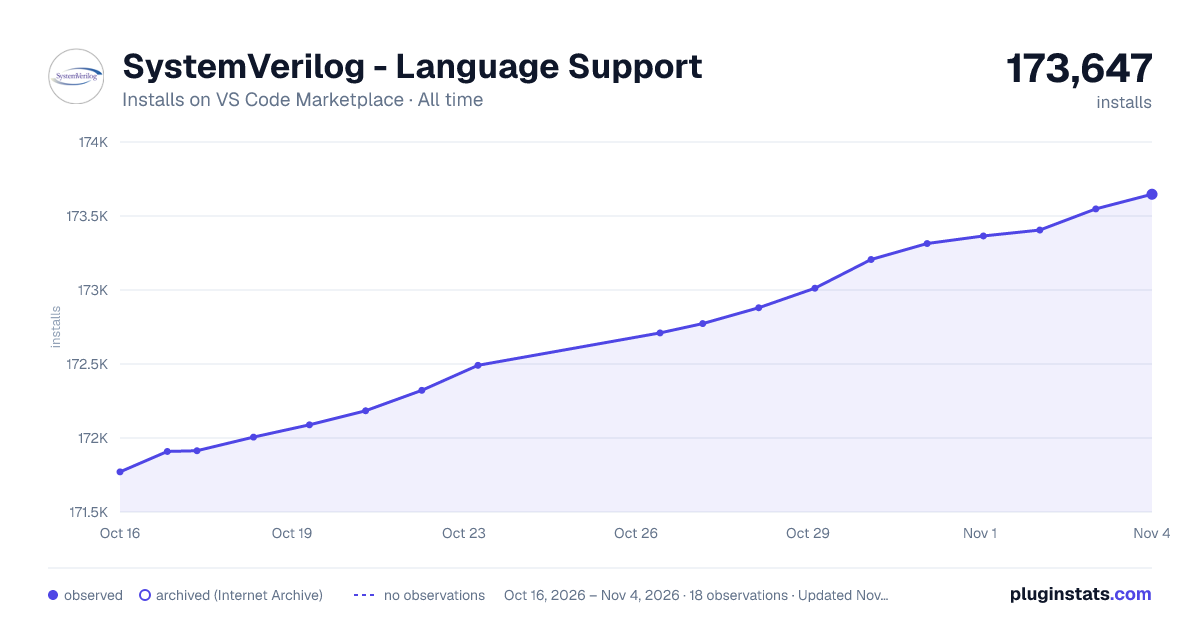

Adoption over time


7/30/90-day growth


Ranking history


Ratings over time


Listing placement


Listing placement


Listing placement


Filled points are observed values; hollow points come from Internet Archive snapshots of the listing page. Dashed segments span periods with no observations — values between points are not interpolated.
Each band is one page of 20. Installs on a log scale. Placement is projected from installs, so it can differ from the marketplace's own sort order. Hover a dot to see the listing.
Recent observations
Full history (4)Similar VS Code Marketplace Programming Languages plugins
All 20 SystemVerilog - Language Support alternativesData source
Install counts, average rating, and rating counts come from the public Visual Studio Marketplace gallery API. Installs are cumulative and exclude updates.
Listing: https://marketplace.visualstudio.com/items?itemName=eirikpre.systemverilog. First seen Oct 16, 2026; last successful collection Oct 19, 2026. See the methodology.