 PluginStats
Table Formatter installs statistics
By Shuzo Iwasaki · VS Code Marketplace · Formatters
Format table syntax of Markdown, Textile and reStructuredText.
Table Formatter has 110,177 recorded installs on VS Code Marketplace, ranking #2238 of 2,501 tracked listings.
Rating: 4.53 / 5 from 17 ratings
About Table Formatter
VSCode Table Formatter
Table Formatter is a extention package for the Visual Studio Code to format table syntax.
Description
This extention format table syntax of markup language, aligns the columns width. Supports multiple markup languages, and you do not need to specify a markup language when formatting.
Features:
• Formatting table syntax • Align cell width with pipe • Align text position in cell • Add missing cells automatically • Add missing separator syntax automatically in cell • Automatic discrimination of table syntax • Discriminate markup language automatically • Determine range of table syntax automatically • It is possible to select the format target • Only table contain current cursor position • All tables in opend text • CJK support
Supported markup language:
• GitHub Flavored Markdown • Header separator • Align • Textile • Header • Align • reStructuredText • Grid table • Simple table
Not supported:
• Spanning rows and colums • Multiple lines in cell
Usage
Enter command in the command palette (Ctrl-Shift-P or Cmd-Shift-P) with cursor position in table syntax. The current table will be formatted. Or, you can format all the table syntax in opend text. At that time, markup language is automatically determined.
Command title:
• Table: Format Current • format one table syntax contain current cursor position only • command: extension.table.formatCurrent • Table: Format All • format all table syntaxes in opend text • command: extension.table.formatAll
Sample:
• Plain Text Table *1 • Markdown • Textile • Grid Table • Simple Table *2
Configration
Some of configrations and examples of it.
• tableformatter.common.centerAlignedHeader • tableformatter.markdown.oneSpacePadding • tableformatter.markdown.tableEdgesType • 'Normal': Formatted table has delimiters on both sides. • 'Borderless': Formatted table has no delimiters on both sides. • 'Auto': If original table has no pipe delimiter at all line heads, format as borderless.
Installation
Search extension in marketplace and Install.
- In the command palette (Ctrl-Shift-P or Cmd-Shift-P) select Install Extensions. 2. Search for table formatter and select.
Roadmap
• [x] reStructuredText support • [x] Grid table • [x] Simple table • [ ] CSV support • [ ] Formatting • [x] Configuration • [ ] Switching Enable Text algin • [ ] Escaped pipe string • [ ] Escaped break string • [ ] Simple table editing • [ ] Insert blank col and blank row • [ ] Insert escaped pipe and break • [ ] Convert to plain text table from CSV • [ ] Fast and simple shortcut format in table syntax • e.g.) Press Tab key in table syntax, and format current table • Probably needs updating of VSCood features about key bindings "when" property.
Release Notes
Changelog
Licence
MIT License
Author
Shuzo.I
Enjoy!
*1 It is misaligned because this monospaced font not compatible with CJK.
*2 Need to specific syntax. One cell content have no space, or put between double quotation.
Description from the VS Code Marketplace listing.
- keybindings
- markdown
- restructuredtext
- table
- textile
README badge
Show your rank in a README or on your website. The badge updates automatically.
Charts
Images: 30d · 1y · all time · 1600×900 dark


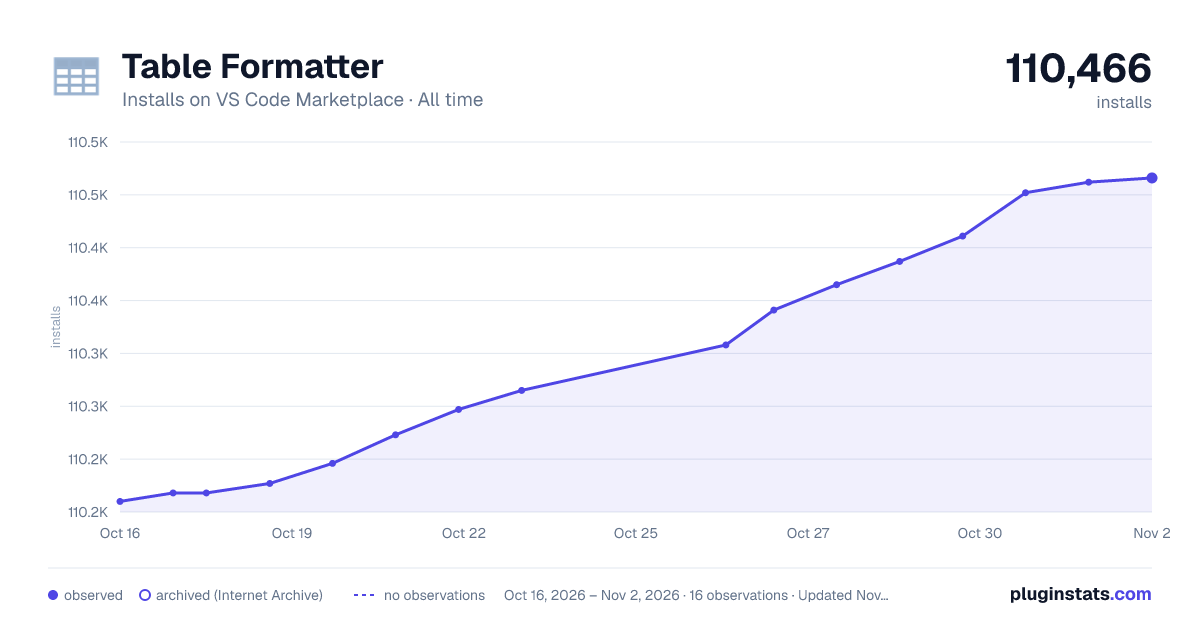

Adoption over time
7/30/90-day growth
Ranking history
Ratings over time
Listing placement
Listing placement
Filled points are observed values; hollow points come from Internet Archive snapshots of the listing page. Dashed segments span periods with no observations — values between points are not interpolated.
Each band is one page of 20. Installs on a linear scale. Placement is projected from installs, so it can differ from the marketplace's own sort order. Hover a dot to see the listing.
Recent observations
Full history (4)Similar VS Code Marketplace Formatters plugins
All 20 Table Formatter alternativesData source
Install counts, average rating, and rating counts come from the public Visual Studio Marketplace gallery API. Installs are cumulative and exclude updates.
Listing: https://marketplace.visualstudio.com/items?itemName=shuworks.vscode-table-formatter. First seen Oct 16, 2026; last successful collection Oct 19, 2026. See the methodology.