 PluginStats
Python Editing Terminal installs statistics
By ted-996 · VS Code Marketplace · Other
Edit the active file from Python
Python Editing Terminal has 93,966 recorded installs on VS Code Marketplace.
It ranks #2461 of 2,501 tracked VS Code Marketplace listings by installs.
It is rated 5.0 out of 5 from 1 ratings.
PluginStats has 4 daily observations since Oct 16, 2026; the latest is from Oct 19, 2026.
Rating: 5.00 / 5 from 1 ratings
About Python Editing Terminal
python-editing-terminal README
Python Editing Terminal is a Python shell for your Visual Studio Code workspace. Right now, it can access and edit the current file, or a selection, and open a new or existing one. It is also possible to use Python Editing Terminal with other languages besides Python.
Examples & Features
Open the Python Editing Terminal from the Command Menu (Ctrl+P >Open Python Editing Terminal). A terminal will open, where you can run arbitrary Python code and use the vscode module.
Examples:
• Get or set the file text (Unicode-aware): On Python 2, this returns an unicode object; on Python 3, a str object is returned. • Get or set the file content (UTF-8 encoded, relevant on Python 3): On Python 2, this returns a str object; on Python 3, a bytes object is returned. • Get or set the selection: • Get and set the lines in the file (without newlines): • Get and set the file text as JSON: • Get and set the file text as CSV: • Get and set the file text as TSV: • Open new tabs: • Query a REST API directly from your editor: • Convert a file from CSV to TSV (or vice-versa):
Reference
The vscode module contains two objects, vscode.editor and vscode.selection that access the entire document, or just the selection, respectively. These expose the following properties:
• vscode.editor.text (or vscode.selection.text): The text of the currently open document/selection. Getting it fetches the text from the editor, setting it changes it in the editor. Returns and is set with an Unicode-aware object (unicode under Python 2, str under Python 3). • vscode.editor.content (or vscode.selection.content): The text of the current open document/selection, encoded as UTF-8. Can be set like vscode.editor.text. Returns and is set with a non-Unicode-aware object (str under Python 2, bytes under Python 3). The distinction is the same as content and text in the Requests Python module. • vscode.editor.lines (or vscode.selection.lines): The current document/selection, split as a list of lines. Newlines are stripped (not included in the list entries). Setting it to a list of strings (without trailing newlines) sets the document text to those lines. OS-specific newline style is respected. • vscode.editor.json (or vscode.selection.json): The current document/selection, parsed as JSON. Getting it gives you a object parsed from the current document, setting it writes an object as JSON. • vscode.editor.csv (or vscode.selection.csv): The current document/selection, parsed as CSV. Getting it gives you a list of lists, setting it writes a list of lists as CSV. • vscode.editor.tsv (or vscode.selection.tsv): The current document/selection, parsed as TSV. Getting it gives you a list of lists, setting it writes a list of lists as TSV.
The vscode.editor/vscode.selection objects also expose the following method:
• vscode.editor.new(filename=None, text=None, content==None, lines=None, json=None, csv=None, tsv=None): Open a new tab and optionally also set its content. All parameters are optional, but at most one of text, content, lines, json, csv, or tsv should be specified. The filename is relative to the open workspace.
Requirements
This extension depends on the requests Python module. Install it with pip install requests.
Extension Settings
This extension contributes the following settings:
• pythonEditingTerm.termPath: The Python executable. Can be either the main executable, or another Python shell, like IPython. (See the following section for using other languages.) Can be a full path or the name of a binary on the PATH environment variable. • pythonEditingTerm.termArgs: Additional arguments to pass to the Python executable. Warning, may not work under certain OSs. • pythonEditingTerm.termInit: The original code to run on startup. Necessary to connect the terminal to Visual Studio Code. {port} is replaced with the server port, and {extPath} is replaced with the extension root directory.
Changing the shell & using other languages
Python Editing Terminal exposes a pythonEditingTerm.termPath setting, containing the full path to the Python shell executable. This extension is tested under Python and IPython, versions 2.7 and 3.7, but any other languages with a shell (not necessarily Python) can work.
This extension runs a local Node.js REST server and responds to the following requests:
• GET request on /text: returns the text in the current editor tab. Use the Etag and If-None-Modified HTTP headers to prevent redownloading the file every time, if there was no change. • PUT request on /text, with request body: sets the text in the current editor to the request body. • POST request on /new, with a filename field (optionally empty): open a new tab with the given filename. If the filename is empty, the new tab is untitled.
To enable editing from other languages, change the pythonEditingTerm.termPath config to the path to your language's shell. Then, change the pythonEditingTerm.termInit config to some code that provides functions to easily GET, PUT and POST to that HTTP server. For example, for Python, this is the code:
As mentioned above, {extPath} is replaced with the extension install directory and {port} with the port on which the server is running.
Commented code:
See the Python module code here.
Release Notes
1.0
Initial release.
1.0.1
Documentation update.
1.0.2
Bugfix release, see the changelog.
1.0.3
Added vscode.editor.new Python function & server support, better help and instructions to add support for other languages.
1.0.4
Added lines support alongside json and csv.
1.0.5
• Added content property • Fixed Python 3 support, Unicode support, and other minor bugs. • Can now find the Python binaries on the path. • Added vscode.selection.XX (where XX can be text, content, lines, json or csv).
1.0.6
• Added tsv property (to vscode.editor, vscode.selection, and help)
License
Python Editing Terminal is licensed under the MIT License.
Description from the VS Code Marketplace listing.
- python
Charts
Images: 30d · 1y · all time · 1600×900 dark


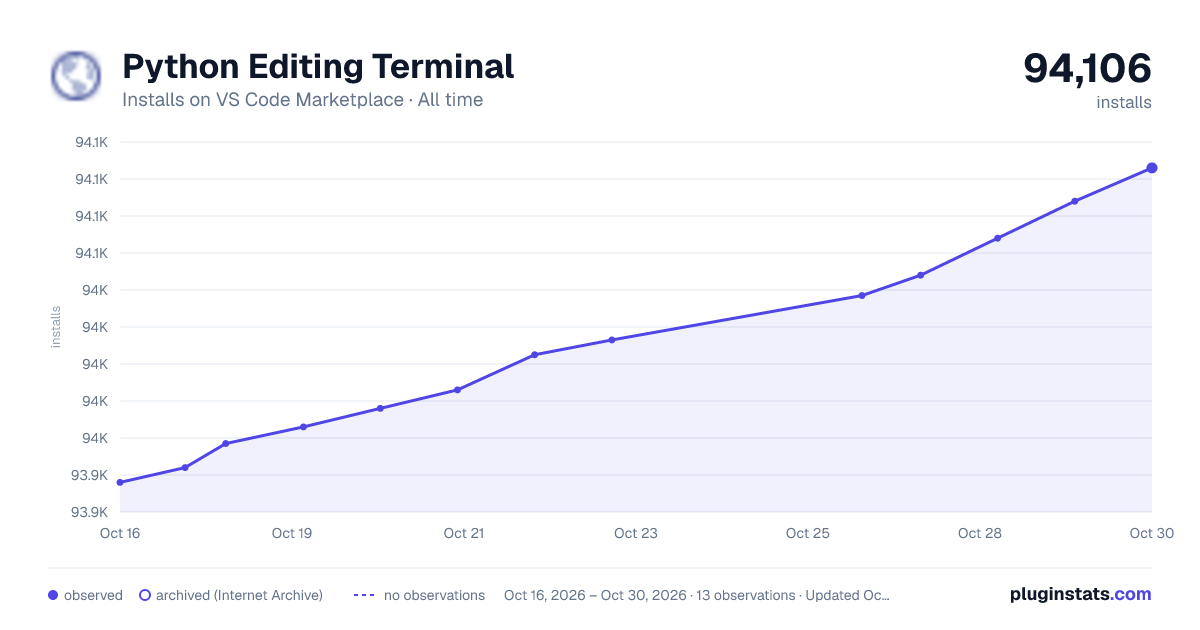

Adoption over time


7/30/90-day growth


Ranking history


Ratings over time


Listing placement


Filled points are observed values; hollow points come from Internet Archive snapshots of the listing page. Dashed segments span periods with no observations — values between points are not interpolated.
Each band is one page of 20. Installs on a log scale. Placement is projected from installs, so it can differ from the marketplace's own sort order. Hover a dot to see the listing.
Recent observations
Full history (4)Similar VS Code Marketplace Other plugins
All 20 Python Editing Terminal alternativesData source
Install counts, average rating, and rating counts come from the public Visual Studio Marketplace gallery API. Installs are cumulative and exclude updates.
Listing: https://marketplace.visualstudio.com/items?itemName=ted-996.python-editing-terminal. First seen Oct 16, 2026; last successful collection Oct 19, 2026. See the methodology.