Skip to content
PluginStats

VSMarketplace Badges installs statistics

By KamaoKat (2 listings) · VS Code Marketplace · Programming Languages

Insert version, installs and rating badges for VSMarketplace extensions easily to your HTML or Markdown pages.

View on VS Code Marketplace Fresh · Oct 23, 2026

VSMarketplace Badges has 192,486 recorded installs on VS Code Marketplace, a change of +0.2% over the past 7 days, ranking #1563 of 2,502 tracked listings.

Installs
192,486
Official API · Oct 23, 2026
7-day growth
+0.2%
+398 installs
30-day growth
—
Insufficient history
90-day growth
—
Insufficient history
Rank
#1563
▼ 1 in 7 days

Rating: 5.00 / 5 from 2 ratings

About VSMarketplace Badges

VSMarketplace Badges

Version Installs Downloads Rating Short Rating Star

TrendingDaily TrendingWeekly TrendingMonthly

Insert version, installs and rating badges for VSMarketplace extensions easily to your HTML or Markdown pages.

将VSMarketplace扩展的版本、安装量和评分等徽章轻松插入到您的HTML或Markdown页面。

Homepage/主页: https://www.xuangeaha.xyz/

Repository/仓库: https://github.com/Xuangeaha/VSMarketplace-Badges

Issues/问题: https://github.com/Xuangeaha/VSMarketplace-Badges/issues

Changelog/更新日志: https://marketplace.visualstudio.com/items/XuangeAha.vsmarketplace-badges/changelog

License/许可证: https://marketplace.visualstudio.com/items/XuangeAha.vsmarketplace-badges/license

Download/下载: https://marketplace.visualstudio.com/items?itemName=XuangeAha.vsmarketplace-badges

Copyright (c) 2023-2026 KamaoKat(卡猫kat,XuangeAha(轩哥啊哈OvO))

How To Use 使用方法

You can choose:

  1. Type badge in the file of supported languages above. 在所支持语言文件中键入 badge。
  2. Select the badge you want to insert and press Tab to insert badge. 选择你想插入的徽章后按下 Tab 以插入徽章。
  3. Type in your publisher name and entension name in the format of publishername.entensionname. 以 publishername.entensionname 的格式键入发布者名和扩展名。
  4. Press Tab and finish. 按下 Tab 后完成。

or:

  1. Right click to show context menu. 右键显示上下文菜单。
  2. Select Insert VSMarketplace Badges to insert vsmarketplace badges. 选择 Insert VSMarketplace Badges 以插入徽章。
  3. Type in your publisher name and entension name in the format of publishername.entensionname. 以 publishername.entensionname 的格式键入发布者名和扩展名。
  4. Press Tab and finish. 按下 Tab 后完成。

Language Supports 语言支持

HTML

<a href="https://marketplace.visualstudio.com/items?itemName={publishername.extensionname}">
    <img src="https://vsmarketplacebadges.dev/{badge_title}/{publishername.extensionname}.svg" alt="{badge_title}">
</a>

Markdown

[![{badge_title}}](https://vsmarketplacebadges.dev/{badge_title}/{publishername.extensionname}.svg)](https://marketplace.visualstudio.com/items?itemName={publishername.extensionname})

Badge List 徽章列表

Badge Title/徽章标题Prefix/前缀URL/地址Discription/描述
Versionbadge-verhttps://vsmarketplacebadges.dev/version/*****.svgVSBadges Version
Version Shortbadge-ver-shttps://vsmarketplacebadges.dev/version-short/*****.svgVSBadges Version Short
Installsbadge-instlhttps://vsmarketplacebadges.dev/installs/*****.svgVSBadges Installs
Installs Shortbadge-instl-shttps://vsmarketplacebadges.dev/installs-short/*****.svgVSBadges Installs Short
Downloadsbadge-dldhttps://vsmarketplacebadges.dev/downloads/*****.svgVSBadges Downloads
Downloads Shortbadge-dld-shttps://vsmarketplacebadges.dev/downloadsversi-short/*****.svgVSBadges Downloads Short
Ratingbadge-ratehttps://vsmarketplacebadges.dev/rating/*****.svgVSBadges Rating
Rating Shortbadge-rate-shttps://vsmarketplacebadges.dev/rating-short/*****.svgVSBadges Rating Short
Rating Starbadge-rate-sthttps://vsmarketplacebadges.dev/rating-star/*****.svgVSBadges Rating Star
TrendingDailybadge-trdhttps://vsmarketplacebadges.dev/trending-daily/*****.svgVSBadges TrendingDaily
TrendingWeeklybadge-trwhttps://vsmarketplacebadges.dev/trending-weekly/*****.svgVSBadges TrendingWeekly
TrendingMonthlybadge-trmhttps://vsmarketplacebadges.dev/trending-monthly/*****.svgVSBadges TrendingMonthly

Enjoy!

Description from the VS Code Marketplace listing.

  • .gitignore
  • all
  • asset
  • assets
  • badge
  • badges
  • branch
  • branches
  • c
  • c#
  • c++
  • cheatsheet
  • clone
  • code
  • coding
  • codings
  • css
  • debug
  • debugger
  • debuggers

README badge

Show your rank in a README or on your website. The badge updates automatically.

Charts

Images: 30d · 1y · all time · 1600×900 dark

Adoption over time

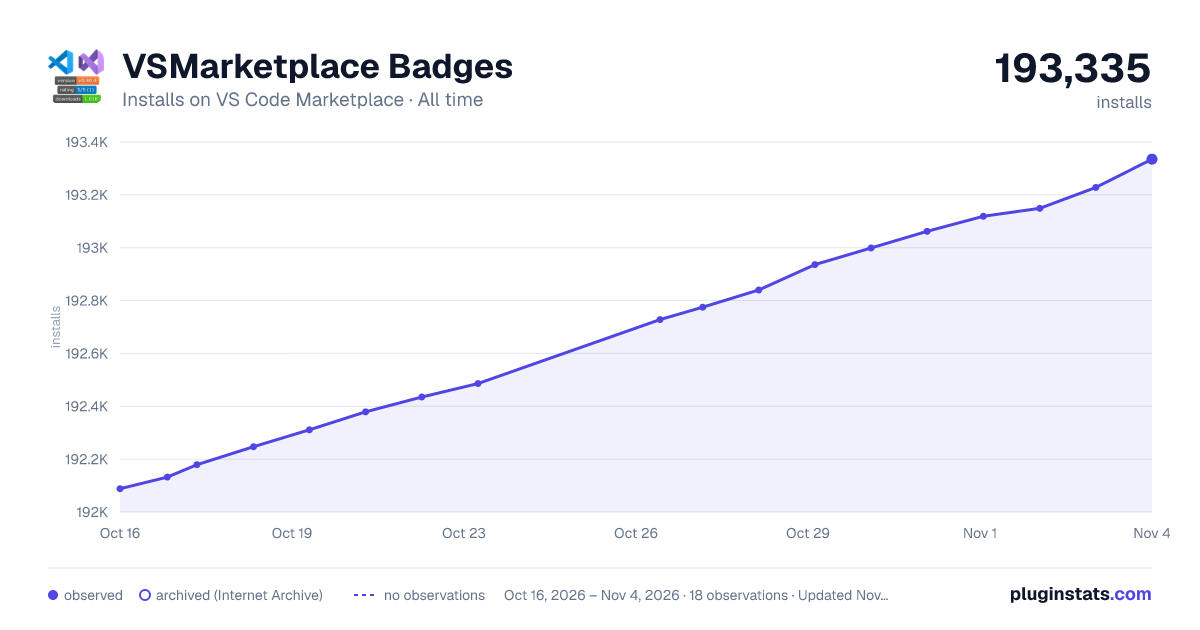
VSMarketplace Badges installs on VS Code Marketplace, last 90 days: 192,486 installs as of Oct 23, 2026.VSMarketplace BadgesInstalls on VS Code Marketplace · Last 90 days192,486installs192K192.1K192.2K192.3K192.4K192.5KJul 25Aug 9Aug 24Sep 8Sep 23Oct 8Oct 23installsobservedarchived (Internet Archive)no observationsOct 16, 2026 – Oct 23, 2026 · 8 observations · Updated Oct…pluginstats.com
VSMarketplace Badges installs on VS Code Marketplace, last 90 days: 192,486 installs as of Oct 23, 2026.

7/30/90-day growth

VSMarketplace Badges installs growth on VS Code Marketplace: +0.2% over 7 days, 30-day growth unavailable, 90-day growth unavailable.VSMarketplace BadgesInstalls growth on VS Code Marketplace192,486installs now7-day growth+398 installs · approx.+0.2%30-day growthinsufficient historyInsufficient history90-day growthinsufficient historyInsufficient historyGrowth vs. nearest observation to each baseline date · Updated Oct 23, 2026pluginstats.com
VSMarketplace Badges installs growth on VS Code Marketplace: +0.2% over 7 days, 30-day growth unavailable, 90-day growth unavailable.

Ranking history

VSMarketplace Badges VS Code Marketplace ranking history: currently #1563 (by installs).VSMarketplace BadgesVS Code Marketplace ranking · by installs · Last 90 days#1563current rank#1560#1561#1562#1563#1564#1565Jul 25Aug 9Aug 24Sep 8Sep 23Oct 8Oct 23rankOct 16, 2026 – Oct 23, 2026 · 8 observations · Updated Oct 23, 2026pluginstats.com
VSMarketplace Badges VS Code Marketplace ranking history: currently #1563 (by installs).

Ratings over time

VSMarketplace Badges ratings on VS Code Marketplace, last 90 days: 2 ratings as of Oct 23, 2026.VSMarketplace BadgesRatings on VS Code Marketplace · Last 90 days2ratings1.81.922.12.2Jul 25Aug 9Aug 24Sep 8Sep 23Oct 8Oct 23ratingsobservedarchived (Internet Archive)no observationsOct 16, 2026 – Oct 23, 2026 · 8 observations · Updated Oct…pluginstats.com
VSMarketplace Badges ratings on VS Code Marketplace, last 90 days: 2 ratings as of Oct 23, 2026.

Listing placement

All VS Code Marketplace2,502 listings · 126 pages · 1,252 shown · page 79, #3 (overall #1,563)
All VS Code Marketplace: every listing in installs order

Listing placement

Programming Languages792 listings · 40 pages · page 27, #16 (overall #536)
Programming Languages: every listing in installs order

Listing placement

Snippets489 listings · 25 pages · page 16, #5 (overall #305)
Snippets: every listing in installs order

Listing placement

Themes266 listings · 14 pages · page 7, #18 (overall #138)
Themes: every listing in installs order

Filled points are observed values; hollow points come from Internet Archive snapshots of the listing page. Dashed segments span periods with no observations — values between points are not interpolated.

Each band is one page of 20. Installs on a linear scale. Placement is projected from installs, so it can differ from the marketplace's own sort order. Hover a dot to see the listing.

Recent observations

Full history (8)
Recent installs observations for VSMarketplace Badges
Date (UTC)InstallsChange vs. previous
192,486+51
192,435+56
192,379+68
192,311+64
192,247+68
192,179+47
192,132+44
192,088—

Similar VS Code Marketplace Programming Languages plugins

All 20 VSMarketplace Badges alternatives

Data source

Install counts, average rating, and rating counts come from the public Visual Studio Marketplace gallery API. Installs are cumulative and exclude updates.

Listing: https://marketplace.visualstudio.com/items?itemName=XuangeAha.vsmarketplace-badges. First seen Oct 16, 2026; last successful collection Oct 23, 2026. See the methodology.