 PluginStats
Language Support for Java(TM) by Red Hat installs statistics
By Red Hat (18 listings) · VS Code Marketplace · Programming Languages
Java Linting, Intellisense, formatting, refactoring, Maven/Gradle support and more...
Language Support for Java(TM) by Red Hat has 57,979,214 recorded installs on VS Code Marketplace.
It ranks #19 of 2,500 tracked VS Code Marketplace listings by installs.
It is rated 3.3 out of 5 from 187 ratings.
PluginStats has 3 daily observations since Oct 16, 2026; the latest is from Oct 18, 2026.
Rating: 3.32 / 5 from 187 ratings
About Language Support for Java(TM) by Red Hat
Language support for Java ™ for Visual Studio Code =====================
Provides Java ™ language support via Eclipse ™ JDT Language Server, which utilizes Eclipse ™ JDT, M2Eclipse and Buildship.
Quick Start ============ 1. Install the Extension 2. On the following platforms, the extension should activate without any setup : win32-x64, win32-arm64, darwin-x64, darwin-arm64, linux-x64, linux-arm64.\ If on another platform, or using the "universal" version, you can set a _Java_ Development Kit. It must be Java 25 or above. 3. Optionally, download and install a Java Development Kit for your project (Java 1.8 or above is supported). See Project JDKs for more details 4. Extension is activated when you first access a Java file • Recognizes projects with *Maven* or *Gradle* build files in the directory hierarchy.
Features =========
• Supports code from Java 1.8 to Java 27 • Maven pom.xml project support • Gradle project support (with experimental Android project import support) • Standalone Java files support • As-you-type reporting of parsing and compilation errors • Code completion • Code/Source actions / Refactoring • Javadoc hovers • Organize imports • triggered manually or on save • when pasting code into a java file with Ctrl+Shift+v (Cmd+Shift+v on Mac). • Type search • Code outline • Code folding • Code navigation • Code lens (references/implementations) • Highlights • Code formatting (on-type/selection/file) • Code snippets • Annotation processing support (automatic for Maven projects) • Semantic selection • Diagnostic tags • Call Hierarchy • Type Hierarchy • Inlay Hints
To launch and debug your Java programs, it's recommended you install *Java Debug Extension for Visual Studio Code*.
See the changelog for the latest release. You might also find useful information in the project Wiki.
Setting the JDK ===============
Java Tooling JDK
Now that Java extension will publish platform specific versions, it will embed a JRE for supported platforms such as win32-x64, win32-arm64, linux-x64, linux-arm64, darwin-x64, darwin-arm64. The embedded JRE is used to launch the Language Server for Java. Users are only responsible for configuring Project JDKs to compile your Java projects.
The following part is only kept for the universal version without embedded JRE.
The tooling JDK will be used to launch the Language Server for Java. And by default, will also be used to compile your projects. Java 25 is the minimum required version.\ \ The path to the Java Development Kit can be specified by the java.jdt.ls.java.home setting in VS Code settings (workspace/user settings). If not specified, it is searched in the following order until a JDK meets current minimum requirement. - the JDK_HOME environment variable - the JAVA_HOME environment variable - on the current system path
Project JDKs
If you need to compile your projects against a different JDK version, it's recommended you configure the java.configuration.runtimes property in your user settings, eg:
The default runtime will be used when you open standalone Java files.
Available commands ========================== The following commands are available: • Switch to Standard Mode: switches the Java Language Server to Standard mode. This command is only available when the Java Language Server is in LightWeight mode. • Java: Reload Projects (Shift+Alt+U): It forces project configuration / classpath updates (eg. dependency changes or Java compilation level), according to the project build descriptor. • Java: Import Java Projects into Workspace: detects and imports all the Java projects into the Java Language Server workspace. • Java: Open Java Language Server Log File: opens the Java Language Server log file, useful for troubleshooting problems. • Java: Open Java Extension Log File: opens the Java extension log file, useful for troubleshooting problems. • Java: Open All Log Files: opens both the Java Language Server log file and the Java extension log file. • Java: Force Java Compilation (Shift+Alt+B): manually triggers compilation of the workspace. • Java: Rebuild Projects: manually triggers a full build of the selected projects. • Java: Open Java Formatter Settings: opens the Eclipse formatter settings. Creates a new settings file if none exists. • Java: Clean Java Language Server Workspace: cleans the Java language server workspace. • Java: Attach Source: attaches a jar/zip source to the currently opened binary class file. This command is only available in the editor context menu. • Java: Add Folder to Java Source Path: adds the selected folder to its project source path. This command is only available in the file explorer context menu and only works for unmanaged folders. • Java: Remove Folder from Java Source Path: removes the selected folder from its project source path. This command is only available in the file explorer context menu and only works for unmanaged folders. • Java: List All Java Source Paths: lists all the Java source paths recognized by the Java Language Server workspace. • Java: Show Build Job Status: shows the Java Language Server job status in Visual Studio Code terminal. • Java: Go to Super Implementation: goes to the super implementation for the current selected symbol in editor. • Java: Restart Java Language Server: restarts the Java language server.
Supported VS Code settings ========================== The following settings are supported:…
Description from the VS Code Marketplace listing.
- GradleKotlinDSL
- gradle-kotlin-dsl
- java
- JavaProperties
- java-properties
- json
- keybindings
- linters
- multi-root ready
Where Language Support for Java(TM) by Red Hat sits in the listing
Each band is one page of 20. Installs on a log scale. Placement is projected from installs, so it can differ from the marketplace's own sort order. Hover a dot to see the listing.


Charts
Images: 30d · 1y · all time · 1600×900 dark


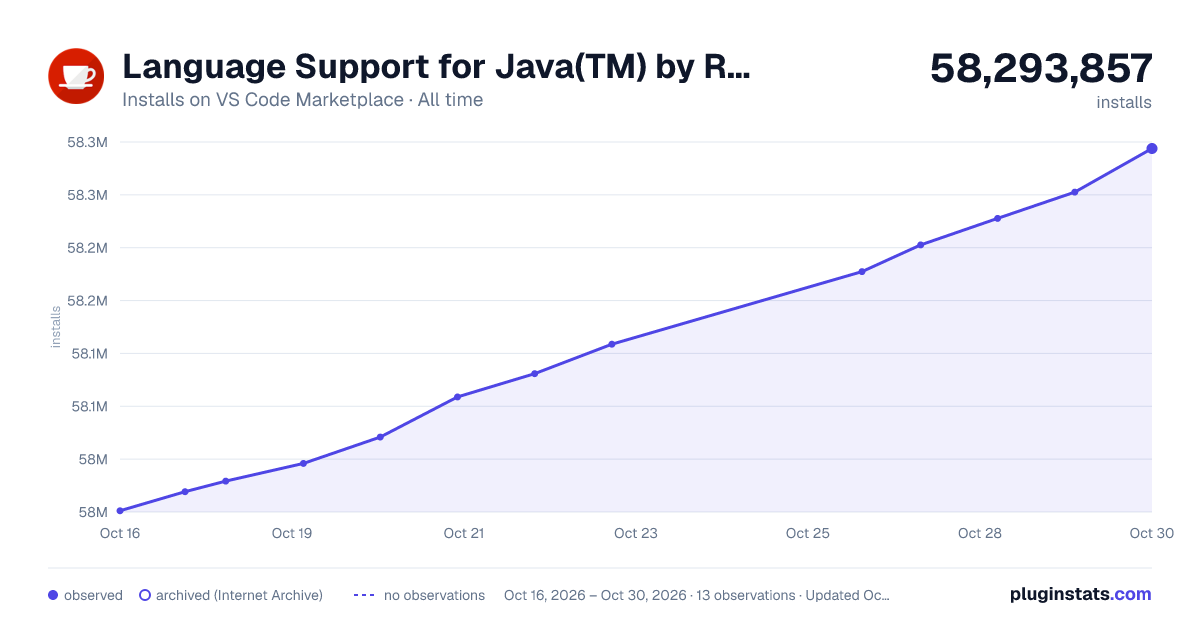

Adoption over time


7/30/90-day growth


Ranking history


Filled points are observed values; hollow points come from Internet Archive snapshots of the listing page. Dashed segments span periods with no observations — values between points are not interpolated.
Recent observations
Full history (3)Similar VS Code Marketplace Programming Languages plugins
Data source
Install counts, average rating, and rating counts come from the public Visual Studio Marketplace gallery API. Installs are cumulative and exclude updates.
Listing: https://marketplace.visualstudio.com/items?itemName=redhat.java. First seen Oct 16, 2026; last successful collection Oct 18, 2026. See the methodology.