 PluginStats
Git Project Manager installs statistics
By Felipe Caputo · VS Code Marketplace · Other
Allows you to change easily between git projects.
Git Project Manager has 1,511,333 recorded installs on VS Code Marketplace.
It ranks #417 of 2,501 tracked VS Code Marketplace listings by installs.
It is rated 4.5 out of 5 from 22 ratings.
PluginStats has 4 daily observations since Oct 16, 2026; the latest is from Oct 19, 2026.
Rating: 4.50 / 5 from 22 ratings
About Git Project Manager
Git Project Manager
Git Project Manager (GPM) is a Microsoft VSCode extension that allows you to open a new window targeting a git repository directly from VSCode window.
Available commands
Currently there are 3 avaliable commands, all of them can be accessed via Ctrl+Shift+P *(Cmd+Alt+P on Mac)* typing GPM
GPM: Open Git Project *(Defaults to: Ctrl+Alt+P)*
Show a list of the available git repositories in all folders configured in gitProjectManager.baseProjectsFolders. The first time it searchs all folders, after that it uses a cached repository info.
GPM: Refresh Projects
This commands refresh the cached repositories info for all configured folders.
GPM: Refresh specific project folder
This commands allows you to select a specific folder to refresh its repositories, without refreshing all folders.
GPM: Open Recent Git Project *(Defaults to Ctrl+Shift+Q)*
This command will bring a list of your most recent git projects, leting you swap even faster between them.
The size of the list if configured in gitProjectManager.recentProjectsListSize
Available settings
Before start using GPM you need to configure the base folders that the extension will search for git repositories. Edit settings.json from the File -> Preferences -> Settings and add the following config
{ "gitProjectManager.baseProjectsFolders": [ "/home/user/nodeProjects", "/home/user/personal/pocs" ] }
Another available configuration is gitProjectManager.storeRepositoriesBetweenSessions that allows git repositories information to be stored between sessions, avoiding the waiting time in the first time you load the repositories list. It's false by default.
{ "gitProjectManager.storeRepositoriesBetweenSessions": true }
To improve performance there are 2 new and important configurations that are: ignoredFolders: an array of folder names that will be ignored (*node_modules for example*)
{ "gitProjectManager.ignoredFolders": ["node_modules"] }
maxDepthRecursion: indicates the maximum recursion depth that will be searched starting in the configured folder (default: 2)
{ "gitProjectManager.maxDepthRecursion": 4 }
In version 0.1.10 we also added the "gitProjectManager.checkRemoteOrigin" configuration that allows users to not check remote repository origin to improve performance
{ "gitProjectManager.checkRemoteOrigin": false }
Added in version 0.1.12, you can configure the behavior when opening a project if it'll be opened in the same window or in a new window. (*this option is ignored if there aren't any opened folders in current window*)):
{ "gitProjectManager.openInNewWindow": false }
Participate
If you have any idea, feel free to create issues and pull requests.
Description from the VS Code Marketplace listing.
- git
- keybindings
Where Git Project Manager sits in the listing
Each band is one page of 20. Installs on a log scale. Placement is projected from installs, so it can differ from the marketplace's own sort order. Hover a dot to see the listing.


Charts
Images: 30d · 1y · all time · 1600×900 dark


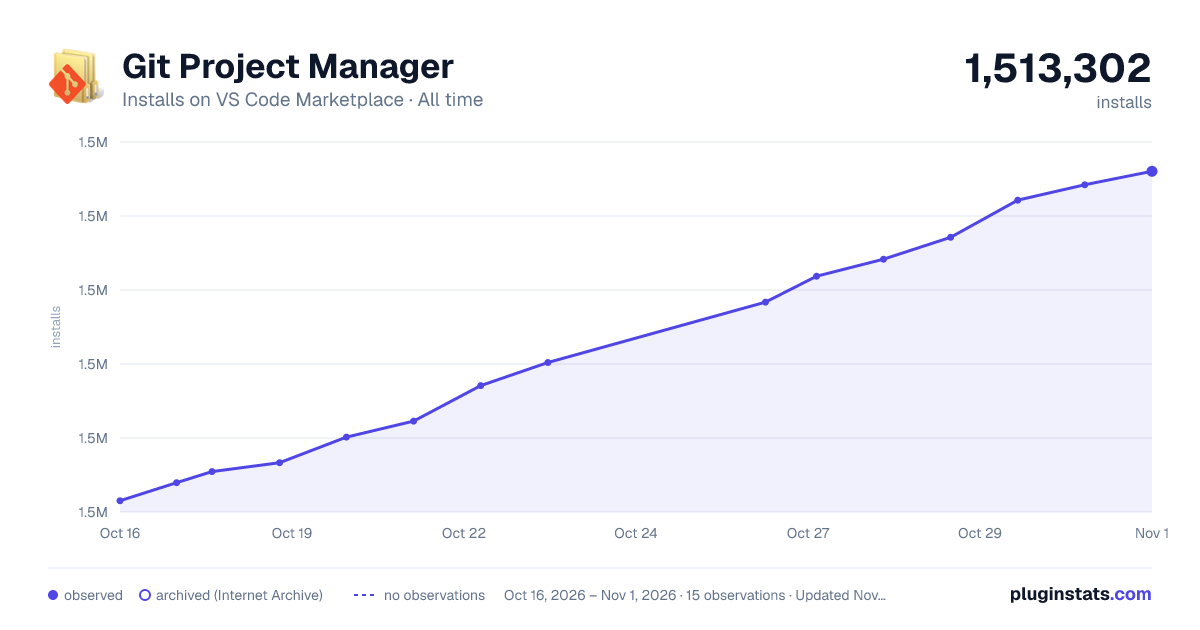

Adoption over time


7/30/90-day growth


Ranking history


Filled points are observed values; hollow points come from Internet Archive snapshots of the listing page. Dashed segments span periods with no observations — values between points are not interpolated.
Recent observations
Full history (4)Similar VS Code Marketplace Other plugins
Data source
Install counts, average rating, and rating counts come from the public Visual Studio Marketplace gallery API. Installs are cumulative and exclude updates.
Listing: https://marketplace.visualstudio.com/items?itemName=felipecaputo.git-project-manager. First seen Oct 16, 2026; last successful collection Oct 19, 2026. See the methodology.