 PluginStats
CodeTogether Cloud installs statistics
By Genuitec · VS Code Marketplace · Other
CodeTogether improves collaboration for teams by providing improved transparency and insights.
CodeTogether Cloud has 195,356 recorded installs on VS Code Marketplace.
It ranks #1548 of 2,501 tracked VS Code Marketplace listings by installs.
It is rated 4.3 out of 5 from 10 ratings.
PluginStats has 4 daily observations since Oct 16, 2026; the latest is from Oct 19, 2026.
Rating: 4.30 / 5 from 10 ratings
About CodeTogether Cloud
CodeTogether
Real-Time Collaboration and Actionable Insights for Modern Development
CodeTogether is the all-in-one platform that unites collaborative coding with software engineering intelligence. CodeTogether offers real-time live collaboration alongside actionable, data-driven insights to improve team productivity, streamline workflows, and deliver high-quality software efficiently.
Key Features
• Real-Time Collaboration (Free)
Securely live share your IDE and coding sessions with cross-IDE support for IntelliJ, VS Code, and Eclipse. See changes instantly, even when editing the same file, like Google Docs for code.
• AI-Powered Workflow Insights
CodeTogether’s DevEx Workflow AI analyzes team activity to identify bottlenecks and inefficiencies, empowering you to address them before they impact the project timeline.
• Full Development Life Cycle Visibility
Track progress, productivity, and KPIs from early coding stages to deployment. Pinpoint inefficiencies and ensure on-time software delivery with automated, data-driven analysis.
• Simple Integration
Connect to your IDE, repositories (GitHub, GitLab, Bitbucket), and issue trackers (Jira) with ease, enabling streamlined workflows and team-wide transparency.
Plans for Every Team
• Free Plan: Ideal for users who only need the CodeTogether Live module. Enjoy unlimited live coding sessions with up to 50 participants at no cost. • Free Trial: Get full access to the CodeTogether suite with a 30-day free trial. • Paid Plans: Find the perfect plan for your team’s needs. Explore options at CodeTogether Pricing.
Getting Started
Install the full CodeTogether Suite for complete functionality, or opt for the Live module if you only need live collaboration features.
Full Suite Setup:
1. Install: Add the CodeTogether plugin to your IDE. 2. Log in: Click _Log in_ from the CodeTogether view. 3. Set up your project: Use the Welcome checklist to configure integrations and add your project.
Live Collaboration:
1. Start a session: Click _Host New Session_ to share your IDE. 2. Invite guests: Select _Invite others_ from the Hosting section in the CodeTogether view, and then select the team member (full suite only) or click _Copy_ to copy the session URL to your clipboard to share with others. 3. Join a session: Select an active session from the Remote Sessions node in the Projects panel of the CodeTogether view (full suite only). Alternatively, click _Join Session_ and use the session URL to join.
Optimize Development:
1. Go to the portal: Click _Dashboard_ from the CodeTogether view. 2. Analyze Insights: Access the dashboards, reports and activity logs for AI-driven insights into current workflow. 3. Streamline development: Leverage insights to make informed decisions and mentor team members effectively.
Description from the VS Code Marketplace listing.
- CodeTogether abap
- CodeTogether ABL
- CodeTogether bat
- CodeTogether Batch
- CodeTogether BibTex
- CodeTogether C
- CodeTogether C#
- CodeTogether C++
- CodeTogether Clojure
- CodeTogether Cobol
- CodeTogether Coffeescript
- CodeTogether Cpp
- CodeTogether CSharp
- CodeTogether CSS
- CodeTogether Dart
- CodeTogether Diff
- CodeTogether Docker
- CodeTogether Elixir
- CodeTogether F#
- CodeTogether FSharp
Where CodeTogether Cloud sits in the listing
Each band is one page of 20. Installs on a log scale. Placement is projected from installs, so it can differ from the marketplace's own sort order. Hover a dot to see the listing.


Charts
Images: 30d · 1y · all time · 1600×900 dark


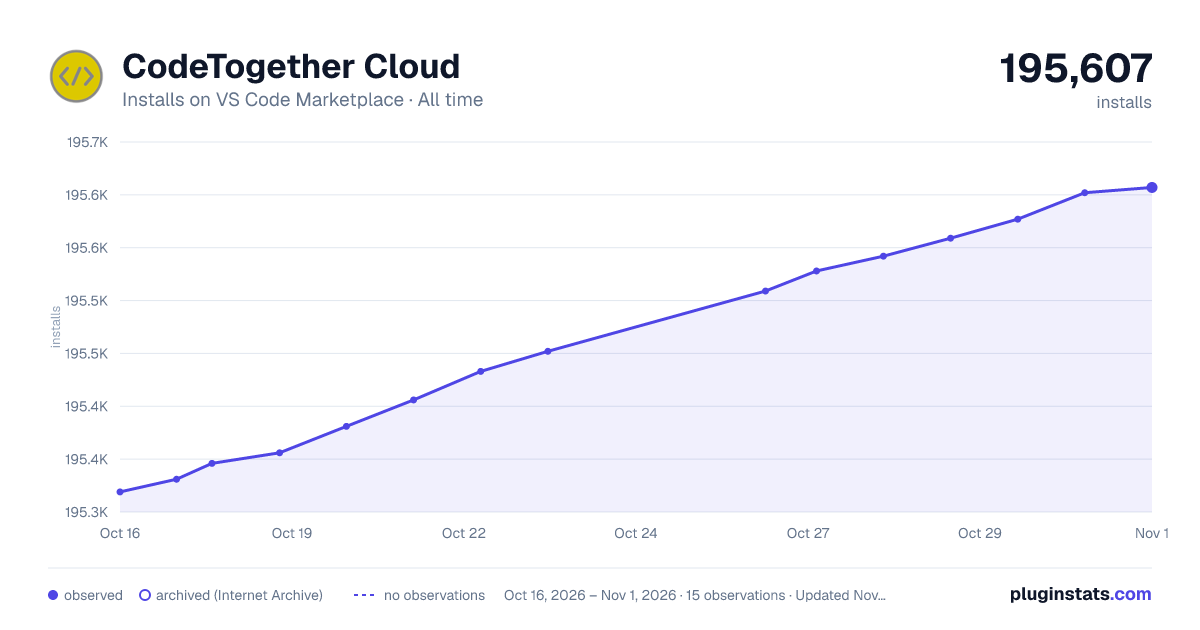

Adoption over time


7/30/90-day growth


Ranking history


Filled points are observed values; hollow points come from Internet Archive snapshots of the listing page. Dashed segments span periods with no observations — values between points are not interpolated.
Recent observations
Full history (4)Similar VS Code Marketplace Other plugins
Data source
Install counts, average rating, and rating counts come from the public Visual Studio Marketplace gallery API. Installs are cumulative and exclude updates.
Listing: https://marketplace.visualstudio.com/items?itemName=genuitecllc.codetogether. First seen Oct 16, 2026; last successful collection Oct 19, 2026. See the methodology.