 PluginStats
Postman installs statistics
By Postman (4 listings) · VS Code Marketplace · Programming Languages
Streamline API development and testing with the power of Postman, directly in your favorite IDE.
Postman has 2,711,782 recorded installs on VS Code Marketplace.
It ranks #274 of 2,501 tracked VS Code Marketplace listings by installs.
It is rated 3.0 out of 5 from 93 ratings.
PluginStats has 4 daily observations since Oct 16, 2026; the latest is from Oct 19, 2026.
Rating: 2.99 / 5 from 93 ratings
About Postman
The Postman VS Code extension
With the Postman VS Code extension, you can develop and test your APIs in Postman right from Visual Studio Code and other supported applications. You can use the VS Code extension to send API requests, manage collection and environments, troubleshoot requests, and much more. Streamline your development workflow by testing your APIs in the same application you use to develop them.
The VS Code extension also supports Visual Studio Code Insiders, VSCodium, Antigravity, Cursor, Kiro, and Windsurf.
The VS Code extension supports version 1.74 and later of the Visual Studio Code, Visual Studio Code Insiders, and VSCodium applications. The VS Code extension supports all versions of Antigravity, Cursor, Kiro, and Windsurf.
To learn more about the Postman VS Code extension and its capabilities, check out the documentation.
Prerequisites
Before you begin, configure the following prerequisites to use the VS Code extension:
• Override proxy support - Open your user settings, then enter "Proxy Support" in the search box. Select the Proxy Support dropdown list, and select override. • Use Postman behind a firewall - If you're using Postman behind a network firewall, you must allow specific domains to connect to Postman. To learn about the domains you need to allow, see Use Postman behind a firewall.
Sign in to Postman
Sign in to Postman to use the VS Code extension. When you sign in, select a team to access its workspaces. You can also create a Postman account if you don't already have one.
If you purchased a Postman EU Data Residency plan, update the extension to use the EU region when signing in to Postman. Open your user settings, then enter "Postman" in the search box. Click the Region dropdown list, and select EU.
To sign in to Postman, do the following:
1. Click Sign In in the sidebar. The VS Code extension opens a new screen that prompts you to sign in from your browser. 1. In your browser, select a Postman team then sign in to Postman.
To create a new Postman account, do the following:
1. Click Create one in the sidebar. The VS Code extension opens a new screen that prompts you to create an account from your browser. 1. In your browser, enter your information then click Create Free Account.
To view the VS Code extension version you're using, click Views and More Actions at the top of the sidebar then select Version.
Features
The following are examples of features supported in the VS Code extension:
• Import collections and environments exported from Postman. • Import .env files with environment variables from your API project and keep them in sync. • Create and send HTTP, raw WebSocket, and gRPC requests. • Add variables to your environments and reference variables throughout your workspace. • Troubleshoot API requests in the Postman Console. • Share collections, environments, and workspaces with your teammates and manage the roles they're assigned. • Test your API's functionality by writing scripts, importing internal and external packages, and running collections. • Edit test scripts in a separate JavaScript file, giving you access to your code editor's features and AI agents. • Integrate the Postman MCP server with your AI agent to manage your Postman resources, like collections and workspaces, using the Postman API.
To learn more about the Postman VS Code extension and its capabilities, check out the documentation.
Share feedback
Share your feedback to help improve the VS Code extension.
To create a bug or feature request, do the following:
1. Click Views and More Actions at the top of the sidebar. 1. Select Report Bug / Share Feedback. The VS Code extension opens a new screen that directs you to GitHub in your browser. 1. In your browser, click Get started to create a bug or feature request. 1. Enter the bug or feature request details, then click Submit new issue.
Description from the VS Code Marketplace listing.
- api client
- grpc client
- http client
- keybindings
- Postman
- rest client
- testing
- websocket client
Charts
Images: 30d · 1y · all time · 1600×900 dark


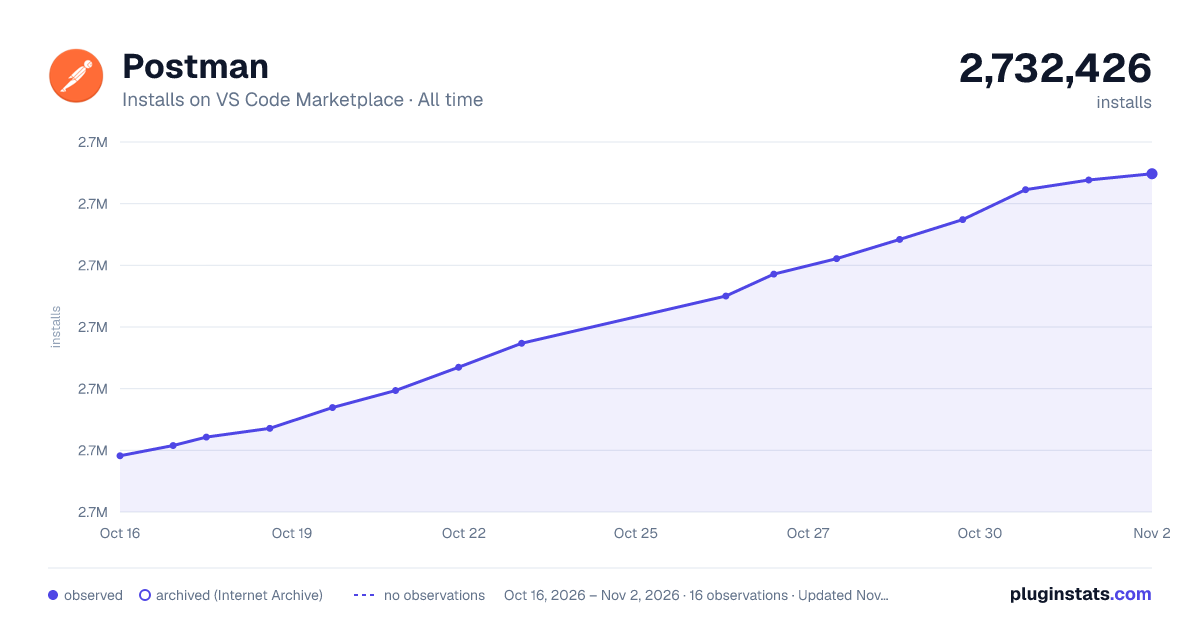

Adoption over time


7/30/90-day growth


Ratings over time


Listing placement


Listing placement


Listing placement


Filled points are observed values; hollow points come from Internet Archive snapshots of the listing page. Dashed segments span periods with no observations — values between points are not interpolated.
Each band is one page of 20. Installs on a log scale. Placement is projected from installs, so it can differ from the marketplace's own sort order. Hover a dot to see the listing.
Recent observations
Full history (4)Similar VS Code Marketplace Programming Languages plugins
All 20 Postman alternativesPostman on other marketplaces
- Postman on ChatGPT Plugins · Compare VS Code Marketplace vs ChatGPT Plugins →
- Postman on Claude Connectors · Compare VS Code Marketplace vs Claude Connectors →
- Postman on Claude Plugins · Compare VS Code Marketplace vs Claude Plugins →
- Postman on GitHub Marketplace · Compare VS Code Marketplace vs GitHub Marketplace →
Data source
Install counts, average rating, and rating counts come from the public Visual Studio Marketplace gallery API. Installs are cumulative and exclude updates.
Listing: https://marketplace.visualstudio.com/items?itemName=Postman.postman-for-vscode. First seen Oct 16, 2026; last successful collection Oct 19, 2026. See the methodology.