 PluginStats
GitLens — Git supercharged installs statistics
By GitKraken (3 listings) · VS Code Marketplace · SCM Providers
Supercharge Git within VS Code — Visualize code authorship at a glance via Git blame annotations and CodeLens, seamlessly navigate and explore Git repositories, gain valuable insights via rich visualizations and powerful comparison commands, and so much more
GitLens — Git supercharged has 53,397,558 recorded installs on VS Code Marketplace.
It ranks #21 of 2,500 tracked VS Code Marketplace listings by installs.
It is rated 3.4 out of 5 from 944 ratings.
PluginStats has 3 daily observations since Oct 16, 2026; the latest is from Oct 18, 2026.
Rating: 3.38 / 5 from 944 ratings
About GitLens — Git supercharged
GitLens — Supercharge Git in VS Code
Understand any line of code, keep every branch, worktree, and coding agent in view, and ship cleaner history — without leaving VS Code.
GitLens is an open-source extension built and maintained by GitKraken, and installed more than 51 million times.
Your repository moves faster than it used to. Coding agents open branches, worktrees pile up, and pull requests stack while you're still reading a diff. GitLens pulls all of it into one interactive view — history, working changes, branches, worktrees, and live agent activity together — then helps you review it, rebase it, and shape it into commits someone can actually read.
Start your free 14-day Pro trial — no credit card required.
GitLens Community is free and open-source, forever — and several Pro features, the Commit Graph among them, are free on public repos.
Getting Started
1. Install it — search for GitLens in the Extensions side bar in VS Code. 2. Sign in — a free GitKraken account opens the Commit Graph on your public repos, and starts your trial if you want it everywhere. 3. Open the Commit Graph — click the GitLens icon in the activity bar, and there it is: your history, your working changes, and everything in flight. (GitLens: Show Commit Graph works too.) 4. Connect what you use — your Git host and issue tracker for pull requests, issues, and autolinks, then your coding agents for session tracking and the GitKraken MCP.
💡 Want new features first? Hit Switch to Pre-Release Version on the GitLens extension page in VS Code.
Preview features require a free GitKraken account and may become Pro features in the future. Experimental features are on by default but still changing.
See Everything in One Place — Commit Graph
Answering "what is actually going on in this repo right now" usually takes a view for branches, another for stashes, a terminal for status, and a browser tab for pull requests. The Commit Graph answers it in one place, and lets you act on the answer. Learn more
• Live state on every row — ahead/behind, unpushed, unpulled, change size, and lanes you can fold away. • Your uncommitted work, in the history — a row per worktree. Stage, commit, stash, or send it to _Compose Commits_. • Act from the row — branch, merge, rebase, cherry-pick, revert, stash, push, pull, open a pull request. • Details in place — commits, branches, stashes, pull requests, comparisons. They stack as sheets; Esc backs out. • The whole repo in the side bar — Overview, Agents, Pull Requests, Worktrees, Branches, Remotes, Stashes, Tags. Click one to scope the graph. • Search that speaks Git — message:, author:, file:, change:, or just describe what you're after. • Always know where you are — jump to HEAD, upstream, or merge target. / finds any branch; the keyboard drives all of it.
Zoom Out and Spot the Patterns — Visualizations
Who should I ask about this file? Where is all the churn? What has that agent actually been touching? A list of commits can't tell you.
• Visual History — a timeline of how a file or a repository evolved: when changes landed, how big they were, who made them. Good for finding the moment something turned, or who to ask about it. • Files Treemap Experimental — your repository as blocks sized by file and colored by type. Zoom into a folder to see what's actually in there. • Commits Treemap Experimental — the same map, colored by how much each area has been changing. • Agent Activity Treemap Experimental — the same map, live: where your agents are reading and editing right now, cooling as they move on.
Open these from the Commit Graph, or _Visual History_ on its own with Show Visual History.
Work in Parallel — Worktrees and Agents
You stash to switch branches and lose your place. An agent is off working somewhere and you can't tell whether it's running, stuck, or waiting on you. Both get worse the more places your work lives.
Worktrees Without Losing Track
A worktree is a second checkout of the same repository — a branch you can leave open without stashing a thing. GitLens takes over the bookkeeping around it.
• Create one from a branch, a commit, or a pull request, and open it in this window or a new one. • Every worktree gets its own working-changes row in the Commit Graph, so you can see which are dirty without opening them. • Move work across them — copy your working changes over, or apply a stash into another worktree. • Open a terminal in one, reveal it in your file manager, or delete it when you're done.
Know What Your Agents Are Doing
• Agent sessions — Claude Code sessions show up in the Commit Graph with live state: working, idle, or needs input. Resume one straight from the row it's working on. • Start Work with Agent — pick an issue and GitLens creates the branch or worktree, then hands it to a coding agent. • Agent Kanban Experimental — switch the Graph into a board view that groups agent sessions by what needs your attention first. • Terminal links — your agent prints a SHA, branch, tag, or range in the terminal. Click it and land on it in the Commit Graph. • GitKraken MCP — give your coding agents structured access to your Git history, pull requests, and issues. Install it into Claude Code, Codex, Gemini CLI, GitHub Copilot CLI, OpenCode, or your IDE's built-in chat.
Keep Pull Requests Moving
Pull requests are where work goes to wait. GitLens brings the whole round trip into the editor: Start Work turns an issue into a branch or worktree, Launchpad tracks what comes back, and you review and land it without leaving the graph.
Launchpad — Triage What's Waiting on You
Reviews shouldn't mean bouncing between your editor, GitHub, and your inbox. Launchpad puts every pull request you're involved in on one list, ordered by what's actually blocking someone. Check one out, or start its review with a coding agent, without opening a tab. Learn more
Open, Review, and Merge in Place…
Description from the VS Code Marketplace listing.
- annotation
- blame
- git
- gitlens
- keybindings
- log
- multi-root ready
Where GitLens — Git supercharged sits in the listing
Each band is one page of 20. Installs on a log scale. Placement is projected from installs, so it can differ from the marketplace's own sort order. Hover a dot to see the listing.


Charts
Images: 30d · 1y · all time · 1600×900 dark


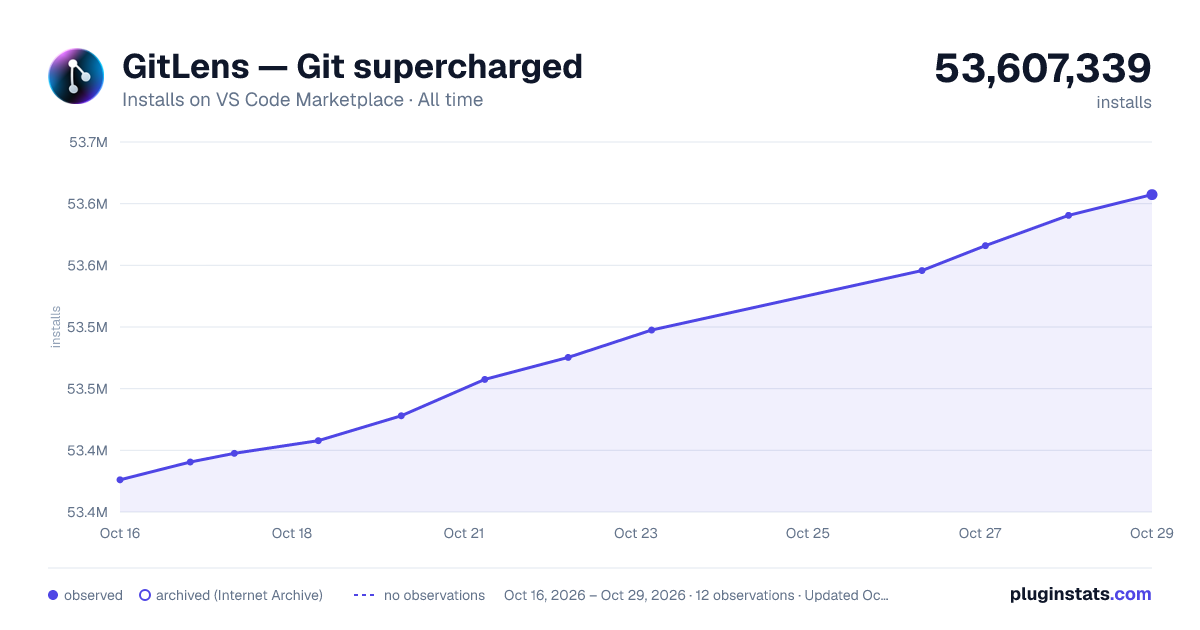

Adoption over time


7/30/90-day growth


Ranking history


Filled points are observed values; hollow points come from Internet Archive snapshots of the listing page. Dashed segments span periods with no observations — values between points are not interpolated.
Recent observations
Full history (3)Similar VS Code Marketplace SCM Providers plugins
Data source
Install counts, average rating, and rating counts come from the public Visual Studio Marketplace gallery API. Installs are cumulative and exclude updates.
Listing: https://marketplace.visualstudio.com/items?itemName=eamodio.gitlens. First seen Oct 16, 2026; last successful collection Oct 18, 2026. See the methodology.