 PluginStats
VSC-Essentials installs statistics
By Gydunhn (3 listings) · VS Code Marketplace · Extension Packs
Language agnostic, The Essential extensions for visual studio code
VSC-Essentials has 95,100 recorded installs on VS Code Marketplace, ranking #2450 of 2,501 tracked listings.
Rating: 5.00 / 5 from 2 ratings
About VSC-Essentials
VSC Essentials - Extension Pack for Visual Studio Code
This extension pack for Visual Studio Code adds extensions that are very useful for any development (Language agnostic). I reserve the right to update the extensions pack contents up to my own discretion. This extension is for my personal use, I think it's great if it works for other people too.
Reasons
The [VSC Essentials extension pack] was made to automate and standardize the installation phase of the essential extensions for Visual Studio Code every time a new member joins the team, or one of them restores a laptop, or exchanges it for a new one.
See the CHANGELOG for the latest changes
settings.json
It is strongly recommended that these settings be used in your workspace. You must copy and paste them, and if you need to adjust something you will already know where to do it.
{
    /**
    * VSC Essentials Config
    */
    // Editor Native Settings
    "extensions.ignoreRecommendations": true,
    "editor.fontLigatures": true,
    "editor.stickyScroll.enabled": true,
    "editor.cursorBlinking": "expand",
    "editor.cursorSmoothCaretAnimation": "on",
    "editor.guides.highlightActiveBracketPair": true,
    "editor.bracketPairColorization.enabled": true,
    "editor.bracketPairColorization.independentColorPoolPerBracketType": true,
    "editor.guides.bracketPairs": "active",
    "editor.guides.indentation": true,
    "editor.indentSize": 2,
    "editor.tabCompletion": "on",
    "editor.showDeprecated": true,
    "editor.autoIndent": "full",
    "editor.rulers": [
        140
    ],
    "editor.wordWrap": "bounded",
    "editor.wordWrapColumn": 145,
    // File Type Settings
    "[markdown]": {
        "editor.defaultFormatter": "yzhang.markdown-all-in-one"
    },
    "[json]": {
        "editor.defaultFormatter": "vscode.json-language-features"
    },
    "[jsonc]": {
        "editor.defaultFormatter": "vscode.json-language-features"
    },
    "[xml]": {
        "editor.defaultFormatter": "DotJoshJohnson.xml"
    },
    // Markdown Related Settings
    "markdownlint.config": {
        "default": true,
        "MD001": false,
        "MD010": false,
        "MD022": false,
        "MD024": false,
        "MD025": false
    },
    "emojisense.languages": {
        "plaintext": false,
        "markdown": true,
        "json": true,
        "scminput": true
    },
    // Todo Tree Settings
    "todo-tree.tree.showCountsInTree": true,
    "todo-tree.general.statusBar": "top three",
    "todo-tree.general.showIconsInsteadOfTagsInStatusBar": true,
    "todo-tree.general.tags": [
        "TODO",
        "FIXME",
        "FIXIT",
        "FIX",
        "BUG"
    ],
    "todo-tree.general.tagGroups": {
        "FIXME": [
        "FIXME",
        "FIXIT",
        "FIX",
        "BUG",
        ]
    },
    "todo-tree.highlights.customHighlight": {
        "TODO": {
        "gutterIcon": true,
        "icon": "tasklist",
        "iconColour": "#FF8C00",
        "type": "tag",
        "background": "#CF7200",
        "foreground": "#FFFFFF",
        "fontWeight": "bold"
        },
        "FIXME": {
        "gutterIcon": true,
        "icon": "tools",
        "iconColour": "#00FF00",
        "type": "tag",
        "background": "#008000",
        "foreground": "#FFFF00",
        "fontWeight": "bold"
        }
    },
    // Better Comments Settings
    "better-comments.multilineComments": true,
    "better-comments.tags": [
        {
        "tag": "!",
        "color": "#FF2D00",
        "strikethrough": false,
        "underline": false,
        "backgroundColor": "transparent",
        "bold": true,
        "italic": false
        },
        {
        "tag": "?",
        "color": "#3498DB",
        "strikethrough": false,
        "underline": false,
        "backgroundColor": "transparent",
        "bold": false,
        "italic": false
        },
        {
        "tag": "//",
        "color": "#474747",
        "strikethrough": true,
        "underline": false,
        "backgroundColor": "transparent",
        "bold": false,
        "italic": false
        },
        {
        "tag": "todo",
        "color": "#FF8C00",
        "strikethrough": false,
        "underline": false,
        "backgroundColor": "transparent",
        "bold": false,
        "italic": false
        },
        {
        "tag": "fixme",
        "color": "#008000",
        "strikethrough": false,
        "underline": false,
        "backgroundColor": "transparent",
        "bold": false,
        "italic": false
        },
        {
        "tag": "fixit",
        "color": "#008000",
        "strikethrough": false,
        "underline": false,
        "backgroundColor": "transparent",
        "bold": false,
        "italic": false
        },
        {
        "tag": "fix",
        "color": "#008000",
        "strikethrough": false,
        "underline": false,
        "backgroundColor": "transparent",
        "bold": false,
        "italic": false
        },
        {
        "tag": "bug",
        "color": "#008000",
        "strikethrough": false,
        "underline": false,
        "backgroundColor": "transparent",
        "bold": false,
        "italic":…
Description from the VS Code Marketplace listing.
- CodeSnap
- Color Highlight
- CSV
- Easy CodeSnap
- Editor
- Esencajoj
- Esenciales
- Essenciais
- Essentials
- Essentiel
- Essentielles
- Essenziali
- Git
- Git Graph
- Git History
- GitLens
- Gydunhn
- Highlight
- Image Preview
- JSON
README badge
Show your rank in a README or on your website. The badge updates automatically.
Charts
Images: 30d · 1y · all time · 1600×900 dark


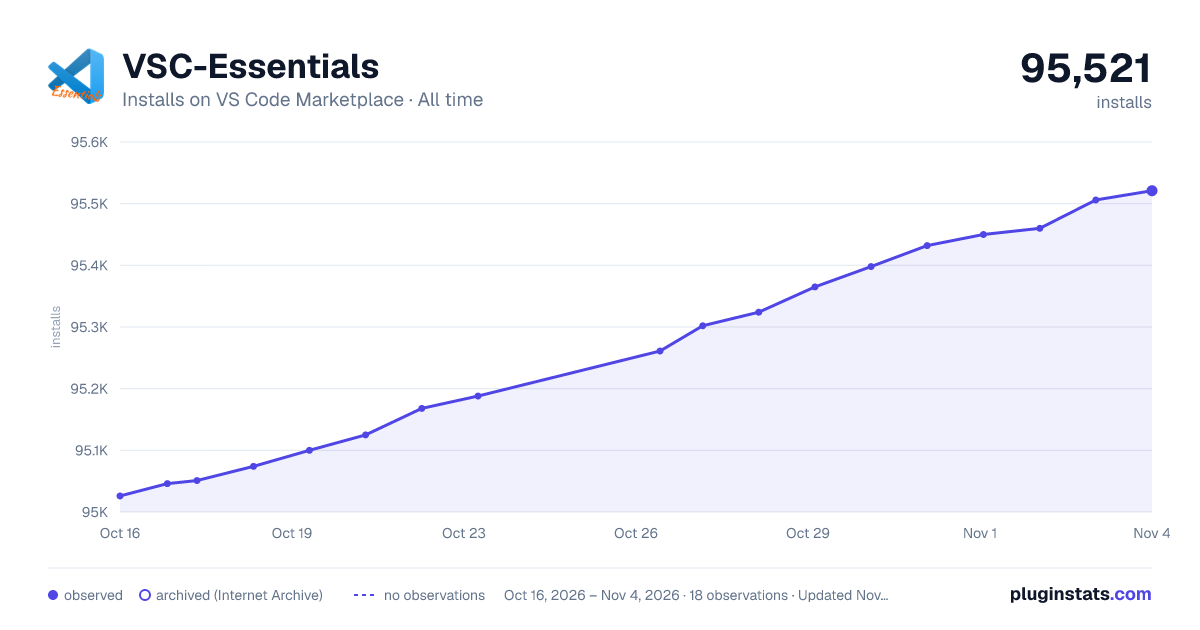

Adoption over time
7/30/90-day growth
Ranking history
Ratings over time
Listing placement
Listing placement
Filled points are observed values; hollow points come from Internet Archive snapshots of the listing page. Dashed segments span periods with no observations — values between points are not interpolated.
Each band is one page of 20. Installs on a linear scale. Placement is projected from installs, so it can differ from the marketplace's own sort order. Hover a dot to see the listing.
Recent observations
Full history (5)Similar VS Code Marketplace Extension Packs plugins
All 20 VSC-Essentials alternativesData source
Install counts, average rating, and rating counts come from the public Visual Studio Marketplace gallery API. Installs are cumulative and exclude updates.
Listing: https://marketplace.visualstudio.com/items?itemName=Gydunhn.vsc-essentials. First seen Oct 16, 2026; last successful collection Oct 20, 2026. See the methodology.