 PluginStats
Vim installs statistics
By vscodevim · VS Code Marketplace · Keymaps
Vim emulation for Visual Studio Code
Vim has 9,142,234 recorded installs on VS Code Marketplace.
It ranks #108 of 2,501 tracked VS Code Marketplace listings by installs.
It is rated 4.1 out of 5 from 395 ratings.
PluginStats has 4 daily observations since Oct 16, 2026; the latest is from Oct 19, 2026.
Rating: 4.09 / 5 from 395 ratings
About Vim
VSCodeVim
Vim emulation for Visual Studio Code
VSCodeVim is a Vim emulator for Visual Studio Code.
• 📃 Our change log outlines the breaking/major/minor updates between releases. • Report missing features/bugs on GitHub.
Table of Contents (click to expand)
• 💾 Installation • Mac • Windows • ⚙️ Settings • Quick Example • VSCodeVim settings • Neovim Integration • Key Remapping • "vim.insertModeKeyBindings"/"vim.normalModeKeyBindings"/"vim.visualModeKeyBindings"/"vim.operatorPendingModeKeyBindings" • "vim.insertModeKeyBindingsNonRecursive"/"normalModeKeyBindingsNonRecursive"/"visualModeKeyBindingsNonRecursive"/"operatorPendingModeKeyBindingsNonRecursive" • Debugging Remappings • Remapping more complex key combinations • Vim modes • Vim settings • .vimrc support • 🖱️ Multi-Cursor Mode • 🔌 Emulated Plugins • vim-airline • vim-easymotion • vim-surround • vim-commentary • vim-indent-object • vim-sneak • CamelCaseMotion • Input Method • ReplaceWithRegister • vim-textobj-entire • vim-textobj-arguments • 🎩 VSCodeVim tricks! • 📚 F.A.Q. • ❤️ Contributing • Special shoutouts to:
💾 Installation
VSCodeVim can be installed via the VS Code Marketplace or the OpenVSX Marketplace.
Mac
To enable key-repeating, execute the following in your Terminal, log out and back in, and then restart VS Code:
We also recommend increasing Key Repeat and Delay Until Repeat settings in _System Settings/Preferences -> Keyboard_.
Windows
Like real vim, VSCodeVim will take over your control keys. This behavior can be adjusted with the useCtrlKeys and handleKeys settings.
⚙️ Settings
The settings documented here are a subset of the supported settings; the full list is described in the FEATURES -> Settings tab of VSCodeVim's extension details page, which can be found in the extensions view of VS Code.
Quick Example
Below is an example of a settings.json file with settings relevant to VSCodeVim:
VSCodeVim settings
These settings are specific to VSCodeVim.
| Setting | Description | Type | Default Value |
| vim.changeWordIncludesWhitespace | Include trailing whitespace when changing word. This configures the cw action to act consistently as its siblings (yw and dw) instead of acting as ce. | Boolean | false | | vim.cursorStylePerMode._{Mode}_ | Configure a specific cursor style for _{Mode}_. Omitted modes will use default cursor type Supported cursors: line, block, underline, line-thin, block-outline, and underline-thin. | String | None | | vim.digraphs._{shorthand}_ | Set custom digraph shorthands that can override the default ones. Entries should map a two-character shorthand to a descriptive string and one or more UTF16 code points. Example: "R!": ["🚀", [55357, 56960]] | Object | {"R!": ["🚀", [0xD83D, 0xDE80]] | | vim.disableExtension | Disable VSCodeVim extension. This setting can also be toggled using toggleVim command in the Command Palette | Boolean | false | | vim.handleKeys | Delegate configured keys to be handled by VS Code instead of by the VSCodeVim extension. Any key in keybindings section of the package.json that has a vim.use in the when argument can be delegated back to VS Code by setting "": false. Example: to use ctrl+f for find (native VS Code behavior): "vim.handleKeys": { "": false }. | String | "": true "": false "": false | | vim.overrideCopy | Override VS Code's copy command with our own, which works correctly with VSCodeVim. If cmd-c/ctrl-c is giving you issues, set this to false and complain here. | Boolean | false | | vim.useSystemClipboard | Use the system clipboard register (*) as the default register | Boolean | false | | vim.searchHighlightColor | Background color of non-current search matches | String | findMatchHighlightBackground ThemeColor | | vim.searchHighlightTextColor | Foreground color of non-current search matches | String | None | | vim.searchMatchColor | Background color of current search match | String | findMatchBackground ThemeColor | | vim.searchMatchTextColor | Foreground color of current search match | String | None | | vim.substitutionColor | Background color of substitution text when vim.inccommand is enabled | String | "#50f01080" | | vim.substitutionTextColor | Foreground color of substitution text when vim.inccommand is enabled | String | None | | vim.startInInsertMode | Start in Insert mode instead of Normal Mode | Boolean | false | | vim.useCtrlKeys | Enable Vim ctrl keys overriding common VS Code operations such as copy, paste, find, etc. | Boolean | true | | vim.visualstar | In visual mode, start a search with * or # using the current selection | Boolean | false | | vim.highlightedyank.enable | Enable highlighting when yanking | Boolean | false | | vim.highlightedyank.color | Set the color of yank highlights | String | rgba(250, 240, 170, 0.5) | | vim.highlightedyank.duration | Set the duration of yank highlights | Number | 200 |
Neovim Integration
:warning: Experimental feature. Please leave feedback on neovim integration here.
To leverage neovim for Ex-commands,
1. Install neovim 2. Modify the following configurations:
| Setting | Description | Type | Default Value |
| vim.enableNeovim | Enable Neovim | Boolean | false | | vim.neovimPath | Full path to neovim executable. If left empty, PATH environment variable will be automatically checked for neovim path. | String | | | vim.neovimUseConfigFile | If true, Neovim will load a config file specified by vim.neovimConfigPath. This is necessary if you want Neovim to be able to use its own plugins. | Boolean | false | | vim.neovimConfigPath | Path that Neovim will load as config file. If left blank, Neovim will search in its default location. | String | |
Here's some ideas on what you can do with neovim integration:
• The power of g • The :normal command • Faster search and replace!
Key Remapping
Custom remappings are defined on a per-mode basis.
"vim.insertModeKeyBindings"/"vim.normalModeKeyBindings"/"vim.visualModeKeyBindings"/"vim.operatorPendingModeKeyBindings"…
Description from the VS Code Marketplace listing.
- keybindings
- vi
- vim
- Vimscript
- vscodevim
Where Vim sits in the listing
Each band is one page of 20. Installs on a log scale. Placement is projected from installs, so it can differ from the marketplace's own sort order. Hover a dot to see the listing.


Charts
Images: 30d · 1y · all time · 1600×900 dark


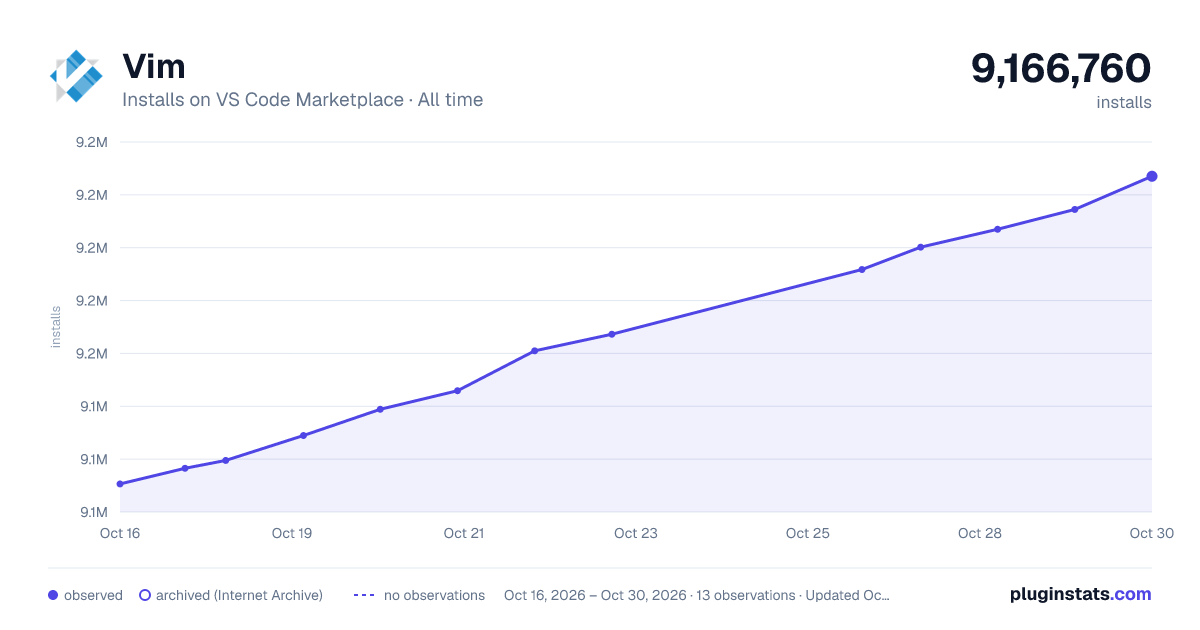

Adoption over time


7/30/90-day growth


Filled points are observed values; hollow points come from Internet Archive snapshots of the listing page. Dashed segments span periods with no observations — values between points are not interpolated.
Recent observations
Full history (4)Similar VS Code Marketplace Keymaps plugins
Data source
Install counts, average rating, and rating counts come from the public Visual Studio Marketplace gallery API. Installs are cumulative and exclude updates.
Listing: https://marketplace.visualstudio.com/items?itemName=vscodevim.vim. First seen Oct 16, 2026; last successful collection Oct 19, 2026. See the methodology.