 PluginStats
flutter-stylizer installs statistics
By gmlewis-vscode · VS Code Marketplace · Other
Flutter Stylizer organizes your Flutter classes in an opinionated and consistent manner.
flutter-stylizer has 250,119 recorded installs on VS Code Marketplace, ranking #1304 of 2,501 tracked listings.
Rating: 4.44 / 5 from 9 ratings
About flutter-stylizer
flutter-stylizer README

Flutter Stylizer is a VSCode extension that organizes your Flutter classes in an opinionated and consistent manner.
Note that as of release 0.1.1, there is now a standalone version of
flutter-stylizer (with identical output to this plugin) that is available here:
Features
Flutter Stylizer organizes the class(es) within a *.dart file
in the following manner (with a blank line separating these parts):
- The main (possibly factory) constructor is listed first, if it exists.
- (
public-constructorin configuration)
- (
- Any named constructors are listed next, in sorted order.
- (
named-constructorsin configuration)
- (
- Any static (class) variables are listed next, in sorted order.
- (
public-static-variablesin configuration)
- (
- Any instance variables are listed next, in sorted order.
(As of version
v0.1.8, a new option flag affects this section; see below.)- (
public-instance-variablesin configuration)
- (
- Any
@overridevariables are listed next, in sorted order.- (
public-override-variablesin configuration)
- (
- Any private static (class) variables are listed next, in sorted order.
- (
private-static-variablesin configuration)
- (
- Any private instance variables are listed next, in sorted order.
- (
private-instance-variablesin configuration)
- (
- Any
@overridemethods are listed next, in sorted order.- (
public-override-methodsin configuration)
- (
- Any other methods are listed next in their original (unchanged) order.
(As of version
v0.0.19, two new option flags affect this section; see below.)- (
public-other-methodsin configuration)
- (
- If
private-other-methodsis (optionally) specified, these will be sorted separately frompublic-other-methods. - The
buildmethod is listed last.- (
build-methodin configuration)
- (
I have found that developer productivity increases when all code in large projects follows a consistent and opinionated style.
Additionally, bringing new developers into a team with a large code base is easier when the code is consistently written and therefore easier to navigate and understand.
Without tooling to enforce a consistent style, developing code is less fun. Having an automated tool to do this ugly work for you, however, makes coding a lot more enjoyable, as you don't have to worry about the rules, but can just run the plugin on file save, and the rules are automatically enforced. Note that this plugin doesn't natively support format-on-save, but you could use another extension... possibly something like this: https://marketplace.visualstudio.com/items?itemName=emeraldwalk.RunOnSave or you could use the stand-alone [Go flutter-stylizer] in your GitHub Actions or CI pipeline to perform this action for you.
Configuration
To override the default order of the stylizer, add a section to your
VSCode User Preferences (Control/Cmd-,) like this:
  "flutterStylizer": {
    "groupAndSortGetterMethods": false,
    "groupAndSortVariableTypes": false,
    "memberOrdering": [
      "public-constructor",
      "named-constructors",
      "public-static-variables",
      "public-instance-variables",
      "public-override-variables",
      "private-static-variables",
      "private-instance-variables",
      "public-override-methods",
      "public-other-methods",
      "private-other-methods",
      "build-method",
    ],
    "processEnumsLikeClasses": false,
    "sortClassesWithinFile": false,
    "sortOtherMethods": false,
  }
And then rearrange member names as desired.
Other option flags
Note that as of v0.0.19, two new option flags were added to modify the
behavior of the "public-other-methods" as requested in #18:
-
groupAndSortGetterMethods(default:false)- Whether to group getters separately (before 'public-other-methods') and sort them within their group.
-
sortOtherMethods(default:false)- Whether to sort the 'public-other-methods' within their group.
As of v0.1.5, a new private-other-methods field was added.
If not specified, private methods will continue to be grouped within
the public-other-methods section.
As of v0.1.8, a new option flag was added:
groupAndSortVariableTypes(default:false)- Whether to group public variables separately by type and sort
them within their groups. Types are: "final", "optional" (
?), and "normal".
- Whether to group public variables separately by type and sort
them within their groups. Types are: "final", "optional" (
As of v0.1.12, a new option flag was added:
sortClassesWithinFile(default:false)- Whether to sort multiple classes within each file.
As of v0.1.15, a new option flag was added:
processEnumsLikeClasses(default:false)- Whether to process enums identically to how classes are processed.
These features are experimental and should be used with caution. Please file any bugs you find on the [GitHub issue tracker].
Run Flutter Stylizer on all files - Option 1
If you want a super-fast way to process all files in a very large project, and aren't averse to the command-line terminal (:smile:) please remember to check out the stand-alone command-line companion tool: https://github.com/gmlewis/go-flutter-stylizer
Run Flutter Stylizer on all files - Option 2
If you install the Command on All Files VSCode extension, you can then run the Flutter Stylizer on all files within your project.
To do so, edit your VSCode settings.json file and add this section:…
Description from the VS Code Marketplace listing.
- dart
README badge
Show your rank in a README or on your website. The badge updates automatically.
Charts
Images: 30d · 1y · all time · 1600×900 dark


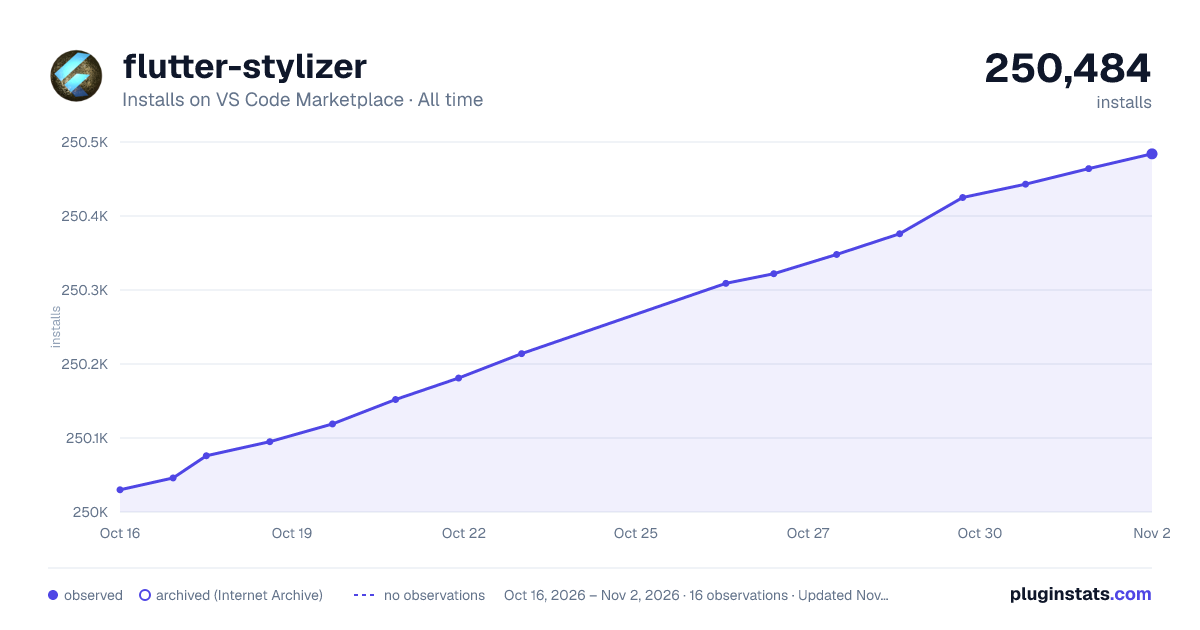

Adoption over time
7/30/90-day growth
Ranking history
Ratings over time
Listing placement
Listing placement
Filled points are observed values; hollow points come from Internet Archive snapshots of the listing page. Dashed segments span periods with no observations — values between points are not interpolated.
Each band is one page of 20. Installs on a linear scale. Placement is projected from installs, so it can differ from the marketplace's own sort order. Hover a dot to see the listing.
Recent observations
Full history (5)Similar VS Code Marketplace Other plugins
All 20 flutter-stylizer alternativesData source
Install counts, average rating, and rating counts come from the public Visual Studio Marketplace gallery API. Installs are cumulative and exclude updates.
Listing: https://marketplace.visualstudio.com/items?itemName=gmlewis-vscode.flutter-stylizer. First seen Oct 16, 2026; last successful collection Oct 20, 2026. See the methodology.